
Less than a decade ago most of our households were a battlefield. There hasn’t been a night, or even a day without that fight over the remote control for the TV. Here, who was the culprit? Cable.
We had hundreds of channels and, now when you take a look at it, don’t you realize that cable had everything but offered nothing for everyone?
Whenever the hefty monthly bill came out we found our mothers muttering about “wasting money,” Dad slamming fists on the table, declaring, “There’s gotta be a better way!” But, What’s the scenario today?
The cutting-cord revolution has transformed every household. At present, we are enjoying an entertaining journey into the world of streaming.
Video streaming platforms have become most of our go-to for family movie nights, We have the ESPN app (ESPN+ now lives inside it as the Select plan) to satisfy Dad’s sports cravings.
And, Hulu, now part of the Disney+ app, makes moms happy with those home improvement shows. Not to mention how our kids are engrossed in the vast animation libraries on Crunchyroll, which took over Funimation in 2024.
So, gone are the channel-flipping wars! Our room is now filled with the quiet hum of individual devices and the satisfaction of data consumption.
The cable cord has now become more or less like a relic of a bygone era.
This transition is quick but not seamless. There were learning curves. The ups and downs were caused by buffering hiccups and occasional compatibility issues.
This slowly got resolved as a new (algo)rhythm came up with the machine learning content curation process.
As a result of this, nearly all of us have been captivated by short video platforms and the best video streaming servers.
This makes a statement that we aren’t just watching videos but experiencing entertainment on our terms.
This cable-streaming shift in the entertainment landscape was possible primarily due to the technology behind the screen.
And, if you are the one who is about to venture into the streaming platform then look out for its technical aspects.
What are Video Streaming Services?
The definition proved by the Business Research Company, for Video streaming services is as follows.
Video streaming services are online platforms that rely on powerful streaming server infrastructure to continuously deliver content to users across the internet.
This allows users to watch videos they wish to watch without demanding them to download the entire video file in the first place.
In downloading, you get the entire file first and then you’ll be able to watch it, while in streaming it’s the opposite. It lets you start watching almost immediately.
This blog has all that you need to know before bidding goodbye to the limitations of linear programming and saying hello to the best video streaming services waiting to be explored, one stream at a time.
How Video Streaming Servers Power Modern Content Delivery
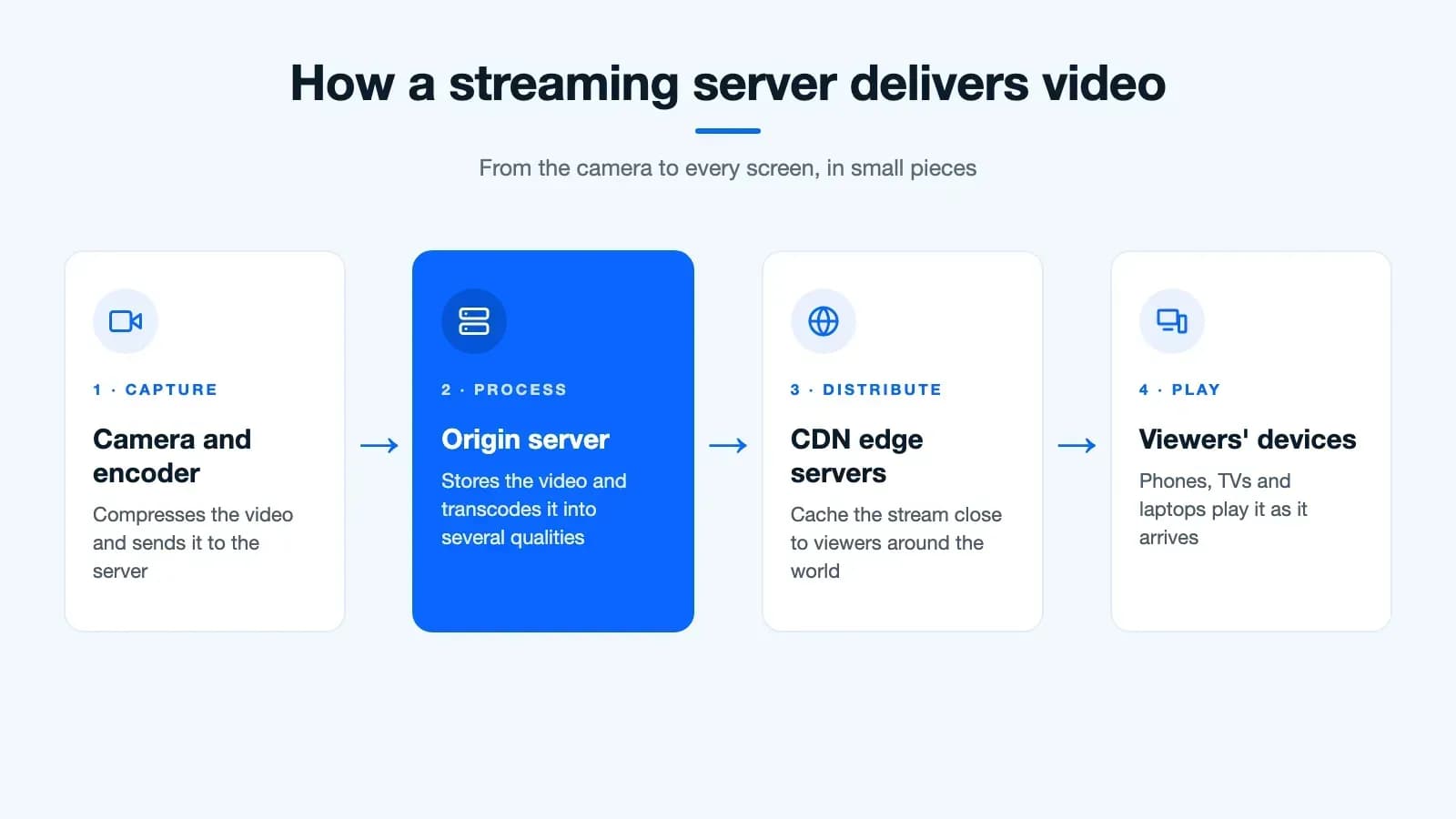
Modern streaming servers help you broadcast your video content to viewers in real time.
These dedicated video streaming servers also handle the heavy workload of delivering large video files efficiently, with smooth playback regardless of concurrent viewer count.
These servers also make sure that viewers can watch the event that gets broadcasted with minimal latency.
Overall, these streaming server systems serve as the backbone for online video distribution by ensuring a pleasant video-watching experience for viewers.
Types of Video Streaming Servers in 2026
Understanding different video streaming server types helps you make informed decisions. Each server type serves specific purposes in content delivery.
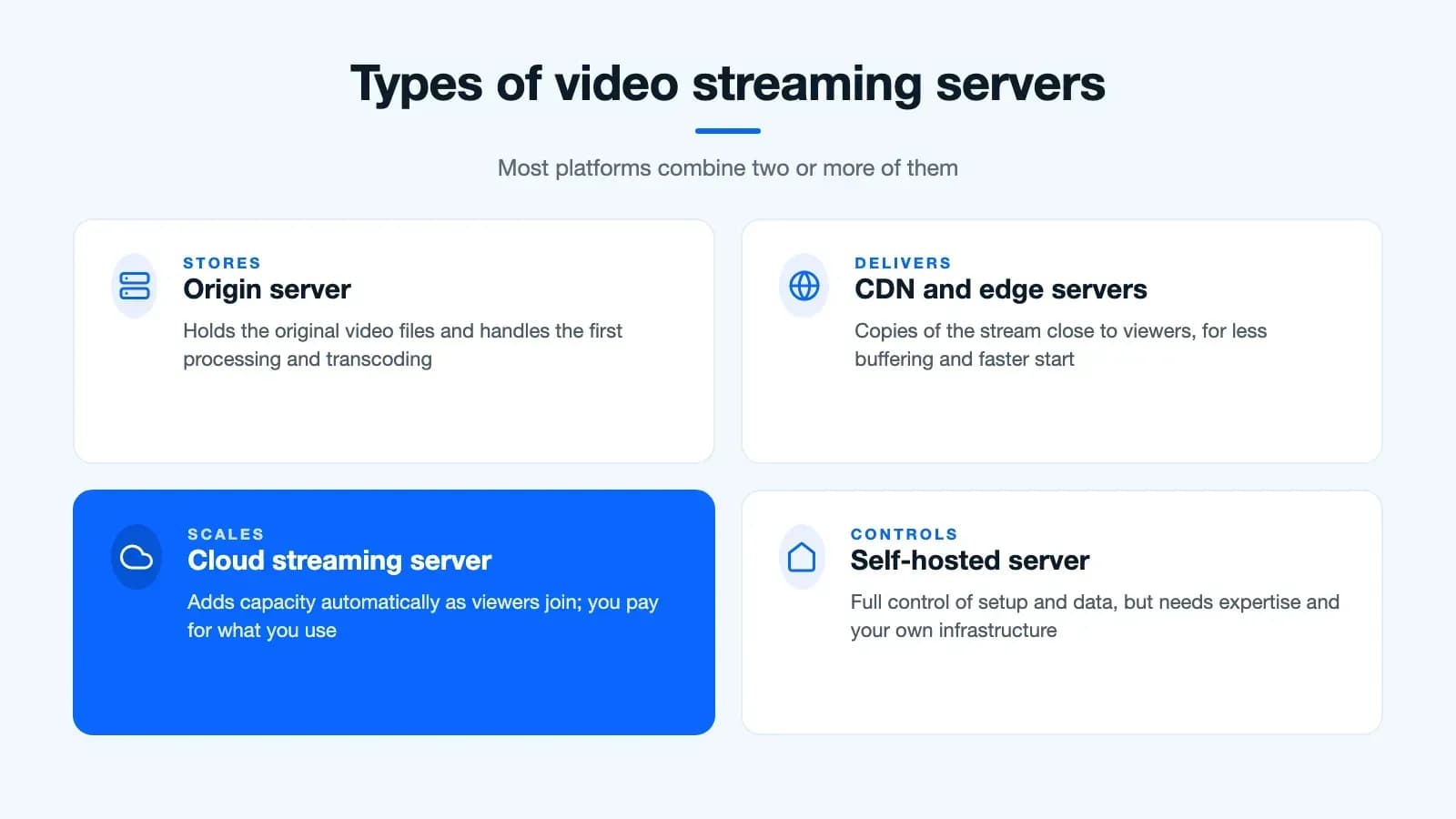
Origin servers store your original video files and handle initial processing. They work alongside CDN servers that distribute content globally for faster delivery. Edge servers bring content closer to viewers, reducing buffering and improving playback quality.
Cloud-based streaming servers offer scalability and cost-effectiveness. They automatically adjust resources based on viewer demand. Self-hosted servers provide complete control but require technical expertise and infrastructure investment.
Hybrid solutions combine multiple server types for optimal performance. This approach balances cost, control, and delivery speed for most streaming platforms.
Do you Know? Wikipedia states that the term streaming was initially used to denote tape drives manufactured by Data Electronics Inc. So, originally this term meant slowly ramping up and running for the entire track. Later in the 1990s Streaming was used to describe the videos on demand.
Significance of the Best Video Streaming Servers:
- They offer a huge range of different content that includes movies, TV shows, documentaries, original productions, live events, user-generated videos, and so on.
- Services can offer both on-demand content, that you can watch at your desired pace, and live streaming content that lets you watch events as they happen.
- Some services come free with ads or other limitations while others ask for a paid subscription.
- You can access premium video streaming server platforms across many devices including smart TVs, computers, smartphones, tablets, and gaming consoles.
- Different services make use of different technologies for streaming. Yet, the process is similar.
- They all send small chunks of video data to your device at a time. This allows you to start watching at once without waiting for the entire file to download.
Video Streaming Servers Vs Cable
| Feature | Cable | Video Streaming Servers |
|---|---|---|
| Content-Type | Mostly live TV, some on-demand content | Mostly on-demand content, some live TV options |
| Channel Selection | A wide variety of channels, including local channels and sports networks | More focused selection, based on specific streaming services |
| Cost | Generally more expensive, with contracts and additional fees | Can be cheaper, with flexible pricing models and no contracts |
| Flexibility | Less flexible, and requires a set-top box and cable connection | More flexible, watch on various devices and internet connection |
| Availability | Limited to homes with a cable connection | Available anywhere with a decent internet connection |
| Reliability | Generally reliable, unaffected by internet outages | Reliant on internet speed and stability, buffering is possible |
| Personalization | Limited personalization | Personalized recommendations and watchlists |
| Original Content | Limited original content | Many platforms offer original shows and movies |
| Simultaneous | A limited number of simultaneous streams | Varies by service, some offer unlimited |
Video Streaming Servers Vs Cable
What are the Different Types of Streaming Protocols?
Behind every smooth streaming experience are protocols that connect powerful streaming servers to your devices. These unsung heroes manage content delivery across networks.
What are Streaming Protocols?
We are watching videos without downloading them at once. And the streaming process happens smoothly piece by piece.
These tiny pieces are made possible by streaming protocols!
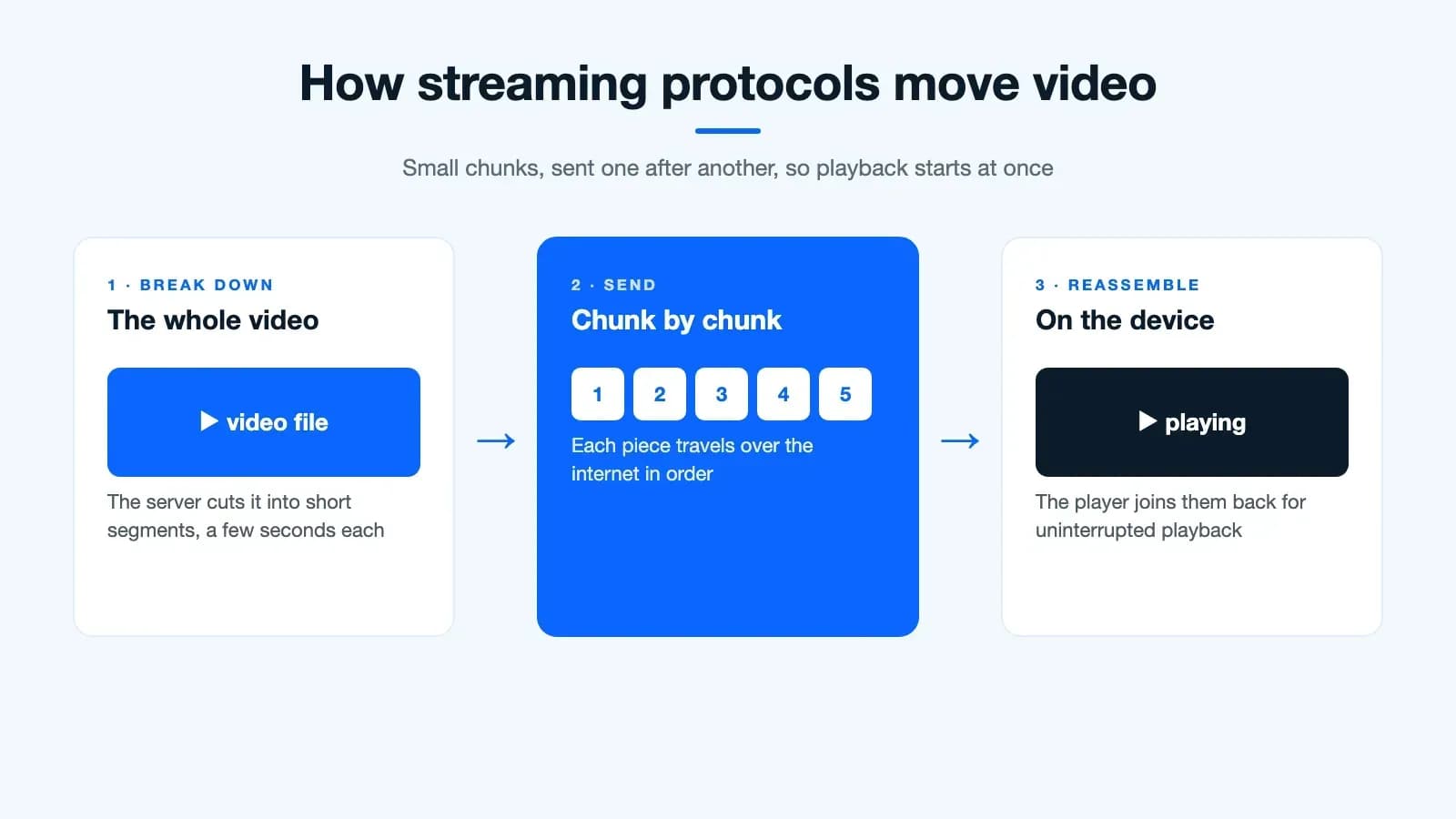
They are like the road rules for delivering video and audio over the internet. So, what then? They,
- Break down the media into bite-sized pieces like cake
- Send the chunks one by one to your device.
- Reassemble the chunks on your device for uninterrupted playback.
There are various types of protocols. And, each protocol comes with its strengths and weaknesses, making it suitable for different situations and devices.
Key Factors for Choosing Video Streaming Servers
Selecting the right video streaming server requires careful consideration of multiple factors. Your choice impacts viewer experience and operational costs.
Bandwidth capacity determines how many concurrent viewers your server can handle. Latency affects real-time streaming quality, particularly for live events. Geographic distribution through CDN networks ensures global reach with consistent performance.
Scalability features allow your server infrastructure to grow with audience demand. Security protocols protect your content from unauthorized access and piracy. Integration capabilities with existing systems streamline your workflow and reduce technical complexity.
Here’s a glimpse at a few keys for the best video streaming servers:
Real-Time Messaging Protocol (RTMP)
Details: It was built for Flash Player, and today it is mostly used to send a live stream from the encoder (OBS, for example) to the streaming server, which repackages it for viewers.
Pros: Easy setup, low latency, best suitable for basic live streams.
Cons: Lacks built-in encryption (RTMPS adds it), and modern browsers can’t play it, so viewers get the stream converted to HLS or DASH.
Designed to meet the needs of smaller audiences on older platforms using low-latency live streams
Real-Time Streaming Protocol (RTSP)
Details: Legacy protocol was originally put to use in delivering live video for entertainment.
Pros: The right protocol for specific use cases like video surveillance. Highly customizable and low latency.
Cons: It comes with a complex setup, is not supported by browsers, and demands separate protocols for data transport.
Designed for Specific apps like video surveillance and closed-circuit television (CCTV).
Secure Reliable Transport (SRT)
Details: An open-source protocol, first developed by Haivision, built to carry live video over unpredictable networks like the public internet.
Pros: Low latency, recovers lost packets, AES encryption built in, and royalty-free.
Cons: Browsers can’t play it, so like RTMP it is used to get the stream to the server, which repackages it for viewers.
Designed for broadcasters sending live feeds from the field, or between studios and the cloud.
Dynamic Adaptive Streaming over HTTP (DASH)
Details: A Standard protocol for HTTP for adaptive bitrate streaming. It offers different quality levels across various devices based on network conditions.
Pros: High-quality videos, for large audiences, largely supported on modern devices.
Cons: Higher server load compared to HLS and slightly higher latency.
Designed to meet the needs of broad audiences across various devices delivering high-quality on-demand and live streaming.
HTTP Live Streaming (HLS)
Details: It’s a widely used Apple developed Protocol to carry out adaptive bitrate streaming on iOS and other platforms.
Pros: Efficient, low server load, suitable for mobile devices.
Cons: Less flexible than DASH. Got potential compatibility issues on non-Apple devices.
Designed for On-demand and live streaming, prioritizing mobile compatibility as a priority.
Web Real-Time Communication (WebRTC)
Details: Peer-to-peer real-time audio/video communication is made possible using open-source projects directly in web browsers.
Pros: Very low latency, no need for plugins, the best option to go for interactive applications.
Cons: Limited scalability. This may pave the way to demand device resources and network bandwidth. That is changing: WHIP, the ingest standard published as RFC 9725 in 2025, and its playback partner WHEP let platforms fan WebRTC streams out to thousands of viewers.
Designs for real-time video conferencing, low-latency live streaming for small audiences, and interactive features like screen sharing.
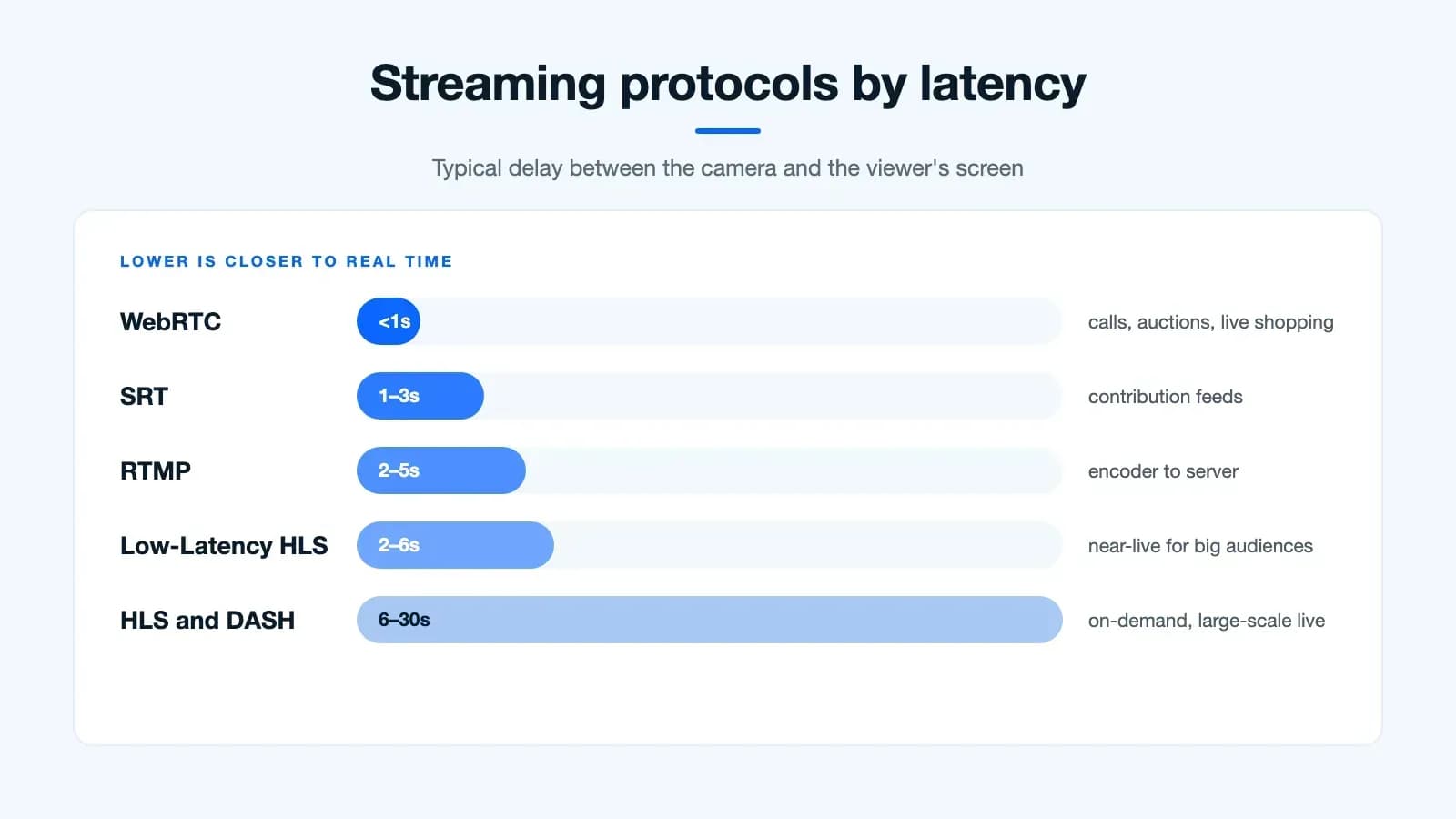
Ultimately, the best protocol for your needs depends on several other factors:
Latency requirements: Ultra-low latency (WebRTC, RTMP) or less critical (DASH, HLS)
Target audience: Video streaming to desktop, mobile, or both (DASH, HLS)
Content type: Live content vs. on-demand content (RTMP, RTSP, DASH, HLS) or interactive content(WebRTC)
Technical expertise: Complexity of the setup and management (easier: HLS, DASH, harder: RTMP, RTSP)
What to Consider While Choosing the Best Video Streaming Servers?
To deliver smooth streaming to your audience through reliable video streaming servers, you need to choose the right protocol. This plays a vital role in guaranteeing an enjoyable experience for your viewers.
How to get it done perfectly? Here are a few important factors to consider:
1. Type of Content
Live vs. On-demand
Live: RTMP and WebRTC are outstanding options for low-latency real-time experiences.
On-demand: HLS and DASH provide much better adaptability to varying internet speeds.
Quality of Video
HLS and DASH can be chosen for higher quality streams with adaptive bitrate, while RTMP prioritizes speed over high quality.
2. Target audience
Device compatibility: Modern devices support HLS and DASH, while RTMP may demand specific players.
Internet availability: SRT prioritizes reliability among challenging environments whereas DASH provides more flexibility for unstable connections.
3. Technical concerns
Latency: RTMP and WebRTC provide limited features in the lowest latency while HLS and DASH show better adaptability but in higher latency.
Security: SRT protocols prioritize secure delivery, and HTTPS protocols (HLS and DASH over HTTPS) provide encryption.
Implementation complexity: RTMP and WebRTC come with a need for a little more technical expertise. On the contrary HLS and DASH are widely supported and easier to implement.
4. Video Streaming Server Cost
Licensing fees: HLS, DASH, SRT and WebRTC are all royalty-free. Licensing costs, where they apply, come from codecs such as HEVC rather than from the protocol itself.
Infrastructure: SRT and WebRTC will ask for specific server configurations, while HLS and DASH are compatible with ongoing setups.
5. Additional factors to consider
Scalability: Always pick the protocol that can handle traffic. It’s important to think of how your needs will grow in the future.
Customization: Look for those protocols that are flexible and allow tailoring of the streaming experience to fit your specific needs.
Support: Make sure that have access to adequate support for the chosen protocol. This comes in handy when you are encountering technical issues.
By considering these factors, you can opt for the best video streaming protocol that matches your specific demands and also delivers an optimal viewing experience for your audience.
What’s Changed in Streaming Servers for 2026
Since this guide was first written, the gap between “live” and “real time” has narrowed a lot. Here’s what’s new on the server side:
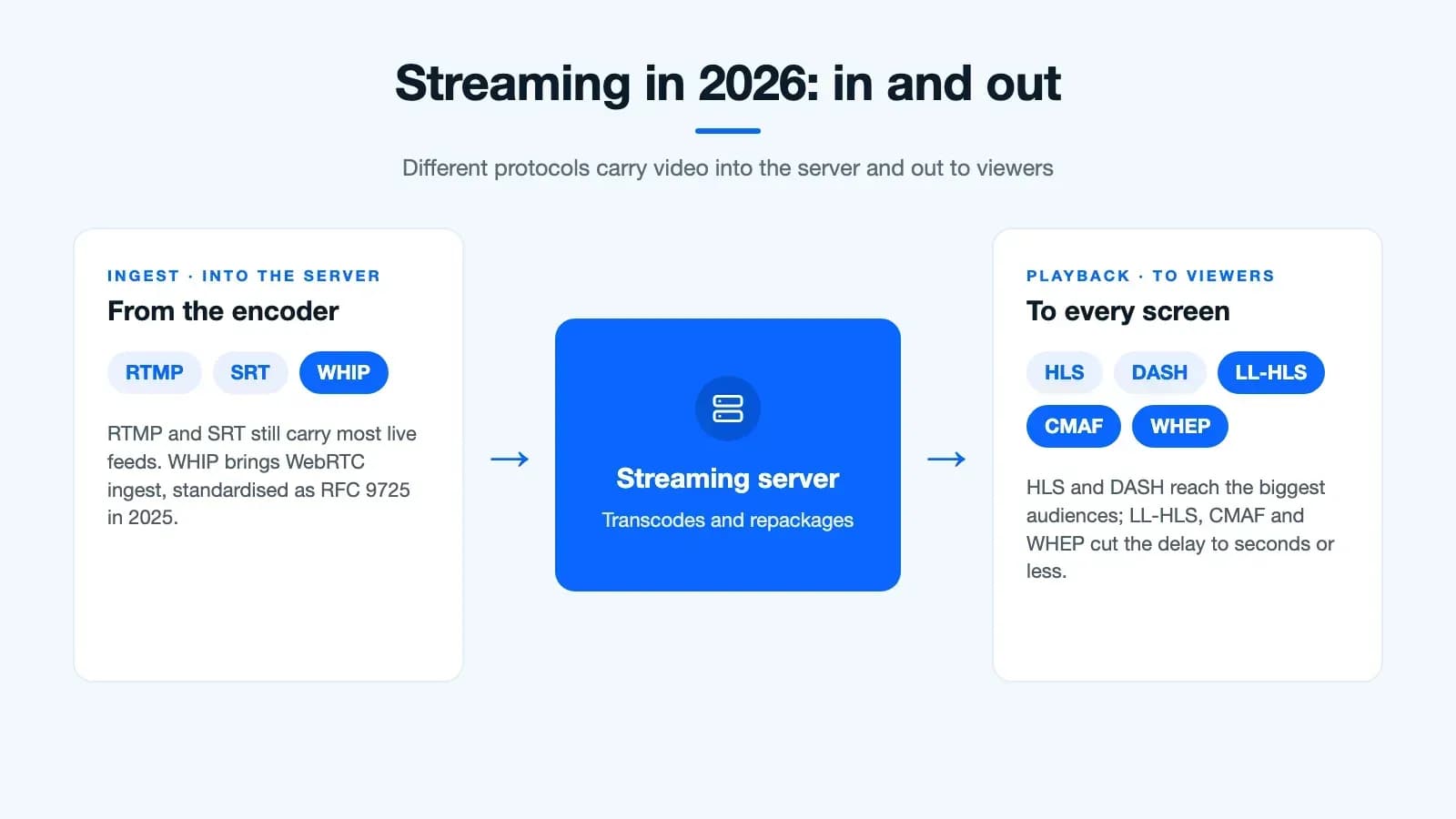
Low-latency HLS and CMAF: Apple’s Low-Latency HLS and the chunked CMAF format bring HLS and DASH down to a few seconds of delay, so large audiences get near-live streams without giving up adaptive bitrate.
WebRTC at scale: With WHIP for ingest and WHEP for playback, servers like Wowza, Cloudflare Stream and Red5 now deliver sub-second streams to big audiences. That suits live auctions, live shopping and sports, where a few seconds of delay really matter.
Consolidation: Microsoft retired Azure Media Services in June 2024, and Bending Spoons now owns both Brightcove and Vimeo. Before you commit, check who owns a platform and how long it has supported the features you need.
And if you are building your own OTT platform instead of renting one, these choices become part of your app’s architecture from day one.
What Determines the Cost of the Best Video streaming servers?
For service providers who rely on streaming protocols, the impact of video streaming server infrastructure on their budget will be complex and multifaceted. Here’s a breakdown of the same:
Costs
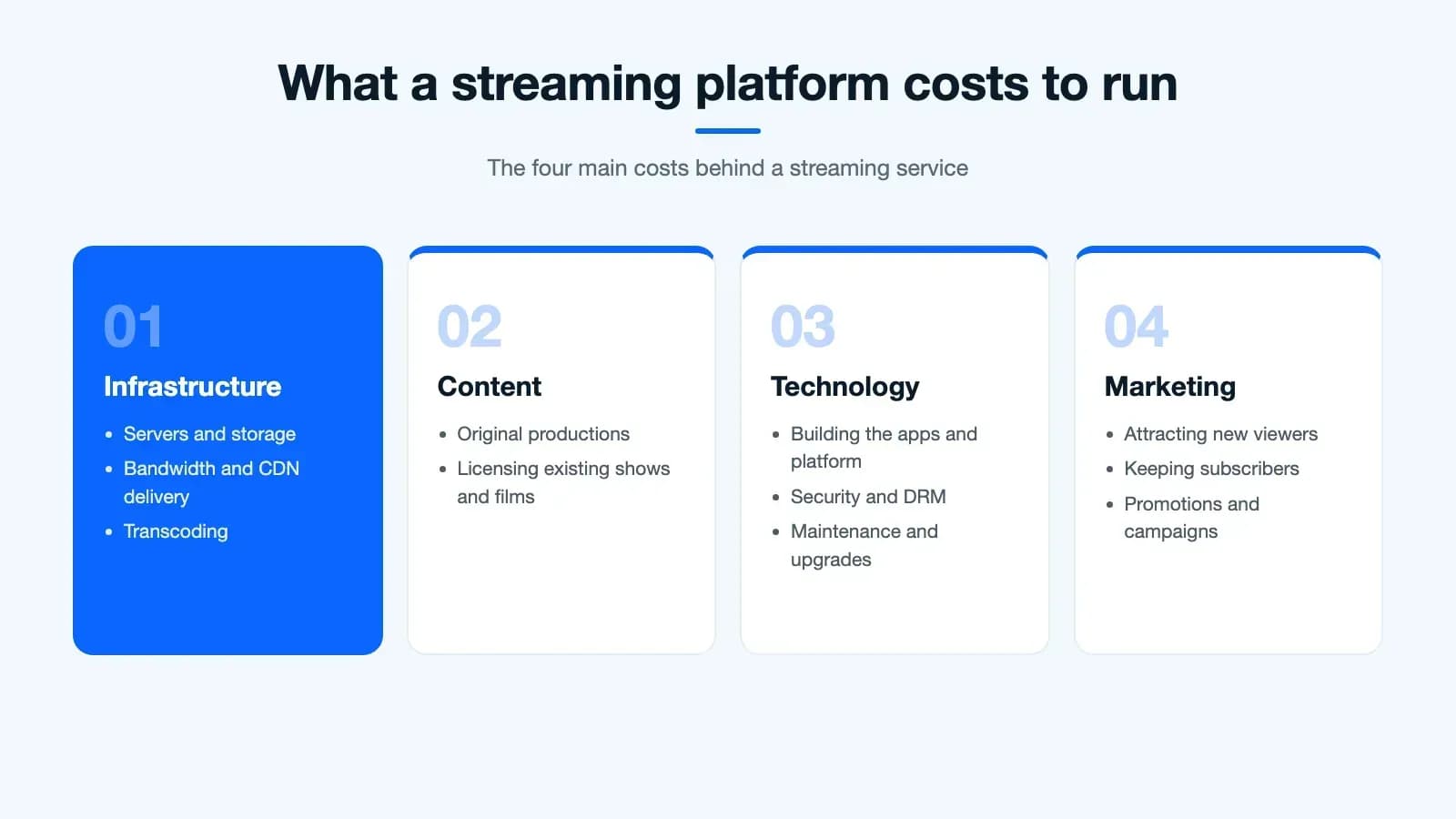
Infrastructure: Significant costs in streaming are due to the unavoidable requirement of robust servers, bandwidth, and content delivery networks (CDNs). It’s very important to maintain a reliable infrastructure and scale on par with demand.
Content Acquisition: The next significant expenses come from the content acquisition process. Expenses differ with the choice of the service, either its original content creation or licensing of existing content.
Technology: Another unavoidable expense is the development and maintenance cost of the existing streaming platforms. The impact of including features, security, and user experience, gets reflected in the expenses.
Marketing and User Acquisition: You cannot ignore to conduct marketing and promotional campaigns. This is done either to attract new users or retain subscribers, which in turn adds a handsome cost to the budget.
Benefits
Subscription Revenue: Subscriptions are usually associated with different tiers and models (e.g., freemium, ad-supported, premium) these are the primary source of efficient revenue streams.
Data Insights: Carry out targeted advertising, personalized recommendations, and content development with the help of user data collected from the streaming activity. This valuable database has the potential to generate additional revenue.
Operational Efficiency: Streaming overpowers physical infrastructure like cable networks. This will potentially reduce the operational costs of video streaming in the long run.
Scalability: Adding servers and bandwidth to meet the user base growth is a seamlessly scalable process compared to the physical infrastructure limitations.
Considerations
Competition: To retain and attract users you need to stay in the long run in the highly competitive streaming market with your innovation and differentiation. It impacts the budget for sure.
Regulations: The cost and operational strategies are influenced by Data privacy regulations, content licensing restrictions, and net neutrality rules.
Technology Evolution: There is a demand in budget allocation for upgrades and adaptation to keep up with evolving streaming technologies and user expectations.
Overall, service providers find premium streaming server solutions to be both cost-intensive and potentially lucrative.
To achieve financial stability and consistent growth in this dynamic market service providers need to take up careful budgeting, forecasting, and strategic planning.
It’s also important to understand the type of service provider you are referring to.
To make it easier for you to compare and learn check out the following table of the best video streaming servers as well as the cheapest video streaming service for service providers.
List of the Best Video Streaming Servers in 2026
The table below has a list of top-tier streaming server platforms for service providers.
Remember there are many other video streaming servers available. I’ve listed the most preferred services.
Also, the cost provided here may vary based on the usage, features, and other factors.
| Service Provider | Pros | Cons | Cost | Best For |
|---|---|---|---|---|
| Wowza Streaming Engine | Highly customizable, reliable for large-scale deployments, live & VOD support, robust security, advanced analytics | Complex setup & management, higher cost, steeper learning curve | From $195/month (perpetual licences and enterprise plans also available) | Large broadcasters, enterprises, organizations with complex needs |
| Dacast | User-friendly, cloud-based, good customer support, various application support (education, webinars, enterprise), monetization features | Limited customization compared to Wowza, might not be ideal for large-scale deployments | Starts at $39/month | Businesses and creators of various sizes, good for beginners |
| Vimeo OTT | Specifically for OTT services, good for subscription models, white-labeling | Limited customization compared to Wowza, might not be suitable for all types of streaming applications | No monthly fee on the Starter plan; $1 per subscriber a month, plus payment fees | OTT services, businesses focusing on subscription-based video streaming |
| Muvi | Affordable, white-label options, supports various monetization options | Limited customization compared to some options, might not be as robust for very large-scale deployments | Starts at $399/month | Startups, individuals, businesses prioritizing affordability and branding |
| Brightcove Video Cloud | Highly scalable, robust security features, good for large enterprises, advanced analytics & reporting | Higher cost compared to some options, complex features require technical expertise | Starts at $199/month | Large enterprises, organizations with strict security needs and complex workflows |
| Amazon Elemental MediaLive | Cloud-based live streaming service with various encoding options and integrations | Limited VOD capabilities, requires some AWS experience | Pay-as-you-go pricing | Live event broadcasters, organizations needing flexible scaling for live streams |
List of the Best Video Streaming Servers
List of Affordable Video Streaming Servers in 2026
The following table has a list of affordable streaming server solutions for service providers. See to it that, it is not an exhaustive list.
Also, there are many other video streaming servers available. I’ve hand-picked a popular and affordable few from the massive lot.
The pricing mentioned can also vary based on the usage, features, and other factors.
| Service Provider | Pricing | Streaming Protocol | Key Features | Technical Considerations |
|---|---|---|---|---|
| Amazon IVS | Pay-as-you-go based on hours of input and output | RTMPS, SRT, WebRTC, HLS | Low-latency live streaming, real-time stages, player SDKs | Requires AWS account, live-first, recordings go to Amazon S3 |
| Bunny Stream | Pay-as-you-go based on storage and bandwidth | HLS, DASH | Live and VOD streaming, global CDN network, low latency, API access | Requires integration with their API, limited customization options |
| Mux Video | Per-minute pricing | HLS, DASH | Live and VOD streaming, server-side ad insertion, detailed analytics | Requires integration with their API, focus on developer experience |
| api.video | Pay-as-you-go based on usage | HLS | Live and VOD streaming, encoding, embeddable player, analytics | Requires integration with their API, focus on European market |
| Wowza Streaming Engine | Subscription-based | HLS, DASH, RTMP | Live and VOD streaming, transcoding, recording, security features | Requires server installation, complex configuration |
| Bitmovin | Pay-as-you-go based on usage | HLS, DASH | Live and VOD streaming, encoding, cloud storage, analytics | Requires integration with their API, focus on high-quality video |
| Cloudflare Stream | $5 per 1,000 minutes stored, $1 per 1,000 minutes delivered | HLS | Live and VOD streaming, global CDN network, low latency, DDoS protection | Requires integration with their API, limited customization options |
List of Affordable Video Streaming Servers
Wowza Media Server
Having mentioned Wowza and its key features along with cost, protocols, etc in the tables above let’s explore the pros and cons of Wowza in detail, helping you decide if it aligns with your budget and requirements:
Pros:
Easily Customizable: Wowza’s on-premise and cloud-based software provides extensive customization options. This allows you to tailor the platform to suit your streaming specifications. This flexibility fulfils specific use cases and complex streaming setups.
Reliable for Large-Scale Deployments: Wowza is best suited for major broadcasters, enterprises, and organizations with significant demands. Its built can handle large audiences and high traffic volumes, making it highly scalable.
Live and VOD Support: Name it any scenario be it live streaming, on-demand content, or both, Wowza offers comprehensive solutions.
Robust Security Features: The streaming service prioritizes the security of our content and user data with the help of features like DRM integration, secure streaming protocols, and access control.
Advanced Analytics: Gain valuable insights into your audience behavior and content performance with detailed analytics tools built into the platform.
Cons:
Complex Setup and Management: Compared to simpler platforms this seems a bit less user-friendly. And, for the high level of customization, it will demand technical expertise and careful configuration.
Higher Cost: Wowza may look like a more expensive solution that too for smaller companies or individual users in comparison with a few of its competitors.
Steeper Learning Curve: If you lack prior streaming experience then getting used to the platform’s intricacies and managing technical aspects can be quite challenging.
Cost considerations:
I wouldn’t prefer to highlight specific costs or provide a rough estimation because Wowza’s pricing varies depending on your specific needs and the deployment model (on-premise vs. cloud).
You can find different options starting from individual licenses for smaller operations to enterprise-grade solutions for large-scale deployments. They offer various licensing options and packages. As a guide, the Streaming Engine subscription starts at $195/month.
Though it is not the cheapest option among the best video streaming servers, the cost is worthy of the platform’s robust features and scalability. And above all, don’t misunderstand Wowza to be a one-size-fits-all solution.
It outstands in situations requiring high customization, reliability, and security for large-scale live or VOD streaming.
However, if you are the one who prioritizes affordability, and ease of use, or wishes to fulfill the demands of a smaller audience, please look for other service providers. You might find others more suitable.
Alternatives to Consider
Dacast: It is a user-friendly, cloud-based that’s apt for various apps with good customer support.
Vimeo OTT: This is primarily designed for OTT services. It has good subscription models and white-labeling. Vimeo, now owned by Bending Spoons, also calls it Vimeo Streaming.
Muvi: Its plans start at $399/month, it has white-label options, and also supports various monetization options.
Brightcove Video Cloud: Best pick for large enterprises as it comes with highly scalable, and robust security features. It has been owned by Bending Spoons since February 2025.
Final Note
This quick but tremendous evolution from the cable box wars to the era of advanced streaming server technology marks a commendable transformation in how entertainment gets consumed.
Having built short video, live streaming and OTT apps as a developer for 10+ years, I’ve shared what I’ve observed.
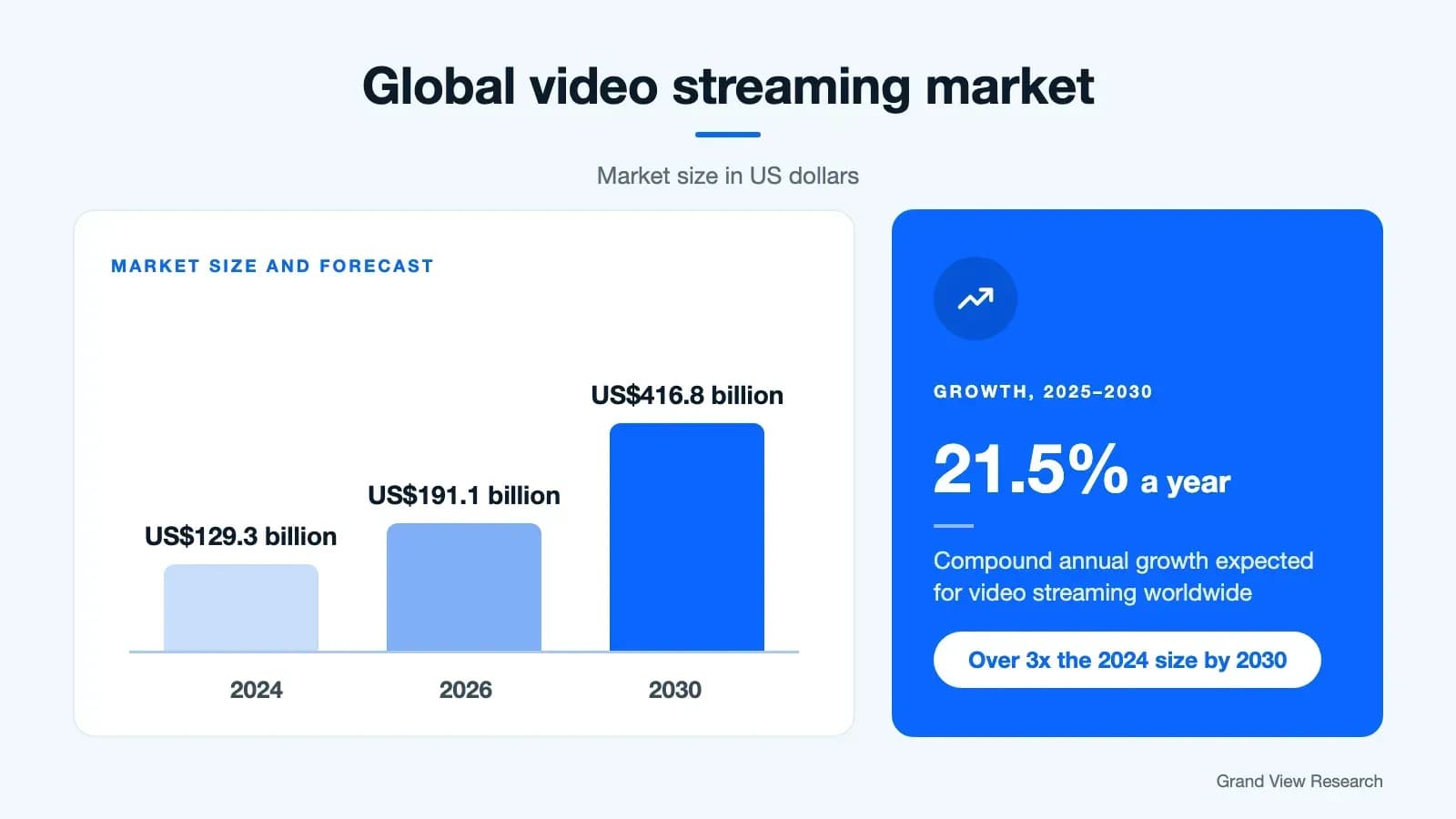
The video streaming market was valued at USD 129.3 billion in 2024, according to Grand View Research.
And now, it’s predicted to grow from USD 191.1 billion in 2026 to USD 416.8 billion by 2030, at 21.5% a year.
And, undoubtedly this can be seen as one of those reasons that increases its market value.
The following graph pictures the growth in the video streaming market.
Be it the TikTok tech stack or the technical aspects of the best video streaming servers, it’s the advent of AI and blockchain paved the way for this monstrous growth in the video streaming market.
And, the one with flexible protocols becomes the most preferred by the service providers.
In the ever-evolving best video streaming servers niche, the possibilities are boundless, and the only limit seems to be an entrepreneur’s imagination.
This blog must have made your vision clear before taking up this captivating journey, one stream at a time.
On the whole, the era of advanced streaming server technology is promising and growing with boundless opportunities for both consumers and service providers.
This contributes to the outburst of personalized, on-demand entertainment.
Agree? Let me know where you stand about the same. And, your thoughts on the behind-the-scenes tech heroes who are making the best video streaming servers possible.
Common questions
Which video streaming server is best for live streaming?
It depends on your audience and latency needs. Wowza Streaming Engine suits large, customised live deployments, Amazon IVS and Cloudflare Stream suit teams that want a managed service, and Dacast suits businesses that want something simple to start with. For real-time interaction such as auctions or live shopping, choose a server that supports WebRTC with WHIP and WHEP.
What is the difference between HLS and DASH?
Both split video into small chunks and adapt the quality to the viewer's connection. HLS was developed by Apple and plays natively on iPhones, iPads and Safari, while DASH is an open international standard that is widely used on Android and smart TVs. Many platforms package the same video for both using CMAF.
Can WebRTC stream to large audiences?
Yes, increasingly. WebRTC was built for small, real-time calls, but with WHIP for ingest (published as RFC 9725 in 2025) and WHEP for playback, servers like Wowza, Cloudflare Stream and Red5 can now deliver sub-second streams to thousands of viewers.
How much does a video streaming server cost?
Managed services start low and grow with usage: Dacast starts at $39/month, Cloudflare Stream charges $5 per 1,000 minutes stored and $1 per 1,000 minutes delivered, and Wowza Streaming Engine starts at $195/month. Bandwidth, storage, encoding and support usually make up most of the bill as your audience grows.
Should I self-host a streaming server or use a cloud service?
Self-hosting, for example Wowza Streaming Engine on your own servers, gives full control over configuration and data but needs technical expertise to run and scale. A cloud service handles encoding, delivery and scaling for you, in exchange for usage-based fees and less control. Many platforms use a mix of both.

Arun Andiselvam
LinkedInI am a startup veteran who has built five brands. I sold the first, an SEO tool, for a six figure exit, and now lead Appkodes, building custom mobile and web apps for founders and businesses. I bootstrapped every one of them from day one.