Most founders come to us with the app idea first and the money question second. If you are building a Bigo Live or Twitch-style product, the revenue design decides your feature list, your payment stack, your moderation workload and your server bill. It needs to be settled before a single screen gets designed.
This guide covers live streaming app monetization the way we explain it to founders in a scoping call. We cover what each model actually pays and how small your creator base can be before the economics work. We also cover what the platforms you are competing with take off the top, and which parts of the system you need to build on day one versus later. Along the way we touch on things nobody tells a first-time streaming founder, including tax drag on creator payouts, why most of your audience will never watch anything live, and how much of your traffic will come from clips rather than broadcasts.
If you want the full build picture, read our guide on how to create a live streaming app. This article stays on money.
The 7 live streaming app revenue models that actually pay
Here is the short answer before the detail. The seven live streaming app revenue models that consistently earn on social streaming products are:
- Virtual gifting. Viewers buy coins, send animated gifts, the app keeps a cut of every conversion and every payout.
- PK Battles. Timed head-to-head contests between two streamers where viewers gift to decide the winner.
- Creator subscriptions. Recurring monthly support for badges, emotes, subscriber-only rooms.
- In-app purchases. Coin bundles, effects, entry tickets, profile upgrades, room themes.
- Advertising. Pre-roll, mid-stream, banner and sponsored placement inventory.
- Paid private sessions. One-to-one or small-room streams billed per minute.
- Premium memberships on the platform side. Your own VIP tier, sold by you rather than by creators.
Most successful apps run three or four of these at once, not all seven. Gifting and PK Battles tend to carry the revenue in social streaming, while subscriptions and ads carry it in content streaming, where people watch long sessions of gaming, music or talk. Paid private sessions sit between the two, and they're the highest-margin option when your niche supports it, think coaching, language practice, or tarot.
The mistake we see most often is launching with ads because they feel safe. Ad revenue needs volume you will not have in month three. Ad breaks hurt retention precisely when retention is the only thing keeping your app alive. Add ads once your concurrent viewer numbers justify an inventory conversation.
Virtual gifting monetization: how the coin economy really works
Virtual gifting is the backbone of social streaming revenue. It works because it converts attention into status in public. A viewer sends a gift, an animation fires across the screen, the streamer says their name out loud, and everyone in the room sees who paid.
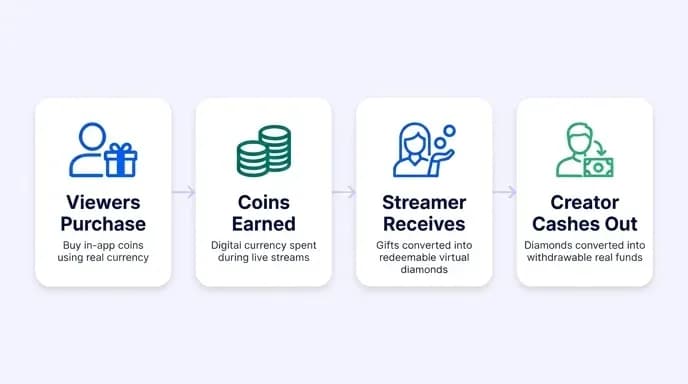
The mechanics run on a two-currency system, and getting this right is most of virtual gifting monetization:
- Coins are what viewers buy with real money through the app stores or a payment gateway. They are a hard currency, priced in bundles, and they never convert back to cash.
- Diamonds or beans are what streamers receive when a gift lands. These convert to cash on withdrawal, at a rate you set.
The spread between the coin price and the diamond payout rate is your margin. You also decide the payout floor, the withdrawal schedule and the verification rules. This is the single most important commercial decision in the build, and it determines whether your unit economics survive the app store fee, the payment gateway fee, your streaming delivery cost and your fraud losses.
Tier your gift catalog steeply. A handful of cheap gifts at the bottom get viewers into the habit of sending something, while a small set of expensive, flashy gifts at the top give big spenders a way to stand out from everyone else in the room.
Make the animation worth the money. If a gift costs real currency, the payoff on screen needs to feel proportionate, because a flat, cheap-looking animation on an expensive gift is the fastest way to kill repeat spending.
Put the leaderboard where people can see it. Top gifter of the day, of the room, of the week. Status needs a scoreboard.
Let streamers thank people instantly. A visible, immediate acknowledgment, whether that's a name on screen or a verbal shoutout, closes the loop between spending and recognition, which is what keeps gifters coming back.
Virtual gifting monetization only fails in one predictable way: when the app treats it as a tip jar rather than a game.
PK Battles revenue: the highest-intensity mechanic in social streaming
PK Battles are the feature that most reliably multiplies gifting revenue. They are the first thing founders ask us to build after they have watched a competitor's app for a week. Two streamers go live side by side on a split screen for a fixed window.
PK Battles revenue works because it introduces four things that a normal stream does not have. There's a deadline, an opponent, a visible score and a consequence. Viewers who would never send a gift to express appreciation will send one to stop their streamer losing in the last thirty seconds.
What you need to build for PK Battles revenue to function:
- Matchmaking. Random, invite-based, or tier-based so a huge streamer does not steamroll a new one. Tier-based matching keeps smaller hosts in the game and widens the number of rooms earning.
- A live score bar. Updating in real time on both halves of the screen, with the margin visible.
- Battle history and rankings. Weekly leaderboards give streamers a reason to keep entering.
Run tournaments on top of this and PK Battles revenue compounds. A bracket over a weekend, with a prize pool funded from the gifting take, concentrates spending into a predictable window and gives your marketing team something to promote. Multi-guest battles, two against two, or four-way, extend the mechanic once the basic version is stable.
One caution: battles are intense, and intensity attracts pressure tactics. Set rules on how hosts can solicit gifts, and moderate them. The apps that lose their payment processors are the ones that let battle culture turn coercive.
In-app purchases for streaming apps beyond coins
Coins are the obvious purchase, but the apps with the healthiest margins sell more than currency. In-app purchases for streaming apps give you revenue from viewers who are not in a gifting mood and from streamers investing in their own presentation.
- Entry tickets to ticketed rooms. Concerts, workshops, paid Q&As, closed PK finals.
- Visual effects and filters that streamers buy to improve their broadcasts.
- Profile and room customization. Frames, badges, animated usernames, room themes, custom entrance effects that announce a VIP when they walk into a room.
The entrance effect deserves a special mention. Both major app stores take a share of every digital purchase made in-app, so pricing has to be set with that cut already factored in. That means your coin bundle pricing has to absorb that before you calculate what a streamer takes home.
One more thing worth building early: a bonus structure on bundles. Larger bundles give proportionally more coins, which lifts average purchase size without changing the perceived price of a gift.
Subscription model live streaming: regular revenue for creators and platform
A subscription model live streaming system gives you the only predictable revenue line in the business. Gifting is spiky. Subscriptions arrive on the same day every month.
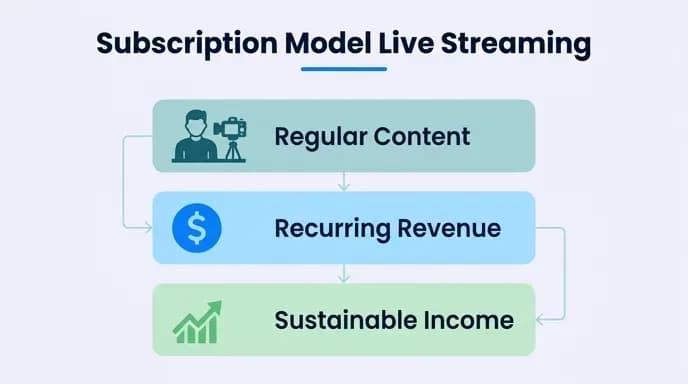
Two layers are worth building:
Creator subscriptions. You take a platform share. This works best for creators with a defined community rather than drive-by audiences, the kind who stream on a schedule and know their regulars by name.
Platform memberships. The coin allowance is the clever part, because it pushes members into the gifting economy and makes the membership pay for itself twice.
Where a subscription model live streaming approach disappoints founders is when it is bolted onto a product with no community mechanics, because people subscribe to relationships, not to streams. Tiering helps.
What viewer count do you actually need to monetize a live streaming app?
This is the question creators ask constantly and platforms answer vaguely, so your app should answer it clearly.
The honest answer is that it depends far more on the relationship than the headcount. A streamer with a couple of dozen regulars who know each other, show up on schedule and have a running in-joke will out-earn a streamer with several hundred passing viewers who never speak. In gifting economies, revenue comes from a small number of committed spenders, not from the crowd.
Here is roughly how the scale ladder works in practice:
A handful of concurrent viewers. Gifting works here, and it is the only thing that does. Ads have no inventory to sell, subscriptions have no base. Design your app so a host with a tiny room can still receive a gift, see it land and withdraw once they reach your floor. If the first payout feels unreachable, they leave.
Dozens of concurrent viewers. Subscriptions start to convert. Regulars become identifiable. PK Battles become viable because there is enough gifting volume to make the score move. This is where most of your middle-class creators will live, and where your retention work pays off.
Hundreds of concurrent viewers. Sponsorships, ad inventory and brand deals enter the picture. Income volatility is the defining feature of this tier, which is why your app needs multiple revenue sources per creator rather than one.
The product lesson: do not design your monetization for your biggest imagined creator. Design it so someone with a small, devoted room can earn something meaningful in their first month, because that is the group that determines whether your supply side grows.
Watch hours, eligibility rules and why your thresholds matter
Creators coming to your platform from elsewhere carry scar tissue about eligibility thresholds. They will ask you the same questions they asked their last platform. Does live time count toward partner requirements, how is the calculation done, and how long until the first payout clears.
Policies on whether live watch time counts toward partner program watch-hour requirements vary by platform, come with conditions attached, and change without much notice, so creators are often left guessing. There is also a rolling window involved, which means hours earned a long time ago drop off. This is why the calculation confuses people. The number can go down.
Your job as a platform owner is to be the opposite of that experience. Specifically:
- Plain-language eligibility rules, inside the app. Put them where a creator will actually see them, not in a help center nobody opens.
- Show progress live. A creator dashboard with a progress bar toward payout eligibility removes the single biggest source of support tickets.
- Be explicit about timing. State when a withdrawal is processed and when the money lands.
None of this is glamorous, but creator-side trust is a growth channel. Hosts talk to each other, and the first thing they compare is how quickly and how reliably they got paid.
Comparing revenue splits: what the big platforms take, and what you should
Founders building a clone app or a niche competitor need a clear-eyed view of the splits creators are used to.
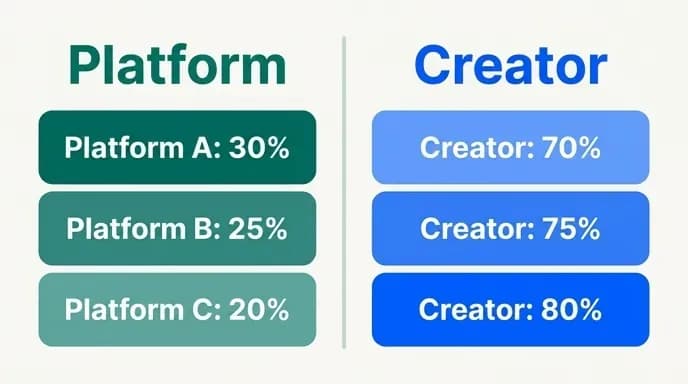
The established live platforms take a meaningful cut of subscription revenue from most creators, with better terms typically reserved for large partners. Video platforms running ad revenue share give creators the larger share of ad income but control the inventory and the rates. Direct membership platforms take the smallest cut, which is exactly why creators push their audiences toward them.
So where should you land? Three principles:
Be transparent about the full chain. Show the creator what a given gift is worth to them after conversion. Hidden exchange rates are the fastest way to lose your best hosts.
Compete on terms early, margins later. A new platform with no audience cannot win hosts on reach, so it wins them on economics: a better split, a lower payout floor, faster withdrawals. You can tighten terms once the network effect is yours.
Tier your splits by performance. Hosts who stream a set number of hours, hit engagement targets or win battles move up a tier. This gives your creators a ladder and gives you a retention mechanism that costs nothing until it works.
For a clone app monetization strategy specifically, resist copying a market leader's split number without copying the context around it. Their rate is sustainable because they have the audience. Yours is not, yet.
The tax and payout problem nobody warns streamers about
This is the gap in almost every article on this topic, and addressing it inside your product is a genuine differentiator.
Streaming income usually arrives as self-employment income with nothing withheld. Creators see money land in their account and treat all of it as spendable.
We are not tax advisors, and your app should not pretend to be one. Tax rules differ by country and by individual circumstance, and creators need to talk to a qualified professional in their own jurisdiction. Your product can still remove the surprise in numerous concrete ways:
- A running earnings statement for every creator. Make it exportable, and break it down by month and by revenue source.
- Issue proper annual documentation in whatever form the market you operate in requires.
- Surface a prompt, not advice: a reminder that streaming income is typically untaxed on arrival and that setting a portion aside is normal practice.
- Support local payment rails so creators are not losing another slice to currency conversion on every withdrawal.
Creators who feel financially organized on your platform stay on your platform. It is a retention feature disguised as accounting.
Repurposing live content: where most of your views will actually come from
Here is the uncomfortable truth about live video: live discovery is terrible everywhere. Most of the people who will eventually watch a given streamer will never see a single second of them live. They will see a clip, and that shapes how you build. A streaming app that only does streaming is leaving most of its growth on the table.
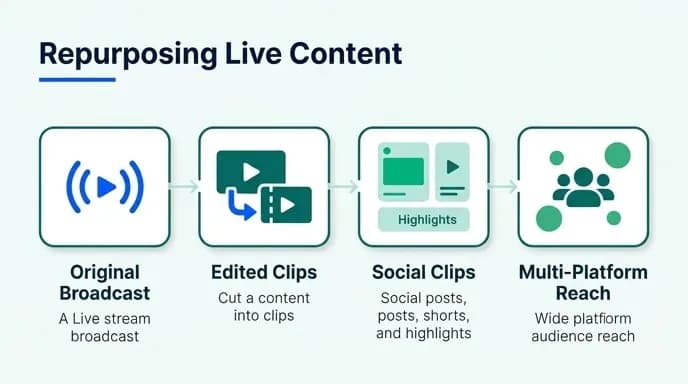
What to build into the product:
Automatic VOD. When a public stream ends, it should become a permanent video on the host's profile. That recording keeps attracting viewers long after the broadcast, and it converts the stream from an event into an asset.
Clipping, in-app. Let viewers mark a moment and generate a short vertical clip with one tap. Viewers are better at spotting the good moments than the host is, because the host is busy hosting. Clips made by viewers also come pre-loaded with the motivation to share them.
A vertical clip feed. Put those clips into a scrollable feed inside your app so that new users land on short-form content rather than an empty live grid. This is the single most effective fix for the cold-start problem in streaming apps, and it draws on the same patterns we use in short video app development.
One-tap export to the big short-form platforms, with branding and a link back.
The time allocation lesson follows from this. The most sustainable creators spend only a portion of their working hours actually live. The majority goes into producing clips and edited video for other platforms, because the clips do the discovery work that live cannot. If your app makes that export workflow effortless, creators will choose your platform over one where they have to screen-record and edit manually.
Do creators need external software, or is your app enough?
New streamers genuinely do not know whether they need broadcasting software, overlays and plugins to earn money, and the answer determines whether they ever start.
For mobile-first social streaming, the answer should be no. Camera, microphone, tap to go live. If your app requires a desktop encoder, you have excluded most of your potential supply side. Build gift animations, alerts, overlays, beauty filters, multi-guest seats and battle screens natively, so the host needs nothing but the phone.
For desktop and gaming-oriented streaming, your app should accept a standard streaming protocol so hosts can push from the broadcasting software they already use, with their existing scene setup intact, while still receiving your gift alerts as a browser source.
Build both paths and be straightforward about which is which. The gap between "I want to stream" and "I am streaming" is where most would-be creators give up.
Time, sustainability and streaming alongside a full-time job
Most of your creators will have another job. Designing for that is a competitive advantage, because the platforms they currently use mostly do not.
The pattern that works for part-time creators is a short, fixed, repeated schedule. Consistency beats volume. A host who is live at the same two evenings every week builds a habit in their audience, while a host who streams for long unpredictable sessions does not. Regulars need to know when to show up.
What your product can do to support this:
- Scheduled streams with notifications, so a host can announce a slot and your app reminds their followers.
- Streak and consistency rewards that recognize showing up on schedule rather than total hours, so part-timers are not permanently out-ranked by people who stream all day.
- Low-effort formats. Audio-only rooms, co-hosted streams, short battle slots. So a tired creator has a way to show up without a full production.
- Discovery that surfaces newer hosts in the hours when your heavy streamers are offline.
Burnout is a supply-side churn problem. Every creator who quits takes their spenders with them, and the ones who quit are usually the ones who felt they had to be live constantly to be seen.
Niche targeting beats generic content every time
The last piece of monetization strategy is positioning, and it applies to your platform exactly as it applies to your creators.
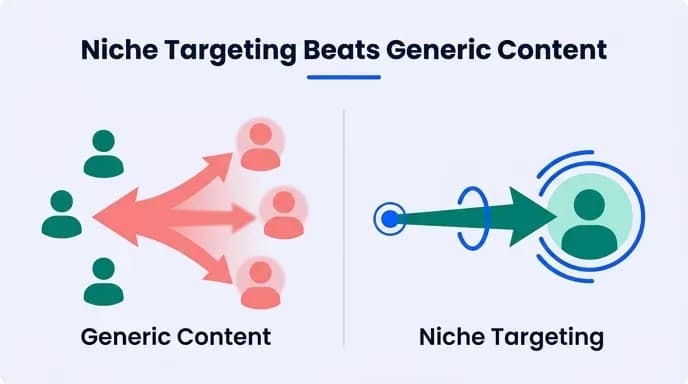
A general-purpose streaming app competes with the incumbents on their terms: catalog size, star power and marketing budget. You will lose that. A streaming app for one community, a language, a region, or a faith, competes on belonging, and belonging is something the big platforms are structurally bad at.
Niche audiences also spend differently. When viewers feel the host is one of them, gifting becomes a contribution to the group rather than a transaction. PK Battles become authentic local rivalries with people watching who know both hosts. Spend per viewer in a tight community routinely beats spend per viewer in a large anonymous one.
For founders working from a clone app monetization strategy, this is the key adjustment. Copying the mechanics of a successful app is sensible: gifting, battles, multi-guest rooms and leaderboards work for good reasons. Copying its positioning is not.
That is also how a small team wins. You do not need a bigger catalog than the incumbent. You need to be obviously the right place for one group of people.
Building the revenue engine before you build the app
Everything above is a product decision, not a marketing decision. The coin-to-diamond rate, the gift tiers, the battle rules, the subscription layers, the payout floor, the creator dashboard, the clip pipeline, these are architecture. Retrofitting them into a finished app costs more than building them in from the start, and badly retrofitted economies are the main reason streaming MVPs stall after launch.
That is how we scope live streaming builds at Appkodes. Our first releases start from $8,000 depending on what the build includes.
If you are weighing a cheap script against a custom build, the monetization engine is where the difference shows. A template gives you a gifting screen. It rarely gives you a currency economy you can tune, a battle system that stays in sync, a payout flow your creators trust or a clip pipeline that solves discovery.
Get a quote for your live streaming app.
Common questions
What are the main ways to monetize a live streaming app?
The seven proven revenue models for live streaming apps are virtual gifting, PK Battles, creator subscriptions, in-app purchases, advertising, paid private sessions, and platform premium memberships. Most successful apps run three or four of these models simultaneously rather than all seven.
How does the virtual gifting coin economy work?
Virtual gifting uses a two-currency system where viewers buy coins with real money, then send animated gifts to streamers who receive diamonds or beans that convert to cash at a rate you set. The spread between coin price and diamond payout is your margin, and success depends on tiering gifts steeply, making animations worth the cost, displaying leaderboards, and giving streamers immediate ways to thank gifters.
What are PK Battles in live streaming?
PK Battles are timed head-to-head contests between two streamers shown side-by-side where viewers send gifts to decide the winner. They multiply gifting revenue by introducing a deadline, opponent, visible score, and consequence that motivate viewers to send gifts they wouldn't normally send.
How many viewers do you need to monetize a live streaming app?
A handful of concurrent viewers can monetize through gifting alone, dozens of viewers can add subscriptions and PK Battles, and hundreds of viewers can support sponsorships and ads. Revenue depends more on viewer relationships and commitment than on headcount, with a small number of committed spenders generating most income.
Why should you avoid launching with ads on a streaming app?
Ad revenue requires volume that new apps won't have in month three, and ad breaks hurt retention precisely when retention is the only thing keeping your app alive. Add ads once your concurrent viewer numbers justify an inventory conversation.

Arun Andiselvam
LinkedInI am a startup veteran who has built five brands. I sold the first, an SEO tool, for a six figure exit, and now lead Appkodes, building custom mobile and web apps for founders and businesses. I bootstrapped every one of them from day one.