How to Build a Low Bandwidth Chat App That Survives Patchy Networks
Most chat apps get built and tested on fast office wifi. Then they ship, and real users open them on a crowded bus with one bar of signal, in a village with a shared hotspot, or in a clinic basement where the connection drops every ninety seconds. The app that wins in those conditions is almost never the one with the richest feature list. It is the one that degrades gracefully instead of failing outright.
Here is the short answer before the long one. A low bandwidth chat app works because it assumes the network will fail, not because it assumes the network will hold. It sends small messages, queues them locally when the connection dies, resends them automatically, adapts video and audio quality in real time, and tells the user honestly what state they are in. Everything else in this guide is detail on how to build each of those behaviors into a product you can ship.
We have spent years building apps across delivery, healthcare, marketplaces and social, and the pattern repeats every time. Founders budget for features. The users who churn are the ones whose messages silently vanished.
Why Most Chat Apps Break on Weak Connections
The failure mode is nearly always the same. The app gets written as if the network is a reliable pipe. Send a message, get a confirmation, show it as delivered. On fiber, that round trip finishes before anyone notices. On a shaky mobile connection, the request hangs, the user taps send again, and now you have duplicates, or nothing, or a spinner that never ends.
Video is where this gets expensive fast. There is a clear observable difference between apps that adjust quality to whatever bandwidth is actually available and apps that insist on holding a high-definition stream. The adaptive ones stay connected through drops, with the picture going soft and then recovering. The stubborn ones freeze, then drop the call entirely.
FaceTime is a useful case study because it has no middle ground. It either works perfectly or it breaks on weak connections entirely, with no graceful degradation. That is a defensible choice for a company that controls its hardware and sells on quality. It is a poor choice for a startup whose users are spread across markets with wildly uneven connectivity.
The second failure mode is payload size. A chat message should be tiny. In practice it often carries a bloated JSON envelope, full user objects and nested metadata. Avatars get re-sent on every event, and presence updates fire constantly in the background.
If your send path does that, every other request in the app is now waiting behind it.
What "Low Bandwidth" Actually Means in Numbers
Vague talk about "optimizing" helps nobody. Design against real consumption bands instead, and the architecture decisions make themselves.
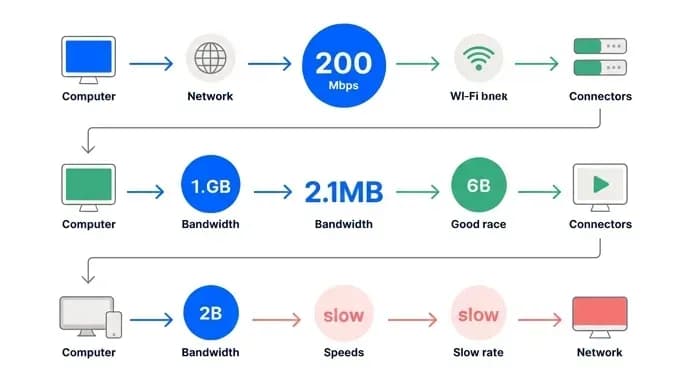
Screen sharing with slides plus audio is unusually cheap in terms of bandwidth. That is why it is the right default for teaching sessions, tutoring apps and clinical briefings rather than a face-on-camera grid. Gallery view in a large meeting sits at the other extreme and can consume several megabits per second. Speaker view uses significantly less for the same conversation, since it renders fewer simultaneous feeds. One is a product decision, not a network problem.
On mobile data, the gap between video and voice is the whole game. Video calls on common messaging apps can burn through data astonishingly fast, often reaching well over a gigabyte in a single hour. Switching on data saving mode at both ends on video calling apps can cut that considerably, though it still adds up quickly over time.
Zoom sits awkwardly in the middle for patchy wifi. If your users are comparing your calling feature against WhatsApp on a shared connection, that is the benchmark you are being judged against.
Text messaging, by comparison, is almost free. A compressed text payload is measured in bytes. The lesson for product planning is blunt: text and voice should always work, video should be opt-in, and anything that renders multiple simultaneous video streams needs a deliberate justification before it ships.
How Bandwidth-Adaptive Video Quality Actually Works
This is the part founders are told is "handled by the SDK," which is true right up until it is not.
Adaptive quality rests on three loops running continuously during a call. The first is estimation. The client measures how long packets take to arrive, how numerous never arrive, and whether the queue of outgoing data is growing. A growing send queue means you are pushing more than the link can carry. It is the earliest reliable signal that trouble is coming.
The second loop is encoder adjustment. Once the estimate drops, the encoder responds by lowering bitrate first, then frame rate, then resolution, in that order. Bitrate cuts are invisible for a second or two. Frame rate cuts make motion look slightly stuttery but keep faces legible. Resolution cuts are the last resort because the picture visibly softens. Apps that feel robust are the ones that step down early and in small increments rather than holding full quality until the call collapses.
The third loop is simulcast and layered encoding on group calls. The sender publishes the same stream at two or three quality levels at once. The server then forwards whichever layer each receiver can actually handle. A participant on fiber gets the high layer, a participant on a weak mobile connection gets the low one, and nobody's experience is dictated by the worst link in the room. Without this, one bad connection drags the whole call down.
Audio-first is the single most effective call quality decision available, and it costs nothing.
Letting Users Stop Incoming Video, and What to Do When the Option Is Hidden
The fastest way to rescue a struggling call is to stop incoming video from downloading. The conversation continues, screen shares stay visible, and the bandwidth requirement collapses to near-voice levels.
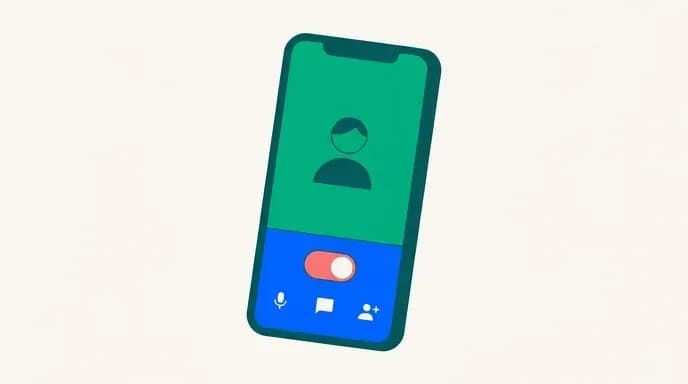
In practice this control is often buried or missing entirely. Users who go looking for it and cannot find it usually assume it does not exist. If it is locked, it is locked at a level above you and needs the account owner.
The lesson for your own product is simple. Do not hide the controls that save a call. Put a one-tap "audio only" switch directly on the call screen, not three menus deep. Make it survive reconnections so the user does not have to set it again every time the network blips. Consider turning it on automatically when your bandwidth estimator sees sustained packet loss, with a visible notice so the user understands what happened and can override it.
The same thinking applies to media in chat. Give people a global setting for auto-downloading images and video, split by connection type, so they can allow it on wifi and block it on mobile data. Users on metered plans notice this immediately, and it is one of the cheapest trust-building features you can ship.
Message Compression and Size Limiting Techniques
Text is where a low bandwidth chat app earns its reliability, because text can be made small enough to squeeze through almost any connection.
Start with the transport. A binary protocol over a persistent socket beats verbose JSON over repeated HTTP requests, because you avoid re-establishing a connection and re-sending headers for every message. Permessage compression on the socket handles the rest, since chat text compresses extremely well when conversations repeat names, phrases and formatting constantly.
Then strip the envelope. Send message identifiers rather than entire user objects. Have the client cache profiles and resolve them locally. Batch presence and typing indicators instead of firing one event per keystroke. Or drop typing indicators entirely on slow connections, since they are pure overhead with no informational value when the message itself is struggling.
For media, compress on the device before upload, not on the server after. Resize images to a sensible display dimension, strip location and camera metadata, and generate a small thumbnail that loads first while the full file arrives in the background. Voice notes should use a speech-optimized codec at a low bitrate rather than a music codec, which sounds identical for speech and is a fraction of the size.
Set hard limits and explain them. A size cap on attachments with a straightforward message beats an upload that fails silently after three minutes. Chunk large uploads so a dropped connection resumes from where it stopped rather than restarting from zero. Nothing drives users off a product faster than losing a nearly finished upload twice in a row.
Offline Queues, Retries and Delivery Receipts That Tell the Truth
An app for patchy networks is really an offline-first app that happens to sync when it can.
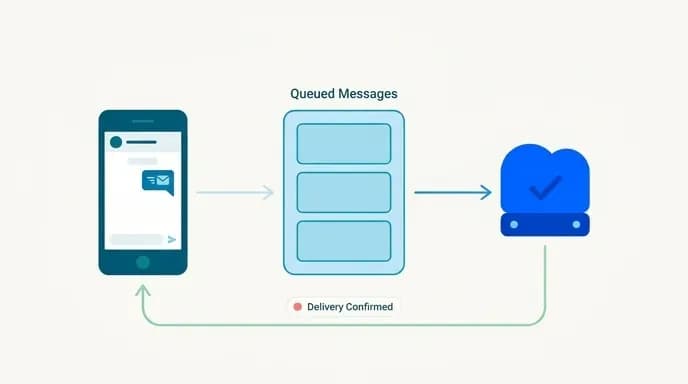
Write every outgoing message to local storage the instant the user taps send, with a client-generated unique identifier. Render it immediately in the thread, marked as pending. A background worker drains that queue whenever connectivity returns. Because the identifier came from the client, the server can discard duplicates when a message arrives twice after a retry, which solves the double-send problem permanently.
Retries need backoff with randomization. If every client in a region reconnects at the same instant after a tower hiccup, your servers take a stampede. Spread the retries out, cap the attempts, and surface a clear failure state with a retry button rather than looping silently forever and draining the battery.
Be honest in your status indicators. Three states cover almost everything: sending, sent to server, delivered to recipient. When the app is offline, say so in the thread rather than showing a spinner that implies progress. Users tolerate a queued message. They do not tolerate believing something was delivered when it was not, and in healthcare or delivery contexts, that false confidence has real consequences.
On reconnect, sync incrementally. Pull changes since the last known sync point instead of refetching entire conversation histories. A user coming back from an hour offline should not trigger a megabyte-scale download on the same weak connection that just failed them.
FaceTime vs Teams vs WhatsApp: Reliability on Unstable Connections
Comparing the big apps is worth doing, because your users already have and will measure you against them.
FaceTime is all-or-nothing. On a good connection the quality is excellent. On an unstable one, there is no gentle fade: it works or it fails, and there is little in between to work with. It is also closed to anyone outside the Apple ecosystem, which rules it out as a reference model for most products.
Teams is more forgiving in that it keeps trying and will fall back toward audio, but it carries heavier client overhead and tends to struggle on constrained devices.
Zoom holds a call well on decent connections and is genuinely good at screen sharing, but on bad wifi it freezes or drops with some regularity and uses noticeably more data than WhatsApp under the same constraints.
WhatsApp is the realistic benchmark for constrained markets. It was built for conditions where connectivity is intermittent, it keeps text flowing when calls cannot connect, its voice calls are frugal with data, and it degrades rather than dies on unstable connections. If your app needs to work for users in regions where this is the everyday standard, that is the behavior to match.
Regional Connection Quality and Local SIM Backup Strategies
Connectivity is not uniform, and the variation is wider than most dashboards reveal. Dense urban coverage can be excellent and still collapse during commuting hours when every tower is saturated. Rural coverage can be consistent but slow. Hotel and café wifi is frequently worse than mobile data, because bandwidth is shared across a crowded building with no traffic prioritization.
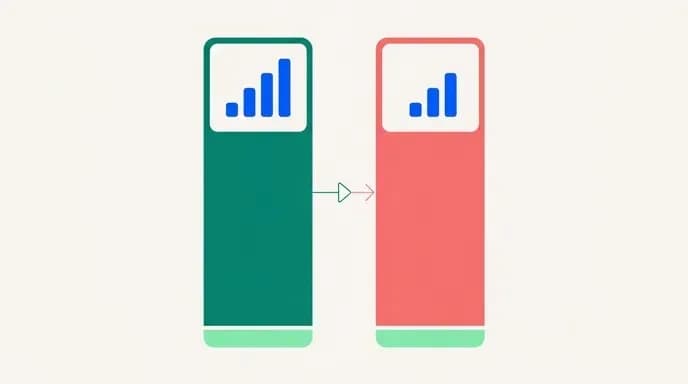
This matters for product decisions in specific ways. If your delivery riders work across a metro area, their experience shifts street by street, and the app must hold their order queue locally. If your telehealth patients are in a region with limited coverage, the consultation needs to fall back to voice automatically rather than abandoning the appointment. If your marketplace serves many countries, assume different baselines per market and make your defaults configurable per region instead of shipping one global setting tuned on your office connection.
For teams and travelers, a local SIM is the single most reliable backup for unreliable wifi. An eSIM bought before arrival lets you keep the home number active for verification codes while routing data through a local carrier, and the local network almost always outperforms shared venue wifi.
The practical pattern for anyone running calls on the road is this: use mobile data as the primary path, keep wifi as the fallback, and test the switch before the meeting rather than during it. A phone hotspot on local data beats conference-room wifi far more often than people expect. Build the same redundancy into your app. Detect connection type, allow seamless handover between wifi and mobile data without dropping the session, and never assume that a connected wifi network means working internet.
Making the App Work on Extremely Weak Signal
At the far edge of coverage, where you have one bar and nothing loads, most apps simply stop. A few keep working, and the reasons are instructive.
They keep payloads small enough to fit in a handful of packets, so a message can slip through a narrow window of connectivity. They retry aggressively but politely, waiting for a real signal rather than hammering the radio. They fall back to the simplest transport that works, and they prioritize ruthlessly. Text comes first, then voice, then thumbnails, then full media, with lower priority items waiting their turn.
Apply all of that to your build. Keep the initial handshake minimal, since a heavy authentication flow is often what fails on weak signal, not the messaging itself. Cache aggressively so the app opens and shows history without any network at all. Where SMS fallback is appropriate, for appointment reminders, order confirmations or verification codes, use it, because SMS reaches devices that cannot sustain a data session.
Testing should use genuinely degraded conditions, not just airplane mode. Simulate high latency, heavy packet loss, and asymmetric bandwidth where upload is far worse than download, which is the common real-world case. An app that survives a lab test with serious packet loss will survive most of what users throw at it.
What This Costs to Build, and How We Scope It
Network resilience is engineering work, not a feature you bolt on later, and retrofitting it is considerably more expensive than designing for it from the start. The offline queue, the sync layer and the adaptive media path shape your data model, so they belong in the first architecture conversation.
The honest scoping answer is that it depends on what you are building. A focused team messaging MVP is a different project from a social app with group video, and a telehealth consultation tool carries compliance work on top of the networking.
What we can commit to is a fixed price and fixed launch date agreed before any work starts, so the budget does not drift mid-build.
Template scripts are tempting at this point, and we understand why. But generic chat scripts are almost always written for ideal conditions. The offline queue, the deduplication logic and the adaptive media handling are exactly what gets cut from a cheap build, and they are exactly what your users will judge you on. A clone app approach can still be the right starting point when the base is sound. It just has to be the right base, extended properly.
We will scope it, quote a fixed price and a fixed launch date before we start, and build it to work where your users are, not where your office wifi is.

Arun Andiselvam
LinkedInI am a startup veteran who has built five brands. I sold the first, an SEO tool, for a six figure exit, and now lead Appkodes, building custom mobile and web apps for founders and businesses. I bootstrapped every one of them from day one.