If you run a repair counter, you already know where the friction sits. A customer drops off a cracked screen. You write the job on a paper slip. The part comes from a drawer nobody tracks, the invoice gets typed into accounting software later, and the customer chases you on WhatsApp for an update you don't have. Mobile phone repair shop software is supposed to end that. Some of it does. A lot of it just moves the mess into a subscription.
This is a straight comparison, written by a team that builds these systems for a living. We'll put our own option first so you know where we stand, then walk through the off-the-shelf categories, what they actually cost once you're in, and the questions almost nobody answers before you've already committed your data.
Option one: a custom build (what we do, and when it's the wrong call)
Appkodes builds custom web and mobile apps with a fixed price and fixed launch date agreed before any work starts. For a repair business, that usually means one system holding repair tickets, customer history, parts inventory, invoicing, and the purchase and registration records you keep on used devices. It's built around how your counter actually works instead of a generic workflow you have to bend to.
We've been doing this for 18 years and have served over 1000 businesses. First releases typically start from $8,000, and scope moves that number, so treat it as a starting point rather than a quote. For context on speed, we've launched a medicine delivery app in roughly 30 days. A focused repair shop system sits in a similar band of complexity.
Here's the honest part: if you run one shop, two technicians, and fewer than a couple dozen jobs a week, custom is probably not where you should start. Buy something cheap first, then learn exactly which parts of your workflow the generic tool fights you on, and build later with that knowledge. Custom earns its money when you have multiple locations, a resale operation alongside repairs, or a workflow that off-the-shelf tools genuinely cannot model. It also pays off if you plan to license the system to other shops.
If you want the wider view of how this category fits with billing and stock control, our guide to mobile shop software covers the ground above the repair counter.
Which category are you even shopping for: POS, ticketing, field service, or work order?
This trips up more owners than pricing does. Search for software for mobile repairing shop and you'll land on four different product categories that all claim to do your job.
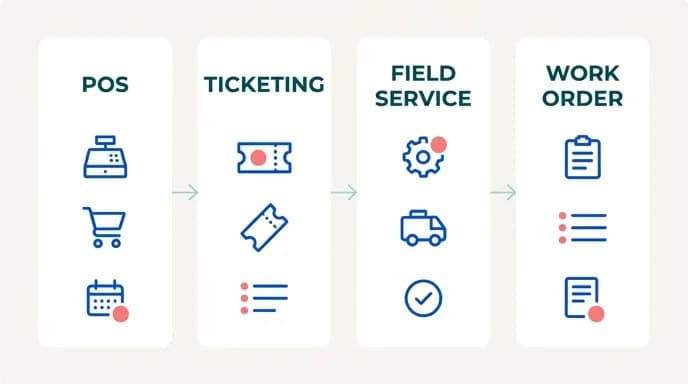
Point of sale software starts from the transaction. It's strong on card payments, cash drawers, and receipts, but weak on anything that takes three days and passes through two technicians. If you sell accessories and cases alongside repairs, POS covers half your business well and the other half badly.
Ticketing software starts from the job. Device in, status changes, device out. That's the closest match to a repair counter, and it's where most dedicated repair tools sit. The gap is usually money: thin invoicing, thin stock control.
Field service software assumes your technician travels. Think routing, scheduling, and on-site job sheets. If you do home visits for laptop or TV repairs, it fits. If everything happens at your bench, you're paying for a dispatch engine you'll never open.
Work order management is the industrial cousin, built for plant maintenance and heavy on asset records and preventive schedules. It will technically hold a phone repair, but the vocabulary and the screens were designed for something else.
Most repair shops need ticketing first, invoicing second, and inventory third. Everything else is optional, and treating it as optional saves you real money.
How to compare workflow friction instead of feature lists
Two tools can list identical features and take a wildly different number of clicks to do the same thing. Feature grids hide that completely. That's why shops that picked on paper so often end up switching within a year.
The test that works: take five to ten real jobs from last week. Pick a screen replacement, a water damage diagnostic, and a warranty return, then run every one of them end to end through each tool you're trialing. Not the demo data. Yours.
Then count. How many screens does it take to go from walk-in to ticket created? Can you attach a photo of the damage at intake without leaving the ticket? When a part arrives, does the job status update where the customer-facing message pulls from, or do you type it twice? Can a technician close a job on a phone at the bench, or does it need the desktop? How many clicks from finished repair to a sent invoice?
Write the click counts down, and by job three you'll have a clear favorite, often not the one with the longer feature list. We've watched shops discover that the tool they were ready to sign for needed seven screens to take payment on a job that was already closed, while the cheaper option did it in two. That gap, multiplied across a year of tickets, is the entire decision.
Device of resale (DOR) tracking and the paperwork nobody demos
If you buy, trade, or resell used phones and laptops, you're carrying a record-keeping obligation that most repair software simply does not model. You need the seller's identity details, the device identifiers, and the date and price of purchase. You also need a retrievable trail connecting that intake record to the eventual sale. Requirements vary by country and by state, so check what applies where you trade rather than assuming the software knows, since few vendors build to any specific local rule.
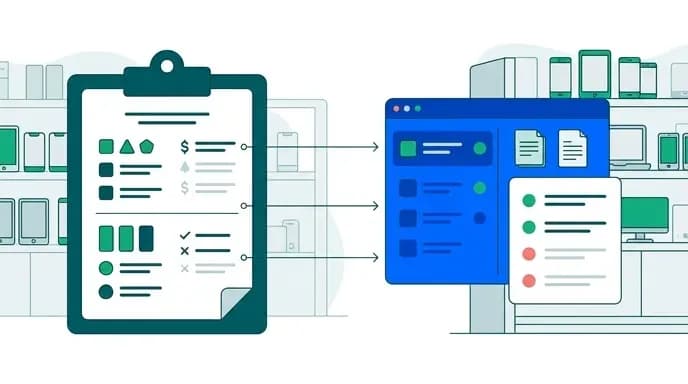
What matters for your comparison is whether the tool can hold that record at all, and whether it links to the rest of the system. A great many shops end up keeping a separate paper register or spreadsheet for resale intake because the software has nowhere to put it. That's the exact data silo you bought software to remove. Now the device exists in two systems, the IMEI is typed twice, and if an officer asks for a six-month history you're reconciling by hand.
Whether merging resale tracking, invoicing, and repair management into one system genuinely fixes the workflow is a fair question. The honest answer: it fixes it when the records share a device record. One entry for the handset, with its purchase documentation, its repair history, and its sale invoice hanging off it. If the tool bolts resale on as an unconnected module, you've bought a second spreadsheet with a login screen. Ask for a live demo of exactly that flow before you sign anything.
Parts inventory tied to specific repair orders
Generic stock control tells you how many screens you have. Repair stock control tells you which screen went into which job, at what cost, for which customer, and whether it's still under supplier warranty.
That link is what makes the rest work. Without it, you can't see true margin per job, because the part cost lives somewhere else, and you can't handle a failed part cleanly, because nothing connects the returned component to the original order. You also can't tell which jobs are blocked on backordered parts without asking your technician, which means you're the status system.
When you trial a tool, allocate a part to an open ticket and then look for it from three directions. Check the job, the stock record, and the customer's history. If all three show it, the data model is sound. If you can only find it from one, expect reconciliation work every month. This is also where tools that try to be full ERP systems overshoot. You don't need multi-warehouse transfer orders and purchase requisitions. You need to know that the aftermarket display from last Tuesday is in a specific handset.
Turnaround time, technician performance, and audit trails
Mobile phone repair shop management software earns most of its keep in what it records while you're not looking.
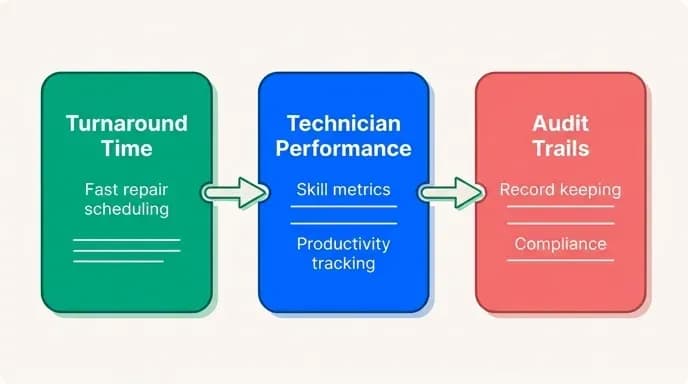
Turnaround time is the metric customers judge you on, and you cannot improve it without a timestamp on every status change. Intake to diagnosis, diagnosis to parts ordered, parts received to repair complete, complete to collected. Once you have those four intervals, you'll find out where the days actually go, and it's rarely where you assumed. Usually it's the gap between finished and collected, which is a communication problem, not a workshop one.
Technician performance needs the same timestamps attributed to a person: jobs completed, average time per repair type, and rework rate on jobs that came back. Used carelessly this becomes a stick. Used well, it tells you who should be training whom and which repair types need a different process.
Work order status history matters for a less pleasant reason. When a customer insists the device was returned with a new scratch, or disputes that they approved a higher quote, an immutable log of who changed what and when ends the argument in a minute. Check whether the tool keeps history or just overwrites the current status, since plenty do the latter. An audit trail you can't export is only half a trail.
What it really costs, including the payment-method problem
Subscription pricing is rarely the real number. The per-location fee looks fine until you add per-technician seats, SMS credits for customer notifications, and a payment-processing margin. Then there's the data-export fee, plus the tier jump that unlocks the one report you actually need.
Watch for features you'll pay for and never open. Repair tools drift toward being full business suites, with marketing automation, CRM pipelines, and appointment booking stacked on top. That bloat lands in your monthly bill whether or not you touch it. A tool that does ticketing, inventory, and invoicing properly beats a suite that does twelve things adequately.
Solo shops hit a specific wall: many platforms assume you'll run payments through their processor, and price the software cheaply because they take a cut of every transaction. If you take cash, bank transfers, or regional wallet payments, that discount evaporates, and you end up on the full list price while using none of the payment features.
Work out your annual cost on your actual payment mix before comparing. Sometimes a flat-fee tool with no payment tie-in is dramatically cheaper for a one-person shop, and sometimes the processor-linked tool still wins. You only know after doing the math on your own numbers.
Migration and vendor lock-in: ask before you load your data
This is the question to ask on the sales call, not two years later. How do I get everything out?

Everything means customers with contact details, full repair history with status timestamps, invoices, and inventory with cost prices. It also means any resale documentation, in open formats, CSV or similar, pulled by you, on demand, not as a support ticket that takes a week. If a vendor will only export customers and current stock, your job history is hostage, and that history is the most valuable asset the software holds.
Test the export during your trial. Load thirty records, export them, and open the file. Are the relationships intact, so a ticket still points at a customer and a part, or is it three unconnected lists you'd have to rebuild by hand? That five-minute check is the single best predictor of how painful your next switch will be.
It's also the honest argument for custom. When we build mobile repairing shop management software for a client, the database is theirs, and the code is theirs. Leaving us means moving hosting rather than rebuilding records. That's not a reason to build custom on its own, but if you've already been burned by a platform that held your data, it's worth weighing.
Making the call
Start manual if you're small and your volume is genuinely low. Spreadsheets and a notebook are not shameful, they're just a ceiling. Move to a dedicated tool the moment you can't answer "where is that device and who touched it last" without walking to the bench. Buy off-the-shelf first, run your real jobs through it, and count the clicks. Build custom when the generic tool is costing you more in workarounds than a build would cost outright, or when your resale and compliance records have nowhere sensible to live.
If you're at that point and want a real number rather than a range, tell us what your counter does on a normal week. We'll come back with a fixed price and a fixed launch date before any work starts, and if a custom build isn't the right answer for your shop size, we'll tell you that too. Talk to us about a build.

Arun Andiselvam
LinkedInI am a startup veteran who has built five brands. I sold the first, an SEO tool, for a six figure exit, and now lead Appkodes, building custom mobile and web apps for founders and businesses. I bootstrapped every one of them from day one.