

Building an event marketplace app where customers plan a wedding, a corporate offsite or a birthday party, then book venues, caterers, DJs and photographers in one place, is a bigger job than it looks. It's smaller than most founders assume, though, if you scope the first release properly. The short answer: build the marketplace core first. That means events, categories, vendor profiles, availability and quote requests. Skip live event operations entirely, and ship in one focused release rather than three speculative ones.
This piece covers the data model, the vendor side, the features that quietly decide whether people come back, and the mistakes that show up in almost every event platform we look at.
What a Multi-Category Event Marketplace App Actually Is
An event marketplace app connects people planning events with the vendors who supply them. The "multi-category" part is what separates it from a venue directory or a photographer booking site. A single customer creates one event and shops across nine or ten different service types against the same date, location, guest count and budget.
The categories most of these platforms need from day one:
- Venues
- Catering and chefs
- Event staffing
- Music and entertainment
- Décor and rentals
- Photography and video
- Beauty services
- Transportation
- Other event vendors
That last catch-all matters more than founders expect, because event supply is long-tail. Ice sculptors, drone operators, mariachi bands and portable restroom rentals all need a home. If your taxonomy can't absorb an odd vendor, you turn away supply you need.
The customer flow is straightforward on paper. Someone signs up, creates an event with the basics (date, location, guest count, budget), and then browses categories where every listing is already filtered against those four facts. That's the whole product thesis. The event object isn't a feature. It's the spine. Everything, including search results, availability checks, quote requests and booking history, hangs off it.
What this first version does not need: live event operations, employee scheduling, time clocks, staff check-ins, day-of coordination tools.
Should You Build a Marketplace or a Brochure App First?
This is the question to settle before anyone writes code. The honest answer depends on something most founders don't think to check: whether you already have supply.

We've seen this pattern hold up repeatedly. If the answer is yes, the marketplace layer is a natural second release with real usage data behind it.
Our broader thinking on this sits in our marketplaces and classifieds resources. If you're weighing a narrow first release against a full platform, our MVP and startup guides cover how to cut scope without cutting the thing that makes the product work.
Session Availability and Capacity: The Feature Everyone Gets Wrong
Here's the single most common complaint we encounter across event software of every kind, and it applies directly to a vendor marketplace: people register, book or request, then find out the thing was full, unavailable or wrong for them.
In conference apps, this shows up as attendees signing up for a workshop only to learn at the door that capacity ran out. In an event marketplace app, it shows up as a customer submitting a quote request to a caterer who was booked solid on their date three weeks ago. Same failure, same frustration. The system let them take an action it already knew would fail.
Fix it at the data layer, not the UI layer. Every vendor service needs a capacity and availability model that search can read:
- Date availability: blocked dates, open dates, and dates held pending a confirmed booking.
- Capacity limits: a caterer who tops out at 200 covers should not appear for a 400-guest wedding.
- Service minimums: a photographer with a four-hour minimum or a $3,000 floor should be filtered out of budgets that can't reach it, or clearly flagged rather than silently returned.
- Geographic range: a vendor who travels 40 miles shouldn't surface for an event 200 miles away.
Make availability a filter, not a label. The difference matters enormously. A label tells the customer after they've scrolled. A filter means the results page only ever shows vendors who can actually do the job. Default it on, with a toggle to see everything.
Capacity management also needs a soft-hold concept. When a customer sends a booking request, the vendor's slot shouldn't vanish from the marketplace, nor should it be treated as fully open. A pending-hold state that expires after a set window keeps the inventory honest without penalizing vendors whose customers go quiet.
Search and filtering themselves are non-negotiable. The event apps that frustrate people most are the ones where you cannot search sessions, cannot filter by what's still open, and have to browse a flat list hoping something fits. Build advanced filters early. Category, subcategory, price band, capacity, rating, distance and availability on the event date all belong there. Filters are not a polish item. They're the product.
Conflict Detection and Overbooking Prevention
Related but distinct: stopping people from booking two things that can't both happen.
Event software has a bad habit of allowing double-bookings without so much as a warning. Users register for overlapping sessions, nothing objects, and the conflict surfaces later as a problem for a human to untangle. In a marketplace, the equivalent is a customer booking two venues for the same date, or a vendor accepting two jobs in the same time slot across different events.
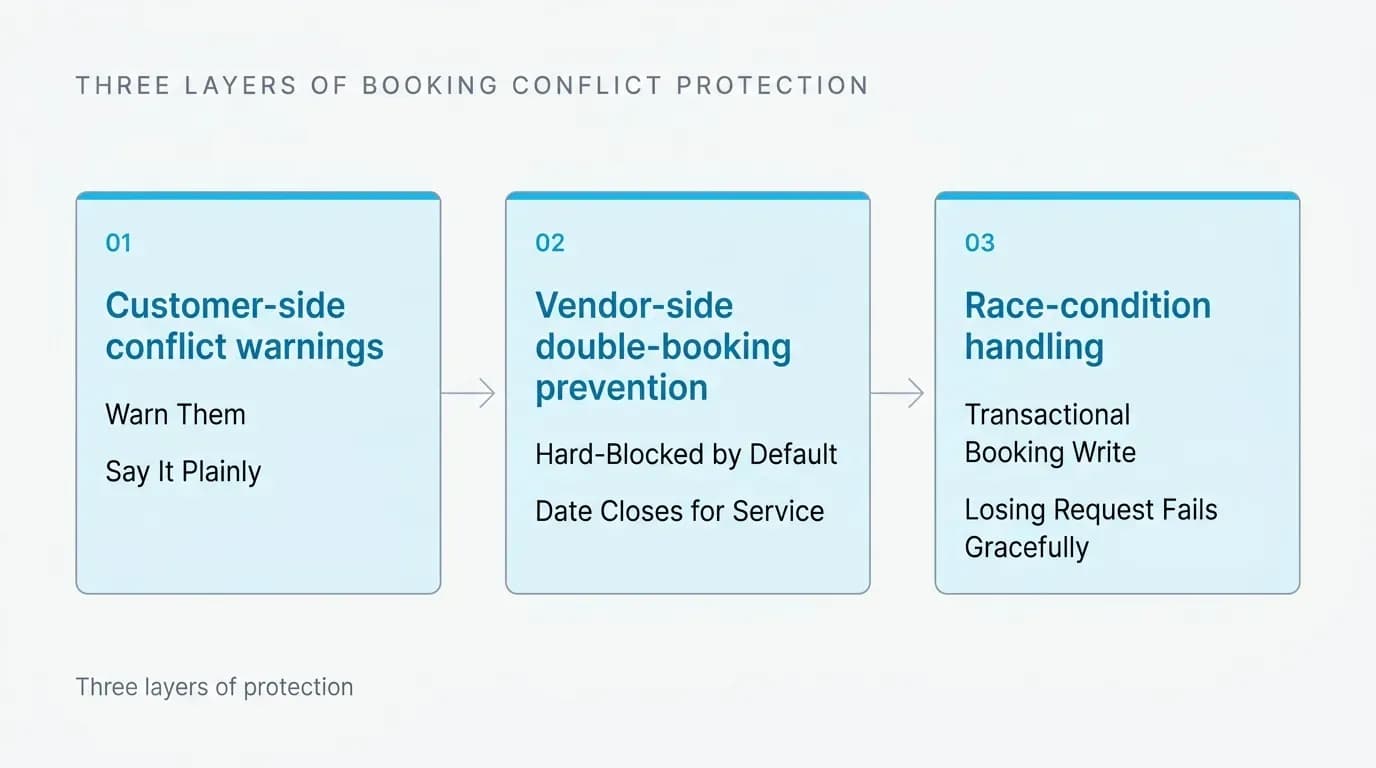
Build three layers of protection:
Customer-side conflict warnings. If a customer already has a confirmed venue for March 14 and requests another, warn them. Don't block it outright, since they might be comparing or running a multi-site event. Say it plainly before they submit.
Vendor-side double-booking prevention. This one should be hard-blocked by default. When a vendor accepts a request for a date, that date closes for that service unless the vendor has explicitly set a concurrent-jobs capacity. A DJ can only be in one place. A rental company with forty chair sets might handle three events at once, and their profile should say so.
Race-condition handling. Two customers requesting the same Saturday within seconds of each other is not a hypothetical. The booking write needs to be transactional, and the losing request needs to fail gracefully with a clear message and suggested alternatives rather than a generic error.
The user experience principle underneath all of this: never let someone complete an action the system knows will fail. It sounds obvious. It is routinely ignored, and it's the fastest way to lose a customer who was otherwise ready to spend money with you.
Calendar Sync Across Multiple Events
Most people planning events are planning more than one, or attending more than one, or both. A wedding planner has six clients. A corporate events manager runs a conference in April and a sales kickoff in June. A customer booking their own wedding is also tracking a tasting, a venue walkthrough and three vendor calls.
The pain point here is specific and consistent. People cannot see their whole schedule in one view, and they cannot get it onto their own calendar without adding items one at a time. In conference apps, that friction shows up as switching repeatedly between two concurrent events and adding each session to a phone calendar individually until the person gives up. That tedium is entirely avoidable.
What to build:
A unified schedule view. One screen, every event the user is involved in, every confirmed booking and appointment underneath it, sorted chronologically with clear event grouping. Not one event at a time with a switcher buried in a menu.
One-action calendar sync. The single highest-value usability improvement available here is letting someone push an entire event schedule to their device calendar in one tap, rather than item by item. Implement it properly with a subscribable calendar feed (iCal/CalDAV) per event, so when a vendor appointment moves, the user's calendar updates itself. Two-way sync is a later feature. One-way subscription covers the real need.
Shareable schedules. Event planning is a group activity. A bride and her mother, a committee of five, a couple splitting vendor calls all need to see the same plan. Give every event a shareable schedule link with view-only access, so nobody is forwarding bookings one at a time. In conference contexts this kind of shared, view-only schedule is a natural fit for the same need.
Multi-event switching without restarts. If a user manages three events, switching between them should be instant and stateful. Any flow that requires closing and reopening the app is a bug, not a limitation.
Real-Time Lead Capture and Vendor Response Speed
On the vendor side, the thing that kills marketplace apps is lag. Not loading-spinner lag. Business lag.
The clearest example comes from tradeshow lead capture, where booth staff have a narrow window to record a prospect's details before that person walks away. When the app replicates data slowly, or requires a round trip to a server on a congested venue Wi-Fi network, the staffer loses the lead. The same physics apply to your marketplace. A customer sends three quote requests on a Saturday afternoon, and whichever vendor responds first usually wins.
Design for speed on both ends:
- Push notifications that actually arrive. New inquiry, new message, request about to expire. Email alone is too slow for this market.
- Response-time visibility. Showing a vendor's typical response time on their profile creates gentle pressure that lifts the whole marketplace.
Vendors who feel the app makes them money will keep their listings current. Vendors who feel it wastes their time will stop opening it, and their stale availability will poison your search results.
Historical Event Access and Recordings
For an event marketplace app, event history is a retention asset, not an archive chore. Someone who threw a great party in 2025 is a customer again in 2027. The fastest path to their second booking is a screen showing exactly who they used, what they paid, and a one-tap "book again."
Build in:
- Permanent booking history per customer, with vendor, service, date, price and notes preserved.
- Previously booked vendors as a first-class browse surface, separate from favorites.
- Favorites that survive across events, so a shortlist built for one occasion seeds the next.
- Document and media retention: quotes, contracts, photo galleries, and any recordings or assets a vendor shares after the job.
- Re-book flows that prefill a new quote request from an old booking.
Ratings, Reviews and Anonymous Feedback
Reviews are what make a marketplace trustworthy, and they're harder to collect than founders expect.
Requiring a login and an attached name to leave feedback tends to suppress both the volume and the honesty of responses. People who had a mediocre experience with a vendor they might hire again, or who work in a small local industry where everyone knows everyone, simply don't comment.
A workable structure:
Verified, attributed reviews for bookings. If money changed hands through the platform, the review carries the customer's name and a verified badge. That's the backbone of vendor reputation and it should stay public and attributed.
Anonymous or aggregate feedback for everything else. Post-event surveys, workshop feedback and service-quality scores that feed an internal rating should be collected without requiring a named public comment. You still know who submitted it on the back end for fraud prevention. The vendor sees a score and unattributed text.
Short forms, prompted at the right moment. A push notification the day after the event with three taps' worth of questions will outperform a long survey emailed a week later, every time.
Vendor right of reply. Public, one response per review, no edit wars. It's the cheapest fairness mechanism there is and vendors value it highly.
Seed the system honestly before launch: ask the vendors you've recruited to invite past clients to leave verified reviews. Never fabricate them. A marketplace caught inventing reviews is finished.
The Feature List for Version One
Here is the scope we'd fix a price against for a first release. It's deliberately complete on the marketplace core and deliberately empty on operations.
Customer side
- Registration and login
- Create and manage an event. Date, location, guest count, budget
- Marketplace categories and subcategories
- Search with advanced filters
- Vendor and company profiles
- Service descriptions and photos
- Pricing and minimums
- Ratings and reviews
- Availability matched to the customer's event date
- Favorites and previously booked vendors
- Service options and upgrades
- Request a quote or submit a booking request
Vendor side
- Create and manage a company profile
- Select marketplace categories
- Add services and service options
- Upload images
- Set pricing or initial prices
- Set minimums
- Set availability
- Receive customer inquiries and booking requests
- Accept, decline or respond
Notice what's absent: payments, escrow, contracts, staff scheduling, time clocks, day-of coordination. Payments are worth delaying unless your category demands them, since quote-and-negotiate is how most event vendors actually sell, and forcing a checkout flow onto a $14,000 wedding venue booking tends to push the transaction off-platform anyway.
The usability bar is simple and it's where good event apps distinguish themselves: fast, intuitive navigation, schedules and vendor details reachable in a tap or two, nothing that makes someone hunt. A good event marketplace app earns its keep by nailing exactly that and nothing fancier.
Cost, Timeline and How We'd Build It
Honest framing first: cost depends on scope. Anyone quoting you a number before they understand your categories, your vendor onboarding flow and your availability rules is guessing. What we can tell you is how the range behaves.
A marketplace of this shape, with two user types, category taxonomy, search and filters, availability, quote requests, reviews, notifications and an admin panel, sits comfortably in the territory where our first releases start at $8,000.
Timeline works the same way. How we work: we agree a fixed price and a fixed launch date before development starts, not an estimate, not a range that creeps. An agreed number and an agreed date. That's only possible because scope is pinned first, which is why the specification work above matters so much.
If your product is genuinely standard, a script might serve. A multi-category event marketplace is not standard.
For the underlying platform pieces, our multi-vendor marketplace software handles much of the vendor-side plumbing. Our mobile app development service page explains how the fixed price, fixed launch date model works in practice.
Get a Fixed Price Before Anyone Writes Code
If you're serious about launching an event marketplace app, the next step isn't a design mockup. It's a scope conversation. Bring your category list, your view on whether you already have supply, and your honest answer on whether payments belong in version one.

We'll come back with a fixed price and a fixed launch date, agreed before work starts, so you know what you're spending and when it ships. Request a quote and we'll scope it with you.
Common questions
What features should a multi-category event marketplace app have?
The core features needed from day one are events, categories, vendor profiles, availability and quote requests. The app should skip live event operations entirely and focus on connecting customers planning events with vendors across categories like venues, catering, entertainment, photography, décor, transportation and other services, all filtered against the same date, location, guest count and budget.
How should availability and capacity be managed in an event marketplace?
Availability should be built into the data layer as a filter rather than a label, showing only vendors who can actually do the job. The system needs to track date availability, capacity limits, service minimums and geographic range. A soft-hold state should be used for pending booking requests so inventory stays honest without penalizing vendors whose customers go quiet.
What should an event marketplace app do to prevent double-bookings?
Build three layers of protection: warn customers if they request conflicting services like two venues on the same date, hard-block vendors from accepting overlapping jobs unless they've set a concurrent-jobs capacity, and handle race conditions with transactional booking writes so the losing request fails gracefully with alternatives rather than a generic error.

Arun Andiselvam
LinkedInI am a startup veteran who has built five brands. I sold the first, an SEO tool, for a six figure exit, and now lead Appkodes, building custom mobile and web apps for founders and businesses. I bootstrapped every one of them from day one.