

Real estate is one of the few markets where a single closed deal pays for a lot of software. That math is why so many founders, brokers and proptech operators end up asking the same question: how to develop a real estate app that agents and buyers will actually open twice. The hard part was never the maps, the photo galleries or the saved-search button. The hard part is picking the one job your app does better than a spreadsheet, a group chat or a phone call to the title company.
This property app development guide covers validation, scope, data, build path, cost, team and launch, with pointers to deeper pieces when you need them. We build software across marketplaces and rentals, and most of what follows comes from watching which decisions made projects ship and which ones quietly sank them.
The short answer: how to develop a real estate app, start to finish
If you want the whole real estate app development process in one list, here it is:
- Pick one painful, repeated job, finding leads, pricing a property, tracking a deal to close, managing tenants, rather than "a real estate app."
- Talk to people who already pay to solve it. Full-time agents, broker teams and property managers. Paying users validate faster than enthusiastic ones.
- Write the feature list, then cut it in half. Your first release should do one job end to end, not five jobs halfway.
- Settle your data sources early. MLS or IDX feeds, public records, owner data, manual listing entry. This decision shapes timeline and cost more than design does.
- Wireframe the three core flows on paper: what a user sees first, what they do, what brings them back tomorrow.
- Choose a build path: custom build, a clone app base you extend, or a template script you probably shouldn't trust with a business.
- Agree a fixed price and a fixed launch date before any code is written, with a scope document both sides signed.
- Launch narrow, instrument everything, and iterate on what the first few dozen real users do rather than what they said in a survey.
That is the skeleton, and the parts most guides skip are the ones worth the most attention below.
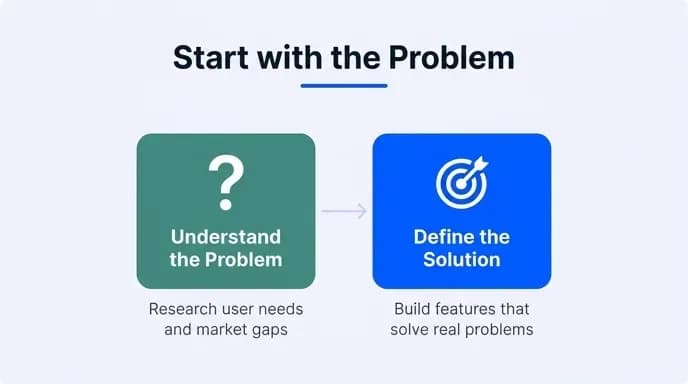
Start with the problem, not the app
The founders who struggle most are the ones who begin with a competitor's product in mind. The ones who do well start with a job they have watched someone fail at. In residential sales, those jobs are easy to spot once you listen for them. Pipeline lives in a spreadsheet. Client notes are scattered across texts, emails and a notebook in the car, and follow-ups happen when the agent happens to remember. Existing CRMs are often rejected not because they lack features, but because they feel like enterprise software bolted onto a job that is really sales.
There is a second filter worth applying before you build a real estate app: who pays, and why would they? If your model asks a buyer or seller to pay for help that the standard commission already covers, you need a sharp answer to that objection, because your users will raise it in the first conversation. Agent-side tools have an easier story. Full-time agents already spend real money every month on third-party lead services, so the budget exists and the comparison is concrete.
For validation, target the agents who close deals consistently, run broker teams, or still door-knock. They track return on investment closely and will tell you plainly whether your app earns its keep. If you want help choosing a direction, our breakdown of real estate app ideas sorts the common models by who pays and how hard they are to start.
What to bring to your first meeting with developers
Non-technical founders ask us the same two questions before a kickoff call: what should I learn first, and what do I need to bring? You do not need to learn to code. You do need enough vocabulary to make decisions, what an API is, what a database holds, the difference between a native app and a web app, roughly what authentication and hosting cost you every month. A weekend of reading covers it.
What you should bring is more specific than most people expect:
- A one-page problem statement. Who the user is, what they do today, what you are replacing.
- A feature list split into "first release" and "later." Not a wish list, a line you are willing to defend.
- Rough wireframes. Boxes on paper are fine. They force you to decide what appears on the first screen.
- Your data plan. Where listings, comps or owner records come from, and whether you have permission to use them.
- Your budget and your launch deadline, stated out loud.
The single most common early mistake we see is hiring developers before the feature list has been validated with real users and before basic technical guardrails exist. Who owns the code, where the repository lives, what happens to credentials if the relationship ends. Sort that out first and the rest of the real estate mobile app development work gets a lot cheaper, because you stop paying people to build things you later delete.
The real estate app development process, step by step
Here is what a well-run build looks like from the inside. Discovery turns your one-pager into a written scope: user roles, screens, integrations, acceptance criteria. This is where the price gets fixed, so it deserves real time.
Design produces clickable screens you can put in front of an agent before anything is coded, since cheap criticism beats expensive rework. Architecture settles the stack, the hosting, and how listings and media will be stored and served, because property apps are photo-heavy and that bill grows quietly.
Build runs in short cycles with something visible at the end of each one. You should be able to open a working version every week or two and poke at it. Integration connects the outside world: MLS or IDX feeds, maps, e-sign, payments, calendars, messaging. Testing covers the mundane, decisive cases. A listing with forty photos on a weak connection, two agents editing the same record, a user who changes their phone number.
Launch is a sequence, not a day: store submission, analytics, crash reporting, support channel, and a plan for the first bug report that arrives at 9pm. These real estate app development steps do not change much whether you are building a consumer search portal or an internal brokerage tool, since only the proportions shift. For a deeper look at how a marketplace-style build differs, see our walkthrough on how to build a property marketplace like Zillow.
Tracking how client preferences evolve during the buying journey
This is the feature almost nobody builds, and the one agents light up about. A buyer starts out certain: three bedrooms, a yard, that school district, under a hard budget. Six showings later they have quietly traded the yard for a shorter commute and raised their ceiling. None of that is recorded anywhere. It lives in the agent's head and in a trail of texts, which means a second agent on the team is effectively initial from scratch.
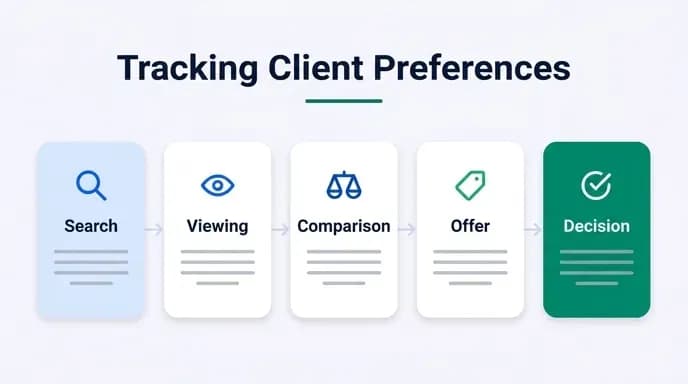
A preference timeline fixes it. Capture the opening brief as a structured record, then log every signal that contradicts or refines it: properties saved, properties dismissed and why, time spent on a listing, questions asked after a tour, feedback entered on the drive home. Show it as a journey rather than a form, what they said at the start, what they have actually responded to since, and where the gap is widening.
Two things make this work in practice. First, capture has to be nearly free: a thumbs-down with two taps on the sidewalk, voice notes that get transcribed into the client record. Second, the app should draw the conclusion rather than leaving the agent to read logs. The search is drifting toward a different neighborhood, or the budget is no longer realistic for the must-haves. That is a feature a seasoned agent will pay for, because it is the context they currently lose.
Automated follow-ups driven by buyer behavior, not manual task entry
Manual task entry is where CRM adoption dies. An agent finishes a showing, gets in the car, and has every intention of creating three follow-up tasks later. Later does not arrive. Within a month the pipeline in the app and the pipeline in the agent's head have diverged, and the app loses.
So build the follow-up engine around behavior the system can already see. A client who viewed the same listing three evenings in a row is warm, and the app should say so tomorrow morning. A lead who went quiet after an initial burst needs a different nudge than one who keeps opening new listings. A buyer whose mortgage pre-approval is approaching its expiry needs a call this week. The trigger comes from what people do, and the agent only decides whether to act.
Keep the agent in control of tone. The useful pattern is a prepared message the agent can send, edit or dismiss with one tap, not an autopilot that fires emails in their name. And keep the daily list short. A follow-up queue of five items that an agent clears every morning beats a list of forty they stop opening by Thursday. When you plan this part of your scope, our guide to real estate app features covers the supporting pieces, messaging, notifications and lead routing, in more detail.
Real-time transaction status across every party in the deal
Between contract and close, an agent becomes a telephone operator. They call the title company to ask whether the title search is back, email the loan officer about underwriting, chase the inspector for a report, then relay all of it to a nervous buyer. Everyone involved holds one piece of the status and nobody holds the whole picture.
A shared transaction timeline is one of the most defensible things you can put in a real estate app. Model the deal as a sequence of milestones, offer accepted, earnest money received, inspection scheduled, inspection complete, appraisal ordered, loan conditions cleared, clear to close, funded, and give each party a lightweight way to mark their own step done. Title companies and lenders will not adopt a heavy new system, so the bar for them has to be low: a link, a single screen, maybe an email reply that updates the record.
Add automatic alerts when a milestone slips past its expected date, and a client-facing view that strips the jargon so the buyer can check progress without calling. Agents will tell you the value is not just speed, it is the end of status-chasing. Build it well and the app earns its place in every deal, which is exactly the kind of stickiness that makes the rest of your roadmap simple to fund.
On-site comparative market analysis in under 60 seconds
Listing appointments are won in the room. An agent sitting at a seller's kitchen table needs a defensible price range now, not after an evening of pulling comps at home. Yet most pricing tools still assume a desk, two monitors and patience.
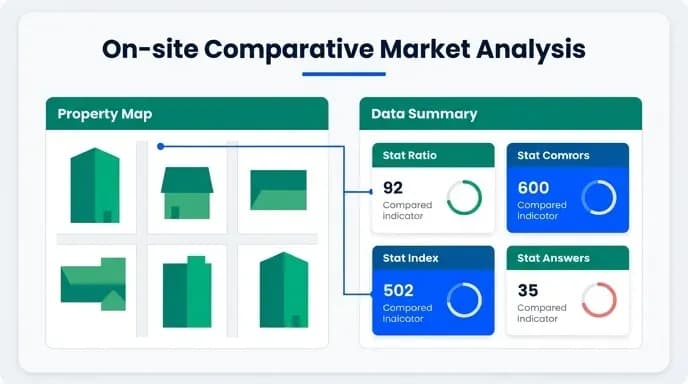
Design for the opposite. The agent arrives at the address, opens the app, and sees recent comparable sales already assembled, distance, similarity, adjustments applied, a price range with the reasoning visible. Under 60 seconds from opening the app to a number they can say out loud, with the ability to swipe a comp out if it does not belong and watch the range update.
That speed is an engineering decision made early. Comps must be pre-computed for likely addresses rather than calculated on demand, adjustments must run on cached data, and the whole screen has to work on a phone with one bar of signal in a basement.
Give the agent a presentation mode too: the same analysis rendered as something they can turn toward the seller, clean enough to be persuasive, honest enough that they can defend each adjustment. Pricing tools also need an exit route for edge cases: unique properties, thin markets and recent renovations. Let the agent override any number and record the reason, since that record becomes valuable in the next section.
Automatic data integration and the comp feedback loop
The fastest way to kill adoption is to ask an agent to re-enter data they already have. Their listings are in the MLS, their contacts are in a phone and an email account, their documents are in a transaction platform, their showings are on a calendar. A new app that starts empty and demands typing will be abandoned in the first week. So plan integrations as a first-release concern, not a phase two: MLS or IDX feeds, calendar sync, contact import, email parsing, and where possible a direct pull from the systems the brokerage already runs. If an agent can sign in and see their own pipeline populated, you have cleared the highest hurdle in real estate mobile app development.
The second half of this is the feedback loop almost no pricing tool closes. Your app suggests a price range, the property eventually sells, and the final number is known. Store the prediction, store the outcome, and compare them. Over time you learn that a particular adjustment runs high in one neighborhood, or that your model undervalues corner lots, or that listings in a certain price band sit longer than the comps implied. Feed that back so recommendations improve and show the agent the track record. "Our range has run slightly low here lately" is a far more credible statement than an unexplained number. Pricing accuracy you can audit is a genuine moat, and it compounds the longer your app runs.
Consolidating owner data from several public records sources
Anyone building for investors, wholesalers or commercial brokers runs into the same mess. Owner information is spread across county assessor files, recorder deeds and corporate registries, and each source spells things differently. The same person appears as a full name, an initial, a trust, and an LLC with a registered agent address. Three records for one owner means three calls to the same person, which is how prospecting lists lose credibility.
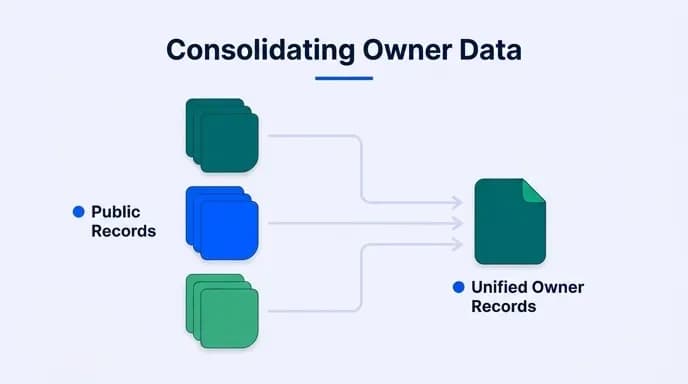
Deduplication is a product feature, not a backend chore. Match on address history and parcel identifiers as well as names, cluster entities that share a mailing address or an agent, and show the user a single consolidated owner card with every underlying source listed beneath it. Keep confidence visible, a confirmed match and a probable one should not look identical, and give users a way to merge or split records manually, because they know their market better than your matching rules do.
Be strategic about refresh too. Public records update on their own schedules, so decide what you re-pull nightly and what can wait, and timestamp everything so nobody acts on a stale owner. And check the licensing terms of every source before you ship, since rules vary by jurisdiction and by provider, and it is worth getting qualified advice on what you are allowed to store and resell.
Template script, custom build, or clone app?
Three paths lead to a launched product, and the honest trade-offs look like this.
A cheap template script from a marketplace is tempting at the price. The risk is what you cannot see: unmaintained dependencies, code written to demo well rather than run, and a license that leaves you dependent on a seller who may vanish. If your app will hold client data, payment details or transaction documents, treat a bargain script as a prototype, not a business.
A clone app base, a proven product foundation your team extends, is the middle route. You inherit working authentication, listings, search, chat and admin tooling, then spend your money on the parts that make your app different, like the preference timeline or the transaction tracker. For most founders asking how to build a property app on a real deadline, this is the sensible starting point.
A fully custom build makes sense when your core idea does not resemble anything that exists, or when data architecture is the product itself. It costs more up front and gives you the cleanest foundation to scale on.
Two adjacent paths are worth knowing about: tools for builders and project teams, covered in our piece on the real estate development app, and tokenized ownership models explained in our guide to Web3 real estate app development.
Cost and timeline: what actually moves the number
Founders want a figure, and the honest answer is that scope sets it. What reliably drives cost up in real estate work: numerous user roles with different permissions, MLS or IDX integration, heavy media handling, document signing, payments, and anything that needs real-time sync between parties. What keeps it down: one role, one job, one platform first, and a willingness to launch without the features you are not sure anyone needs.
For context on what is achievable, first releases can go live on a modest budget when the scope is tight and the team is disciplined about what gets cut. Those are real projects with tightly agreed scopes, not blanket pricing. Your number depends on what you actually ask for, and anyone who quotes you without reading a scope document is guessing.
What we will commit to is a fixed price and a fixed launch date agreed before work starts, so the budget question is settled at the beginning rather than renegotiated in month three. For a detailed breakdown of what each component adds, read our guide to real estate app development cost before you talk to anyone.
Choosing a team and avoiding the usual outsourcing mistakes
When you hire, assess process as hard as you assess portfolio. Ask how scope changes are handled, what happens if a milestone slips, who you speak to week to week, and whether you get access to the code repository from day one. Ask for a written scope with acceptance criteria. If a prospective partner resists putting the deliverable in writing, that is your answer.
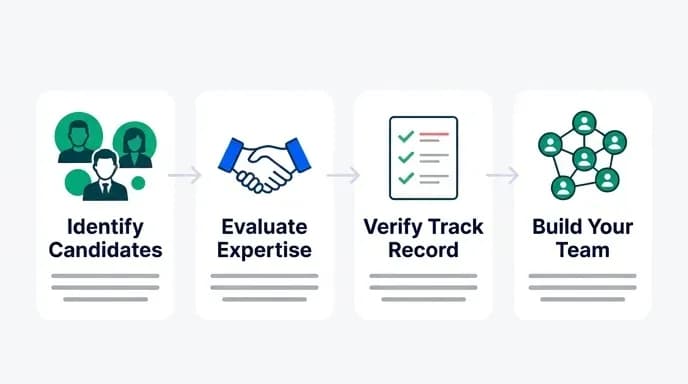
The mistakes we see repeatedly are avoidable: hiring before the feature list is validated, paying for a big up-front design phase with no working software at the end, splitting the build across two vendors with no one accountable for the whole, accepting an hourly estimate for a project you cannot specify, and skipping the handover, credentials, documentation, store accounts in your own name, until the relationship is already strained.
Finally, stay close to the work. The non-technical founders who ship good products are not the ones who learned to code. They are the ones who opened every build, clicked every screen, and gave feedback the same week. That rhythm is worth more than technical knowledge. If you are comparing partners, our rundown of real estate app development companies covers what to check before signing anything.
Ready to build? Get a fixed price first
If you have a direction and a deadline, the next step is a scope conversation, not a sales call. Tell us the job your app does, who pays for it, and when you need to be live.
We will come back with a written scope, a fixed price and a fixed launch date, agreed before work starts, so you are not budgeting against a moving target. Start here: real estate app development with Appkodes. Bring your one-pager and your feature list, and we will tell you honestly what belongs in your first release and what can wait.
Common questions
What is the most important first step when developing a real estate app?
Start with a specific, painful, repeated job that real estate professionals need solved—such as finding leads, pricing a property, or tracking deals to close—rather than building a generic real estate app. Talk to people who already pay to solve this problem, like full-time agents or property managers, to validate that the need is real.
What should I prepare before meeting with app developers?
You should bring a one-page problem statement, a feature list split into first release and later phases, rough wireframes, your data plan for where listings or records come from, and your budget and launch deadline. You should also understand basic technical vocabulary like what an API is, what a database holds, and the difference between native apps and web apps.
How should follow-up tasks work in a real estate CRM app?
Build the follow-up engine around behavior the system can already see, like a client viewing the same listing multiple times or a lead going quiet after initial interest. The app should prepare a message the agent can send, edit, or dismiss with one tap, keeping the agent in control while automating the detection of when action is needed.

Arun Andiselvam
LinkedInI am a startup veteran who has built five brands. I sold the first, an SEO tool, for a six figure exit, and now lead Appkodes, building custom mobile and web apps for founders and businesses. I bootstrapped every one of them from day one.