Virtual Machine Data Loss: What Every Developer and Business Should Know
What happens when a virtual machine crashes mid-deployment? Or when a critical snapshot is accidentally deleted just before a major release? For developers, it could mean weeks of lost work and missed deadlines. For SaaS businesses, even a single VM failure can disrupt live services, breach SLAs, or raise serious compliance concerns.
The cost of losing data in virtual machines may be underrated till it strikes. VM failure downtime can cost organizations upwards of $5,600 per minute—even for mid-sized teams, severe incidents can easily surpass $300,000 per hour.
Virtualization is the foundation of modern development and SaaS. It lets you test across multiple environments without switching hardware. It lets you scale faster, reduce infrastructure costs, and deploy securely. But that same flexibility can also introduce hidden risks, often only discovered after the damage is done.
In this post, we’ll cover the causes of virtual machine data loss, how it affects growing businesses and development teams, and most importantly, how to recover without derailing your work or losing data.
Why Virtual Machines Are Essential in App Development?
To better jump into data recovery, it is instructive to appreciate the reasons why VMs have become very significant in the digital ecosystem, particularly in businesses like those that incorporate their platforms, such as Appkodes.
1. Composable Testing Environments
The reason that developers are in love with virtual machines is only because of the flexibility. VMs help you to run applications on various operating systems without necessarily switching hardware. Want to run your product on Ubuntu, Windows Server, and CentOS simultaneously? That is easy with a virtual environment.
2. Economic Scalability
Young companies also tend to be unable to afford physical server fleets, which is why they resort to virtualization. A single server can support many VMs, which enables businesses to grow without going overboard on their infrastructure expenses.
3. Amplified Isolation and Security
The virtual machines are in a silo fashion. When one VM is compromised or misconfigured, the others are not affected. This is essential in terms of developing several apps or cases when there is sensitive data about the clients.
What Causes Data Loss in Virtual Machines?
Virtual machines are also prone to failure, even though they have advantages. There is an additional vulnerability that is provided by the layered nature of virtualization.
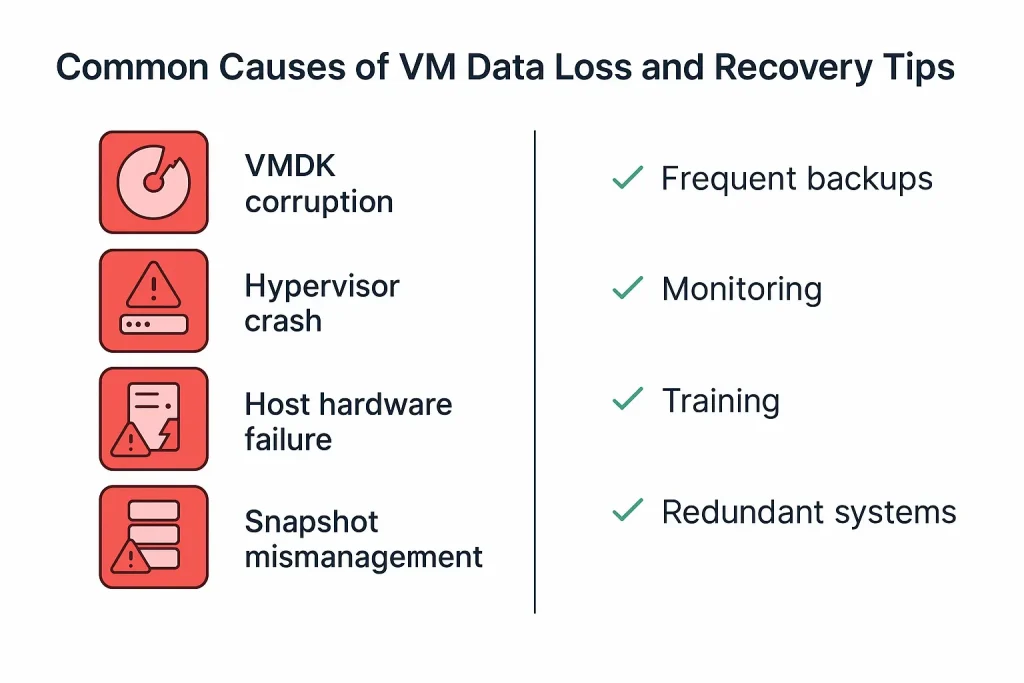
1. VMDK or VHD Files corrupted
Your VM and its operating system, applications, and data (such as .vmdk or .vhd) can be corrupted. This could occur because of sudden shutdowns or storage issues, or because of the fragmentation of disks.
2. Crash of the Host Server
When the physical server on which your virtual machines are running fails due to hardware failure, e.g. faulty SSD or RAID issue, the effect or consequence is that it can bring down all the virtual machines.
3. Hypervisor Failures
The software executing your VMs is known as a hypervisor (VMware, Hyper-V, VirtualBox, etc.) Failure of the bug or the update in the hypervisor can leave the virtual machines inaccessible.
Hypervisor-Specific Recovery Considerations
Different virtualization platforms have unique recovery implications such as,
- VMware ESXi uses .vmdk files and maintains extensive logs (vmware.log) and configuration files (.vmx), which can assist in forensic recovery.
- Hyper-V uses .vhd or .vhdx and stores critical metadata in XML configuration files—deleting these can render the VM unrecoverable.
- VirtualBox allows VM portability, but corrupted .vdi files often need third-party disk utilities for repair.
- Understanding the nuances of your hypervisor is essential when attempting recovery. Recovery tools and strategies are rarely one-size-fits-all.
4. Snapshot Mismanagement
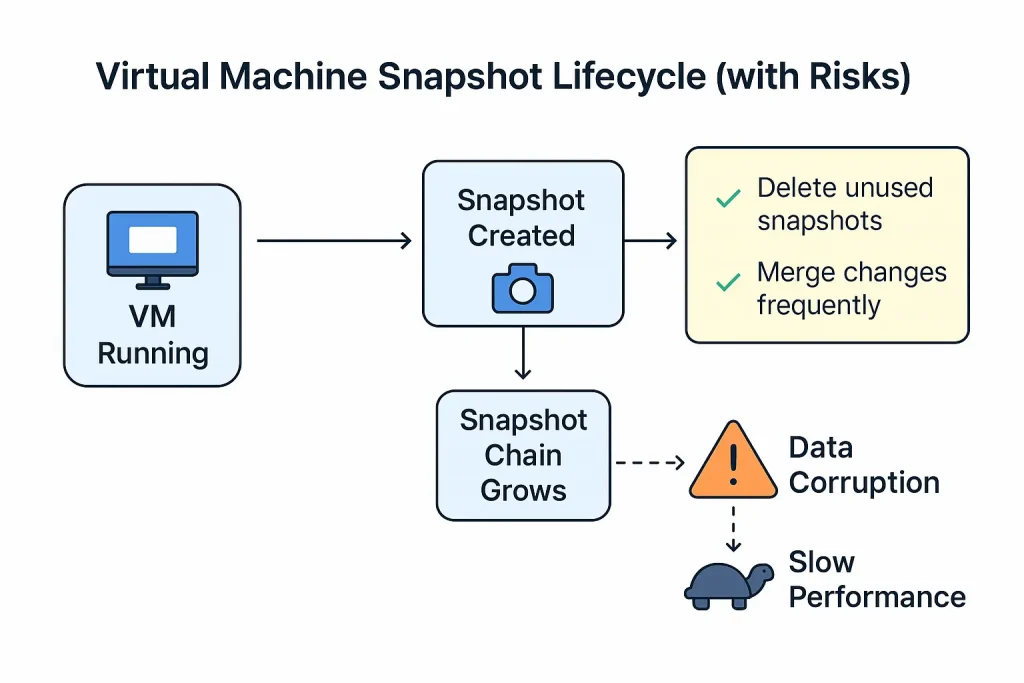
Although Snapshots serve very well in backing up VM states, it is associated with risk. Unprofessional deletion or rollback to a bad snapshot can delete important updates or corrupt the overall VM.
Understanding VM Snapshot Mechanics
Snapshots work by creating a delta file that logs changes while the original disk remains untouched. This “copy-on-write” approach is useful for rollbacks, but it also adds storage and complexity. Over time, chaining multiple snapshots can lead to significant performance degradation and increased corruption risk.
If a single snapshot in the chain becomes corrupted, it can break the entire VM state. The best practice is to avoid running VMs in snapshot mode for extended periods. Merge or delete snapshots regularly and never treat snapshots as backups; they are not designed for long-term reliability.
5. Human Error
One wrong click of the mouse can destroy a VM or write over a critical snapshot. As opposed to physical ones, VMs can be cleared off in a few seconds-without intending to.
The Impact of Virtual Machine Data Loss
Your thoughts may be like, I can simply launch another VM. And yet, there are deeper implications, which are not all that welcome.
Startup Disruption
To businesses that have a practical use of VMs in their daily operations and capacity to host clients, data loss may interrupt services, result in delays of releases, and violation of client contracts.
Dev Progress loss
Developers can lose weeks of coding, testing, or versioning work. Failing to use some stringent backup procedures may imply going back to the drawing board in case of recovery.
Regulatory Risks
In case your VMs hold the data relating to customers, particularly in such sectors as healthcare or finance, a data loss event might result in the violation of laws such as GDPR or HIPAA.
Can You Recover Data from a Virtual Machine?
The answer is yes, as long as you act fast and you are dealing with professionals.
Recovery of data in virtual machines is not easy. It can include the recovery of damaged virtual disk files, reassembling RAIDs, or accessing individual files in an unbootable VM.
This is where experts like SalvageData come in. They are also specialized to retrieve lost data in virtual environments- be it VMware, Hyper-V, or other virtualization environments. Their personnel is equipped with forensic-level tools that allow recovering the lost data without corrupting it further which maximizes the success of the file recovery efforts.
5 Best Practices to Prevent VM Data Loss
Although recovery services can also be used when disaster strikes, prevention is the most appropriate option. This is how to reduce your risk:
1. Put in place Frequent Backups
Set up periodic backups of your VMs and store them either on the cloud or keep it on external drives. Automated backup programs can also assist in making you covered in such a way that you have forgotten or set things manually.
2. Employ Snapshot Management, Intelligently
Backups cannot be replaced with snapshots. No more snapshots than are necessary, do not keep old snapshots, and do not run VMs in snapshot states longer than necessary.
3. Train Your People
The major sources of data loss are still human. Avoidable accidents may be mitigated through the training of developers and IT personnel on how to implement the best practices of virtualization and other safeguard checks.
4. Surveillance Health Host
To detect anomalous high utilization of CPU, RAM, or disk I/O on your host machine, use monitoring tools. Such may become premonitions of hardware issues that may affect your VMs.
5. Redundant Infrastructure investment
In case your business has a high dependency on VMs, then think redundancy setups, i.e., multiple hypervisors, replicated storage, or high-availability clusters to minimize single points of failure.
Real-World Scenarios: What VM Data Loss Looks Like
Case 1- Dev Environment Wipeout
One of the development teams accidentally deleted a snapshot chain in a VM that was being used during testing. Outcome: The whole virtual environment turned out to be unstable. SalvageData retrieved the important files out of the failed VMDK and reconstructed a working VM snapshot– months of work saved on the project.
Case 2: Crashing VM Encrypted
Another startup that provides cloud-based software was able to use encrypted VMs in order to have better security. The sudden power outage has corrupted the encryption headers. The virtual disk was recovered and decrypted by data recovery specialists based on the credentials they were provided.
When to Call the Pros
There are situations when the only thing that can be worse than fixing a broken VM on your own–especially in cases when the data that has to survive is business-related. In case you cannot boot your virtual machine, files fail to mount, and errors about corruption are encountered, stop using the host and invite a professional for recovery.
Accessing the corrupted VM can overwrite recoverable data and any further changes. The faster you move, the more likely of are to complete recovery.
Final Thoughts
Developers, SaaS providers, and online businesses will find Virtual machines to be useful instruments. However, like any tech, they can fail as well. Awareness of the risks and preparation of adequate backup systems can help you avoid major losses.
Nevertheless, prevention is lacking, and it is well to know that proper care, such as the services of SalvageData, is there to prevent damage so you get back what you thought would be gone forever.
To ensure mobile apps run smoothly across environments, optimizing both code and infrastructure is crucial. So, you need to know how to improve mobile app performance across platforms.
Whatever it is you do, whether you’re developing the next big app or managing multiple deployments, your VM setup affects overall performance. So, do not assume your VM data. Safeguard it. And should the untoward occur,–retrieve it cleverly.

Thangamanikandan Bharathan
Starting as an iOS developer and moving up to lead a mobile team at a startup, I've expanded my expertise into Project Management, DevOps and eventually becoming a COO & Chief Service Officer in the IT sector. As a CSO, I excel in team leadership, technical advice, and managing complex business functions, focusing on combining technology and operations to drive growth. I'm keen to connect for collaborations or to exchange insights in the tech world!