4 PowerPoint Automation Tools Every Startup Should Test Before Scaling

We’re all racing toward product–market fit, yet entire workdays still vanish inside PowerPoint. A 2025 survey of 8,500 professionals found that 28 percent of leadership teams spend five or more hours each week perfecting slide times that belong with customers, not kerning text (buffalo7.co.uk).
Workast’s timed trials show that modern AI deck builders create a first draft in under five minutes, cutting prep time by about 90 percent and dodging agency fees that can hit $1,000 per deck (workast.com). This guide reviews four AI slide makers, explains our scoring rubric, and helps you choose one to test today.
How We Scored the Contenders
Every tool faced the same stress test: turn a 300-word pitch brief into an investor-ready deck, export it, and fix only deal-breakers. We timed the loop with a stopwatch, then repeated the cycle twice to smooth out learning-curve noise.
Speed counted, but it made up just one-fifth of the grade. We weighed each criterion evenly:
- Design fidelity. Did the deck stay on brand with our fonts, colors, and logo without manual tweaks?
- Workflow fit. Add-ins that live inside PowerPoint or Google Slides scored higher than platforms that force context switching.
- Price friendliness. We limited contenders to a free plan or a starter tier under $50 per user each month; pricier tools moved to the “later” list for lean teams.
- Growth features. We gave extra credit to features that compound savings every month. PlusAI Live Snapshots, for example, refresh linked charts from Google Sheets or Excel whenever you open the deck, and viewer analytics or one-click rewrites deliver similar dividends as a startup scales.
If two products tied, day-one usability broke the deadlock. The result is a rank-ordered list you can recreate with your own brief this afternoon.
#1 PlusAI: Fastest Route From Idea to On-Brand Deck
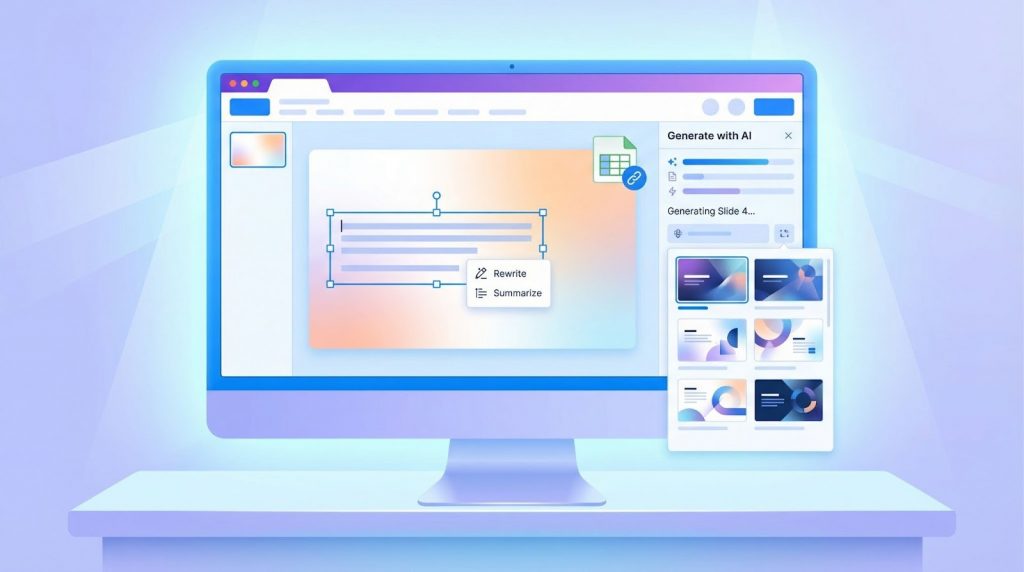
PlusAI tops our list because you can draft, edit, and ship a deck without leaving PowerPoint or Google Slides. Install the add-in, click Generate with AI, and a dozen on-brand slides appear before your coffee cools.
Speed is impressive. In Valasys’ 2026 benchmark, a 10-slide brief was rendered in about two minutes, with every font, color, and placeholder matching the master template (valasys.com).
Live Snapshots link charts or text boxes to Google Sheets or Excel; when you reopen the file, numbers refresh automatically, a workflow that saves roughly one hour per monthly KPI update in the same test (valasys.com).
Editing stays in place. Highlight a paragraph, choose Rewrite or Summarize, and PlusAI polishes wording without disturbing the layout. Need Spanish slides for a LatAm demo? One prompt handles the translation.
Pricing remains startup-friendly: a seven-day free trial, then $10 per user per month for unlimited generations (valasys.com), which is far less than Microsoft Copilot or an outside design agency.
If your team already lives in Microsoft 365 or Google Workspace, test PlusAI first. You’ll trim deck prep from minutes to seconds, stay on brand automatically, and keep collaboration inside the tools you already trust.
#2 Decktopus: Story Structure on Autopilot
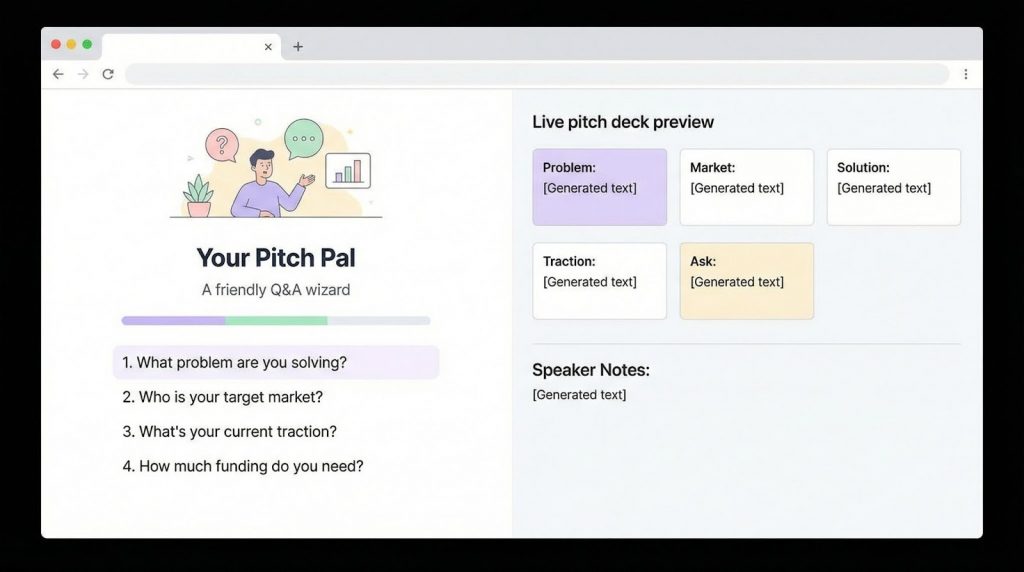
Decktopus acts like a tireless pitch mentor. Instead of handing you a blank canvas, it opens with a guided Q & A about the problem you solve, target market, traction, and funding goal. As you answer, slides appear in the classic investor sequence problem, market, solution, traction, ask so you stay on track.
Speed impresses. In Digital Hill’s 2026 test, that short interview produced a 15-slide draft with speaker notes in roughly three minutes (digitalhill.com). Those notes double as a rehearsal script, cutting prep time before demo day.
Design defaults stay intentionally simple: ample white space, large fonts, and muted palettes, so clarity beats flash. You can swap themes later if brand control matters.
Because Decktopus runs in the browser, collaboration is instant. Share a link for live edits or comments, then export to PowerPoint or PDF. On the Pro tier, exports arrive watermark-free.
Pricing is startup-friendly: the Pro plan costs $14.99 per user per month, and a forever-free tier covers light trials (decktopus.com).
Choose Decktopus if storytelling slows you more than design polish. It transforms prompt answers into a coherent pitch in minutes, leaving you free to perfect delivery instead of slide order.
#3 Beautiful.ai: Designer Polish Without the Designer

Beautiful.ai works as both a brand guardian and an invisible slide designer. Choose or upload a theme and every font, color, logo, and footer lock deck-wide, so no one drifts off brand (beautiful.ai blog).
Its Smart Slide engine earns the lift: paste a new data point, and the layout snaps into place as charts scale, bullets realign, and spacing resets.
In Valasys’ 2026 benchmark, updating a monthly metrics deck saved about 20 minutes per cycle (valasys.com). Teams that lean heavily on automated chart workflows can also compare our rundown of six automated PowerPoint chart creation tools to see how Beautiful.ai stacks up.
That automation shields non-designers from missteps. Titles stay uniform, color contrast meets accessibility guidelines, and each slide looks board-ready.
Brand control goes deeper. Admins can lock a Team Theme so every new deck inherits the right palette and typography; one click retrofits existing presentations when the logo changes (support.beautiful.ai).
Collaboration feels like Figma: teammates co-edit live, leave comments, and assign slide owners. A share link includes viewer analytics, showing who viewed, how long they stayed, and where attention dropped. Export to PowerPoint or PDF when stakeholders request it.
Pricing sits above our first two picks: the Team plan costs $40 per user per month with a 14-day free trial (beautiful.ai). If visuals anchor your pitch design-led DTC, enterprise leave-behinds, or deep tech demos, the fee pays for itself in reclaimed design hours.
Reach for Beautiful.ai when presentation aesthetics build trust. It delivers agency-level polish without hiring an agency.
#4 Slidebean: Pitch-Deck DNA and Investor Analytics in One Tab
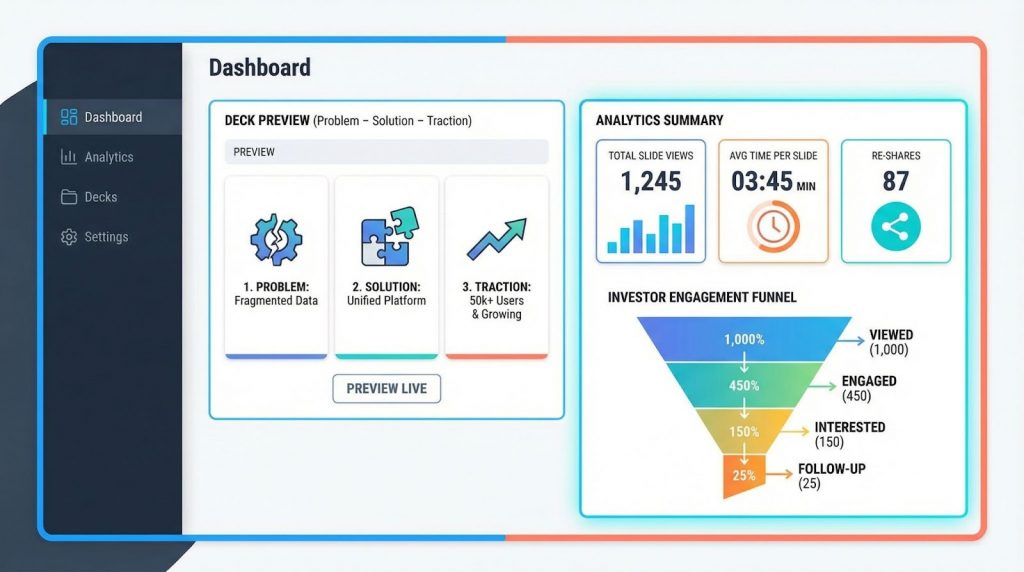
Slidebean was built inside the startup world, so its template gallery mirrors what investors expect: seed pitch, Series A, and traction update. Each template comes pre-loaded with the classic problem–solution–traction arc.
Pick a template, paste your bullets, and the layout AI locks every element into a high-contrast design. By limiting free-form drag-and-drop, Slidebean keeps spacing, icons, and hierarchy consistent, so your deck looks fundraise-ready without a designer.
Speed is solid. Valasys’ 2026 test produced a 12-slide deck in about 15 minutes after a quick logo swap (valasys.com). More importantly, the file felt polished enough to send immediately, a relief when you are balancing sprint planning and investor outreach.
After you click Share, Slidebean tracks views, time per slide, and re-shares. If an investor studies the market slide but skips financials, you know exactly how to tailor the follow-up. Those analytics live in the entry plan; no extra software required.
Pricing remains lean. The Starter plan costs $9 per user per month (or $7 with annual billing) and includes unlimited AI generations plus view tracking (slidebean.com). Step up to Accelerate at $49 for an investor CRM and monthly coaching calls.
Choose Slidebean when you need a pitch deck that follows a proven storyline and feeds you engagement insights the moment it lands in an investor’s inbox.
Conclusion
PowerPoint isn’t the enemy; manual slide work is. The tools above prove that startups no longer need to trade customer time for pixel perfection. Whether you value speed inside PowerPoint (PlusAI), guided storytelling (Decktopus), design polish at scale (Beautiful.ai), or investor-ready structure with analytics (Slidebean), each option can cut hours from your weekly workflow.
The key is not to overthink the choice. Pick one tool, run the same 300-word brief through it this week, and measure:
- Time to first draft
- Number of manual fixes required
- How confident do you feel sharing the deck immediately
Once you see a 70–90% time reduction, standardize the tool across your team. That reclaimed time compounds fast; every pitch, board update, and KPI review gets easier as you scale. The fastest-growing startups don’t make better slides; they spend less time making them. Appkodes helps startups achieve this using PowerPoint automation tools that eliminate repetitive slide work.
Frequently Asked Questions (FAQ)
1. What is PowerPoint automation software?
PowerPoint automation software uses AI and smart templates to generate, format, and update slides automatically. Instead of manually designing layouts, aligning text, or rebuilding charts, these tools handle structure, branding, and updates for you often in minutes.
2. Are AI slide tools safe to use with sensitive startup data?
Most reputable tools use encrypted connections and standard cloud security practices. However, for sensitive financials or IP-heavy decks, choose tools that work inside PowerPoint or Google Slides (like PlusAI) so files remain within your existing workspace permissions. Always review each vendor’s data policy before uploading confidential information.
3. Which tool is best for early-stage startups?
For lean teams:
- PlusAI is best if you already use PowerPoint or Google Slides daily.
- Decktopus works well if you struggle more with what to say than how it looks.
- Slidebean is ideal for founders actively fundraising and needing investor analytics.
Early-stage teams should prioritize speed, low cost, and minimal setup.
4. Can these tools fully replace a designer?
For most internal decks, investor updates, and early pitches—yes. AI tools now deliver layouts that are clean, consistent, and professional. For high-stakes brand launches or marketing campaigns, a designer may still add value, but these tools drastically reduce how often you need one.
5. Do these tools work with existing brand guidelines?
Yes, but with varying depth:
- PlusAI and Beautiful.ai offer the strongest brand control (fonts, colors, logos, master templates).
- Decktopus and Slidebean prioritize clarity and structure, with lighter brand customization.
If brand consistency is critical, test with a real company template before committing.
6. How much time can teams realistically save?
Based on published benchmarks and trials:
- First drafts: under 5 minutes
- Ongoing updates: 20–60 minutes saved per deck
- Overall prep time reduction: 70–90%
For leadership teams creating decks weekly, that can mean 5+ hours reclaimed every week.
7. What’s the best way to evaluate a tool before rolling it out?
Use a simple pilot:
- Take a real 300-word brief or meeting agenda
- Generate a deck
- Time the process
- Count how many changes are truly necessary
If the deck is “sendable” after minor edits, the tool passes.

Thangamanikandan Bharathan
Starting as an iOS developer and moving up to lead a mobile team at a startup, I've expanded my expertise into Project Management, DevOps and eventually becoming a COO & Chief Service Officer in the IT sector. As a CSO, I excel in team leadership, technical advice, and managing complex business functions, focusing on combining technology and operations to drive growth. I'm keen to connect for collaborations or to exchange insights in the tech world!