What is the Cost to Create a Delivery App Like Swiggy in 2025?
So you’re asking this in 2025? You’re not alone. Entrepreneurs, food business owners, and startup founders across the globe are racing to create delivery apps that offer more than just food – they’re building complete on-demand ecosystems. But unlike 5 years ago, launching a delivery app in 2025 isn’t just about hiring a developer and going live.
With the rise of real-time features like GPS tracking, instant payments, AI-driven recommendations, and seamless UX, the cost to create a delivery app in 2025 depends on functionality, scalability, platform choices, and how fast you want to hit the market. In this expert-backed cost breakdown, you’ll learn:
- What affects your delivery app budget in 2025
- Clone scripts vs custom builds – pros and cons
- Essential vs advanced features and their cost impact
- Realistic price ranges based on different business needs
- How to save time and money without compromising on quality
Whether you’re bootstrapping or backed by investors, this guide will help you make the right investment decisions as you step into the booming on-demand delivery app space.
Why Businesses Are Building Delivery Apps in 2025?
The on-demand delivery market is growing not just in size but in speed, innovation, and user expectations. Businesses in 2025 aren’t asking if they should launch a delivery app; they’re asking how fast they can get to market without compromising on quality or performance.
The Delivery App Economy Is Crossing $200 Billion
According to Statista, the global online food delivery market alone is expected to surpass $200 billion in revenue by the end of 2025 and continue to grow through 2030.
And that’s just one vertical. When you add in grocery, medicine, courier, and multi-service delivery apps, the total addressable market becomes even bigger, a golden opportunity for entrepreneurs and enterprises alike.
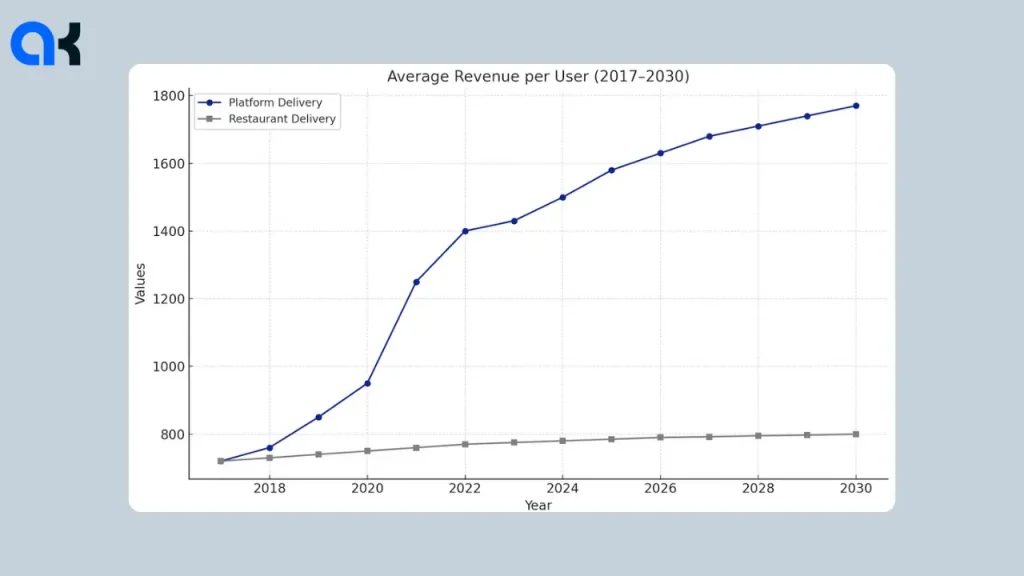
The truth is, building a delivery app from scratch can cost anywhere between ₹15–₹30 lakhs and take several Customers Now Expect Smart, Fast, and Seamless Delivery
In 2025, users don’t just want their order delivered, they want it to,
- Tracked in real time via GPS, with zero delay
- AI-driven recommendations
- One tap payment
If not, customers switch to others. The bar has been set high, and only app-centric apps will thrive.
Zepto and Blinkit Prove Speed Wins
Startups like Zepto and Blinkit have set the bar high for consumer expectations with their 10-minute delivery promises. With micro-warehouses and AI logistics, these platforms are case studies in rapid growth and market capture.
Zepto, for example, became a unicorn in just 22 months, a rare feat that shows the massive opportunity in speed-led delivery innovation.
AI is driving cost-efficient scalability
One of the biggest changes in 2025 is the use of AI for logistics optimization. AI-based route optimization helps companies:
- Deliver more orders per hour
- Cut down fuel usage
- Save up to 15% on operational costs
According to McKinsey, these tools are transforming last-mile delivery by reducing travel distance and improving drop efficiency.
Types of Delivery Apps and Their Cost Differences
When developing a delivery app, the type of app you choose and the features you need will impact the cost. Below is a comparison of different types of delivery apps and the cost to create a delivery app ranges to help you understand the differences and make an informed decision.
| Type of App | Key Features | Cost Range (Basic) | Cost Range (Advanced) |
| Food Delivery App | Menu display, order management, payment gateway, restaurant integration, delivery tracking | $20,000 – $40,000 | $40,000 – $70,000 |
| General Delivery App | Courier management, real-time tracking, admin panel, multi-service delivery | $25,000 – $50,000 | $50,000 – $90,000 |
| Single Restaurant Delivery App | Menu display, order management, simple admin panel | $10,000 – $20,000 | $20,000 – $35,000 |
| Multi-Vendor Delivery App | Multiple vendor profiles, advanced search, customer/vendor ratings, commission management, delivery tracking | $30,000 – $60,000 | $60,000 – $100,000+ |
| Local Food Delivery Service | Targeted to local restaurants, basic order and payment management | $10,000 – $20,000 | $20,000 – $35,000 |
| Restaurant Aggregator (Multi-Vendor) | Multiple vendors, commission system, advanced search/filters, loyalty programs, ratings | $30,000 – $60,000 | $60,000 – $100,000+ |
| Courier/Package Delivery Service | Delivery tracking, real-time communication, route optimization | $25,000 – $50,000 | $50,000 – $90,000 |
| On-Demand Delivery Service (Uber) | On-demand delivery for various goods, route optimization, real-time tracking, multi-service delivery options | $40,000 – $60,000 | $60,000 – $100,000+ |
Factors That Affect Delivery App Development Cost
Building a delivery app in 2025 isn’t just about hiring a developer — it’s about balancing performance, scalability, and user experience. The cost to create a delivery app can vary widely based on technical and business factors. Below is a breakdown of key cost drivers, along with budget ranges and what each includes:
| Factor | Estimated Cost (USD) | What It Covers / Why It Matters |
| Type of App | $10,000 – $100,000 | Costs vary significantly depending on whether you’re building a single-vendor app like Zomato or a multi-vendor marketplace like Uber Eats. Multi-vendor apps require more complex logic, vendor dashboards, and backend architecture. |
| Platform Selection | +$5,000 – $15,000 | Building for both iOS and Android increases the budget due to additional development and testing needs. Cross-platform frameworks (e.g., Flutter) can reduce costs, but native development ensures better performance. |
| App Design | $2,000 – $10,000 | A polished, user-first UI/UX leads to better engagement, lower bounce rates, and higher retention. Custom animations, transitions, and brand personalization can raise costs. |
| Core Features | $10,000 – $25,000 | Includes user login, restaurant/product listing, cart functionality, checkout, payment gateways, and push notifications. These are non-negotiable for any delivery platform. |
| Real-Time Tracking | $2,000 – $8,000 | Integrating live delivery tracking (using Google Maps API or Mapbox) adds cost, especially if route optimization and delivery partner location updates are included. |
| Admin Panel | $3,000 – $12,000 | Enables centralized control for business owners: manage users, track orders, process refunds, generate reports, and configure pricing. This backend tool is essential for smooth operations. |
| Maintenance & Updates | 15%–20% of total annual cost | Post-launch expenses include bug fixes, security patches, feature upgrades, and adapting to OS updates or API changes. Budgeting for ongoing maintenance ensures long-term app performance. |
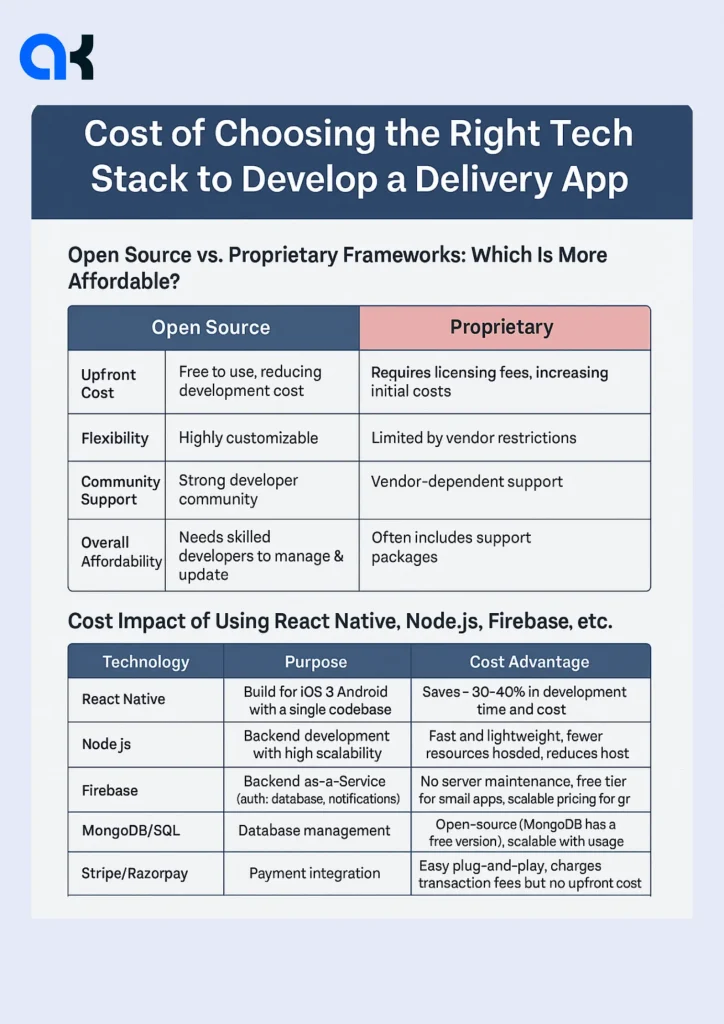
Cost of the Right Tech Stack to Develop a Delivery App
Your tech stack, the combination of programming languages, frameworks, and tools used to build your app, has a major influence on initial development cost and long-term scalability. Here’s an image on how different choices can impact the cost to create a delivery app.
Pro Tip
If you’re using a clone script, many of these features (including admin panel and core UI) come pre-built, which can save you up to 40% and get you to market faster. Want a cost estimate for your business model?
Clone Script vs. Custom Build – Which Is Better in 2025?
One of the first decisions you’ll make when building a delivery app is whether to start with a clone script or go for a fully custom build. Both have their pros, and the right choice depends on your budget, timeline, and long-term goals. Here’s a comparison on the cost to create a delivery app.
| Aspect | Clone Script | Custom Build |
| Time to Market | 2–3 weeks | 4–6 months — longer, but highly flexible |
| Initial Cost | $3,000 – $8,000 | $25,000 – $100,000 depending on features |
| Scalability | Moderate — may need rework later | High — built to scale from the ground up |
| Customization | Limited — preset features & UI | Unlimited — tailor every screen & function |
| Ideal For | Startups, MVPs, pilot programs | Funded startups, enterprise-grade launches |
Clone Scripts: Fast, Affordable, MVP-Friendly
Clone scripts are pre-built delivery app solutions that mimic the core features of popular platforms like Swiggy or Uber Eats. They’re perfect for:
- Entrepreneurs validating an idea
- Local businesses expanding into delivery
- Startups with tight budgets & timeframes
They offer speed and simplicity but have limited flexibility when it comes to advanced customizations, integrations or scaling.
Custom Builds: Tailored for Ambitious Growth
Custom-built apps are developed from scratch, so you can:
- Implement unique workflows
- Add third-party integrations (like AI, CRM, ERP)
- Scale without limitations
They require a higher upfront investment and a longer build time but give you complete ownership and control over the architecture and user experience.
Must-Have Features for a Delivery App in 2025
Building a delivery app in 2025 means going beyond basic ordering and delivery functions. Today’s users demand speed, convenience and personalization, while businesses need powerful tools to manage operations efficiently. Here’s a complete breakdown of the essential modules and feature sets your app must include,
User Panel – Seamless & Intuitive Experience
Your delivery app’s success starts with the end-user experience. Users should be able to navigate, order and track deliveries effortlessly. Key features include:
- One-tap onboarding & sign-up (via social login or OTP)
- Location auto-detection using GPS
- Smart search with filters
- Live order tracking with ETA
- Secure in-app payments & saved cards
- Real-time order notifications
- Ratings and reviews for service quality
Delivery Partner App – Built for Speed & Accuracy
Your delivery personnel need a lightweight, responsive app that minimizes confusion and maximizes efficiency. Critical features include:
- Real-time task assignments
- Route optimization using AI/ML (to reduce delivery time)
- In-app calling/chat with customers
- Earnings dashboard & withdrawal management
- Delivery status updates in one tap
- Availability toggle and duty log
Restaurant / Store Dashboard – Control at Their Fingertips
Vendors should be able to manage their offerings easily. The store panel should have:
- Menu and pricing management
- Inventory control with low-stock alerts
- Offer and coupon configuration
- Live order management dashboard
- Order preparation timer
- Sales analytics & performance insights
Admin Panel – Total Control and Insights
As the platform owner, the admin dashboard is your command center. It should have:
- User, delivery partner and vendor management
- Commission configuration
- Advanced analytics & reports
- Manual order adjustment
- Payment and refund tracking
- Multi-tier rating and review moderation
Smart Add-Ons That Matter in 2025
To stand out in the crowded delivery app space in a pocketfriendly way, consider these high-impact, forward-looking features:
Dark mode, voice search, and accessibility tools
AI-powered product/food recommendations based on user behavior
Predictive delivery time estimation to set expectations
Loyalty programs and gamified reward points
Multi-language support for regional targeting
We added predictive delivery time estimation using AI in one of our client projects. Their order volume jumped by 35% in 3 months.
— Senior Developer, Appkodes.
Why Offshore Development Makes Sense in 2025?
Many startups and enterprises are moving to offshore development teams in countries like India and Vietnam for one simple reason: cost-efficiency without compromising quality.
Save up to 60% on your total development cost
Access to a skilled and scalable workforce
Faster turnaround time and 24/7 support across time zones
Proven success stories in delivery tech (e.g., Swiggy, Dunzo, BigBasket were all built in India)
Some of the most feature-rich and scalable delivery platforms in the market today were developed at a fraction of the Western cost by choosing experienced offshore companies with deep domain expertise.
And, there is also maintenance cost, post launch. This criteria of cost to create a delivery app is usually overlooked by many founders to be or newbies.
Post-Launch Costs- Maintenance, Updates, and Scaling
It’s a lot beyond launching your delivery app. To stay competitive and keep users, maintenance, feature enhancements, and scaling are key. Below are the typical post-launch costs you should expect.
Annual Maintenance Costs: Why It Matters?
| Maintenance Area | Typical Annual Cost | What’s Included |
| Routine Maintenance | 15–20% of initial dev cost | Server monitoring, minor bug fixes, OS compatibility |
| Performance Monitoring | $1,000 – $3,000/year | Load balancing, crash reports, and database optimization |
| App Store Compliance | $500 – $1,000/year | SDK updates, policy changes, and version updates |
Why it matters?
Maintenance avoids breakdowns, ensures user satisfaction, and keeps your app compliant with platform policies.
Cost of Adding New Features Later
| Feature Type | Estimated Cost Range |
| In-app Chat Integration | $1,500 – $5,000 |
| Loyalty/Referral Program | $2,000 – $7,000 |
| AI-powered Recommendations | $5,000 – $15,000+ |
| Real-Time Delivery Tracking | $3,000 – $10,000+ |
Tip: Build your app on a modular, scalable tech stack so feature additions don’t require rewrites or re-architecture.
Unexpected Costs to Be Aware Of
| Unexpected Cost | Estimated Cost | Reason |
| Third-party APIs | $50 – $500/month or per usage | For maps, SMS, and payment gateways (e.g., Google Maps, Twilio) |
| Major OS Updates | $500 – $2,000/update | Required when iOS/Android releases significant changes |
| Bug Fixes & Hotfixes | $100 – $2,000+ per instance | Depends on complexity and urgency |
Reality Check
Even stable apps need updates every 2-3 months. Unforeseen bugs, OS updates, or API policy changes can create surprise expenses.
Post launch isn’t just about fixing what breaks, it’s about evolving with your users and the tech ecosystem. A realistic budget of 15-25% of your app’s initial cost to create a delivery app per year will keep your delivery app functional, relevant, and profitable over time.
How Appkodes Helps You Cut Delivery App Development Costs (Without Cutting Corners)
Building a delivery app doesn’t have to cost a fortune if you partner with the right team. At Appkodes, we’ve helped dozens of entrepreneurs and startups bring their delivery app ideas to life with speed, quality, and affordability.
Here’s how we make it possible,
Proven, Pre-Built Frameworks that Save Time & Money
Instead of building from scratch, Appkodes leverages battle-tested delivery app frameworks like:
FoodStar – our Swiggy & Zomato clone for food delivery
Livza – live-stream-enabled delivery solution
UberEats Clone – ideal for multi-vendor, multi-city food businesses
These base scripts are feature-rich, fully customizable, and ready to deploy, reducing both development time and total cost to build your delivery app.
Faster Time to Market with 24/7 Support
Launching a delivery app isn’t just about building it — it’s about making it live, stable, and scalable. With Appkodes, you get:
24×7 technical support from kickoff to post-launch
Launch assistance for Android, iOS, and web
Rapid prototyping and UI/UX personalization for your brand
We walk with you every step of the way — no missed deadlines, no hidden fees.
Scalable Architecture, Performance-Tested at ScaleOur delivery app solutions are built with scalability in mind — can handle over 100,000 users without lag or downtime. Whether you start small or scale citywide, your app’s backend is designed to grow with your business.
You Own the Code, Always
We believe in transparency and full control. Every project comes with:
100% source code ownership
Licensing tailored for your business needs
No recurring charges or subscription lock-ins
We developed a complete Swiggy-like app with real-time tracking and wallet support for a UAE-based startup — under $12,000 in just 40 days.
— Project Manager, Appkodes
This, being said by the project manager Appkodes isn’t a one-off story. It’s what we do every day.
Final Thoughts: What’s the Right Delivery App Budget for You?
There’s no one-size-fits-all approach when it comes to food delivery app development in 2025. Your ideal budget depends on your business stage, feature requirements and long-term growth plans.
Here’s a quick guide to help you choose the best path.
| Business Type | Recommended Approach | Go-Live Time | Estimated Cost | Why It Works |
| Startup | Ready-made solution (e.g., FoodStar, UberEats clone) | 2–3 weeks | $8,000 – $12,000 | Quick launch, low cost, perfect for MVPs and market testing |
| Growing Brand | Hybrid model: base script + scalable custom features | 4–6 weeks | $12,000 – $25,000 | Scales with demand, flexible for feature additions |
| Enterprise | Fully custom architecture, multi-platform & backend control | 8+ weeks | $40,000 – $100,000+ | Best for long-term growth, security, and complex integrations |
Ready to Build Your Delivery App? Get a custom quote tailored to your features, timeline, and business goals. Talk to Our Delivery App Experts Now! Let’s turn your delivery app idea into a scalable, revenue-generating business in 2025.
Frequently Asked Questions
How much does a delivery app cost?
A basic delivery app can cost between $10,000 to $50,000, and a complex app with advanced features can cost between $50,000 to $200,000 or more. Costs also vary if you build the app in-house or outsource the project to an app development agency.
How much does it cost to build an app like Zomato or Swiggy?
The cost to build such an app can range from $50,000 to $150,000 or more, depending on the app’s complexity. Building an app like Swiggy, Zomato, or UberEats, along has restaurant discovery, food delivery, and customer review features, involves a big investment. The cost increases with additional features like payment integration, real-time tracking, or AI-based recommendations. Building the app for multiple platforms (iOS and Android) will also increase the cost further.
How do I make a delivery app?
To make a delivery app, follow these steps,
Identify your niche – Do you want to offer food, groceries, or parcel delivery?
Define key features – Common features include real-time tracking, user registration, delivery
scheduling, and payment integration.
Choose the platform – Do you want to build an app for Android, iOS, or both?
Select the development approach – You can either build the app from scratch or use a clone
solution.
Hire a development team – If you’re not a developer, hire professionals or work with an app development agency.
Test and launch – Do beta testing before launching the app to ensure smooth functionality.
Is the delivery business profitable?
Yes, a delivery business can be very profitable if you target niche markets or offer value-added services like fast delivery, lower fees, or superior customer support. Yet, keep in mind that profitability depends on operational costs, competition, and user acquisition strategies. So, building partnerships with local businesses or restaurants can increase revenue significantly.
Which delivery app is the most expensive?
The cost of a delivery app can vary, but some of the most expensive delivery apps are those with high functionality, wide reach, and large user base. Apps like Uber Eats, DoorDash, and Postmates are considered the most expensive to operate because of their massive infrastructure, customer support systems, and advanced features. And the cost to build a similar app will also reflect these factors.

Thangamanikandan Bharathan
Starting as an iOS developer and moving up to lead a mobile team at a startup, I've expanded my expertise into Project Management, DevOps and eventually becoming a COO & Chief Service Officer in the IT sector. As a CSO, I excel in team leadership, technical advice, and managing complex business functions, focusing on combining technology and operations to drive growth. I'm keen to connect for collaborations or to exchange insights in the tech world!