Why Every App Needs a Website: A Guide to WordPress SEO for App Creators
Building a mobile app takes time, tools, and plenty of testing. But once it’s live, there’s a bigger challenge waiting: getting people actually to find and download it. Relying on app stores alone limits your reach, especially when your competitors are showing up in search results too. That’s where having a dedicated website comes in.
A site built with WordPress gives you full control over how your app appears online, from landing pages to blog content that drives search traffic. With the right WordPress SEO approach, that website becomes a long-term channel for discovery, downloads, and user growth.
Why Every App Needs a Website
App stores are crowded. Even with a solid product, it’s tough to stand out when you’re listed alongside thousands of similar options. A website gives your app an independent presence, one that’s fully under your control and easy to promote across channels like search, email, and social media.
It also builds trust. A site gives you the space to explain what your app does, display screenshots, answer common questions, and provide updates. That kind of transparency helps people feel more confident before they hit “Install.” And the good news is, finding the easiest way to build a website is simpler than ever.
For those using WordPress, there’s another advantage: the platform is flexible, widely supported, and built with search visibility in mind. Resources like Stellar SEO’s WordPress SEO can help you refine your setup to target the keywords your audience is already searching, which makes your app easier to find and download.
A well-built site provides a foundation for marketing, monetization, and long-term growth.
Why WordPress is the Best Platform for App Creators
WordPress powers a huge portion of the web for good reason. It’s flexible, free to use, and supported by a massive ecosystem of themes, plugins, and tools. For app creators, that means you don’t have to start from scratch or hire a developer to build something functional.
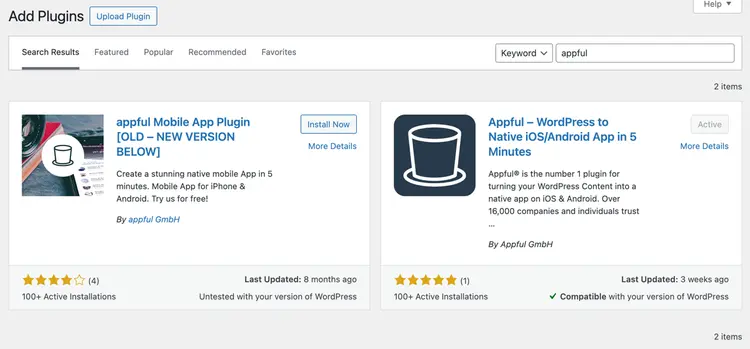
You can launch a clean, responsive landing page in a day. Want to add a blog to share updates or tutorials? Just install a plugin. Need to connect email signups or analytics? There’s already a solution available.
Source: https://www.godaddy.com/
It’s also SEO-friendly out of the box. Clean code structure, customizable URLs, and mobile optimization make it easier to improve your site’s visibility from day one. That kind of technical foundation matters when your goal is to reach more users.
For creators focused on growth, WordPress offers the speed and flexibility needed to test ideas, adjust messaging, and build content that drives downloads.
Understanding WordPress SEO: What App Creators Need to Know
SEO, or search engine optimization, is the process of making your website easier to find through search engines like Google. For app creators, that means showing up when someone searches for the type of tool you’ve built or the problem your app solves.
WordPress gives you the flexibility to handle SEO without needing to touch code. You can set custom page titles, write keyword-rich descriptions, and structure your content in a way that search engines understand. Plugins like Yoast or Rank Math simplify a lot of this, offering on-page tips as you create content.
But SEO isn’t just about keywords. Site speed, mobile responsiveness, internal linking, and proper use of headings all play a part in how your site ranks. WordPress makes it possible to manage these elements effectively, even if you’re not technical.
When set up correctly, your site can bring in consistent, targeted traffic over time, people who are actively searching for what your app offers. That traffic can lead to more installs, better user engagement, and stronger word-of-mouth growth.
5 Key SEO Tips for Your App’s WordPress Website
Your app’s success doesn’t stop at the app store. A well-optimized WordPress website ensures potential users can actually find your app when they search for solutions online. Here’s how to turn your site into a powerful discovery tool with five practical SEO tips.
1. Focus on a Single, Clear Keyword Per Page
What this means: Each page of your site should target a unique keyword or phrase that matches what your audience is searching for. Doing so helps search engines understand the page’s purpose and improves your chances of ranking for that specific term.
Example: If you’re launching a food delivery app, your homepage could target “on-demand food delivery app”. A blog article might focus on “how to start a food delivery business”.
Practical steps
- Research relevant keywords with tools like Google Keyword Planner, Ubersuggest, or Ahrefs.
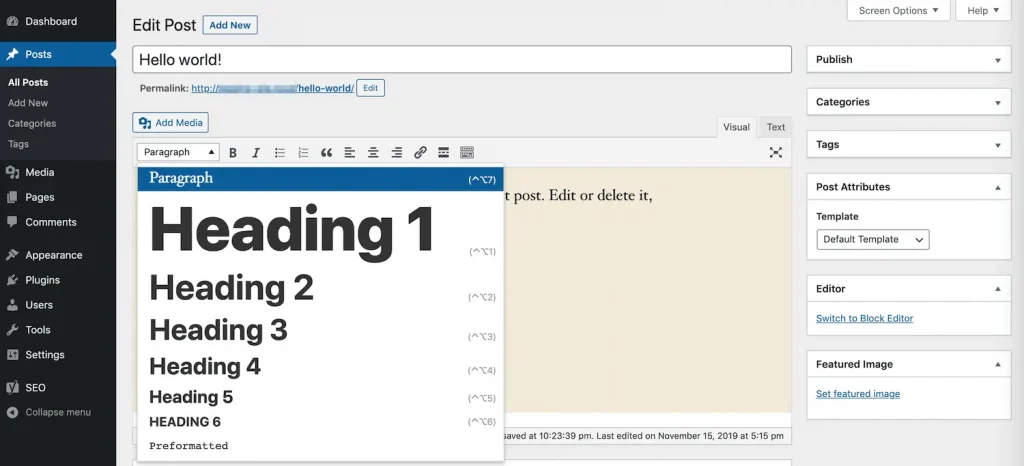
- Place your chosen keyword in the:
- Page title
- Meta description
- H1 heading
- URL slug (e.g., /food-delivery-app)
- Naturally, throughout your content
- Avoid keyword stuffing and write in a natural, helpful way.
Source: https://kinsta.com/
Pro tip: If you’re building your app using ready-made app solutions, combine product-related keywords (e.g., dating app script) with problem-solving ones (e.g., how to launch a dating app quickly) for better reach. When researching competitors and reviewing search results, tools such as URL Opener can also help you quickly open and review multiple URLs during your SEO workflow.
Once your page is published, it’s also helpful to monitor how it performs in search results. While most creators focus on Google, it’s worth keeping an eye on other search engines as well. Using a Bing rank tracker can help you see how your pages perform on Bing and whether your keyword optimizations are improving visibility there.
2. Write for Users, Not Just Algorithms
What this means: SEO is about creating content that’s valuable for people first. Search engines reward websites that clearly answer questions, provide useful insights, and keep visitors engaged.
Example: If you’re promoting a taxi booking app, don’t just repeat “best taxi booking app”. Instead, highlight features like real-time tracking, secure payment, and customer support, the details users actually care about.
Practical steps
- Use short paragraphs and subheadings for easy scanning.
- Add visuals, such as screenshots or short demo videos, to showcase app features.
- Include an FAQ section to address common questions.
Pro tip: Browse Quora or Reddit to see what people are asking about apps in your niche. Answer those questions directly on your site to increase relevance and authority.
3. Optimize Your Load Speed
What this means: A slow site not only frustrates users but also lowers your search rankings. Google considers page speed a ranking factor, especially for mobile traffic.
Example: If your landing page takes six seconds to load, visitors may leave before they even learn what your app does.
Practical steps
- Choose a lightweight WordPress theme, such as Astra or GeneratePress.
- Compress images using plugins such as Smush or ShortPixel.
- Install a caching plugin, such as WP Super Cache or W3 Total Cache.
- Utilize a CDN (Content Delivery Network), such as Cloudflare, for faster global delivery.
Pro tip: Follow best practices from Google’s SEO Starter Guide. Pay special attention to mobile performance, since that’s where most visitors will find you.
4. Make Your Site Mobile-Friendly
What this means: Most visitors will land on your site using their phones. A responsive, mobile-optimized WordPress site ensures they get a smooth experience that reflects the usability of your app.
Example: Imagine a student searching for an “AI language learning app” on their phone. If your site doesn’t display properly on mobile, you’ll lose them instantly.
Practical steps
- Use a responsive theme that adapts across screen sizes.
- Check your site with Google’s Mobile-Friendly Test tool.
- Keep navigation simple and buttons large enough to tap easily.
- Avoid intrusive pop-ups that block content.
Pro tip: Design with a “mobile-first” mindset. Build and test on mobile before adjusting for desktop. A mobile-first approach ensures your most important audience gets the best experience.
5. Use Internal Links to Guide Visitors
What this means: Internal links connect one page of your site to another. They keep visitors engaged and help search engines understand your site structure.
Example: A blog post about “how to launch a delivery startup” can link to your product page showcasing a food delivery app script.
Practical steps
- Link from blog posts to key landing pages (e.g., feature pages, FAQs, or pricing).
- Use descriptive anchor text like “see how our budgeting app dashboard works” instead of “click here”.
- Create a logical content hierarchy: blog posts → cornerstone guides → product pages.

Source: https://www.aerobusinesssolutions.com/
Pro tip: If you’re unsure where to start, focus on linking to your most important pages first, such as your app landing page or pricing page. Tools like Link Whisper can help automate and optimize internal linking across WordPress.
When to Bring in the Experts
DIY SEO can take you far, especially when you’re just starting with a simple landing page or blog. But as your traffic grows, or if your site isn’t performing the way you hoped, it might be time to get help.
Technical issues, slow growth, or struggling rankings can be hard to troubleshoot without experience. That’s where a focused approach to WordPress SEO becomes essential. Whether you’re planning to scale content, build backlinks, or improve your site structure, working with an Appkodes team that understands the platform can save time and lead to better results.
If you’re looking for more ways to boost downloads, these strategies to increase app installs can work alongside a strong SEO foundation.
Good SEO takes time, but the right strategy turns your website into a lasting growth engine for your app.
Conclusion
A well-built app deserves to be seen. Adding a WordPress website to your launch plan gives you a powerful tool for growing your reach, building credibility, and driving more installs over time. With SEO in place, that site becomes more than just a landing page; it becomes a steady source of traffic from people actively searching for what you’ve created.
Whether you handle the basics yourself or work with professionals who understand the platform inside and out, investing in your site’s visibility is a smart move for long-term success.

Thangamanikandan Bharathan
Starting as an iOS developer and moving up to lead a mobile team at a startup, I've expanded my expertise into Project Management, DevOps and eventually becoming a COO & Chief Service Officer in the IT sector. As a CSO, I excel in team leadership, technical advice, and managing complex business functions, focusing on combining technology and operations to drive growth. I'm keen to connect for collaborations or to exchange insights in the tech world!