How to Make AI Code Suggestions Actually Work for Your SaaS Product
I remember sitting at my desk, full of excitement, thinking, Can I really build a SaaS product in just one day using AI? It sounded almost too good to be true. Could a few simple prompts really do what usually takes weeks of coding?
The first few minutes felt like magic. I typed a prompt, and the AI started building for me. Buttons appeared, forms took shape, and even some backend logic was ready. It was like watching a product assemble itself right in front of me. I couldn’t believe how fast it was moving.
But it wasn’t perfect. Some parts didn’t fit together, some logic clashed, and little bugs popped up in weird places. Sometimes the AI’s “helpful” code generation even caused more problems than it solved. It was frustrating, yet also somewhat exciting.
Still, it was amazing to see how much AI could do. It handled the boring, repetitive stuff, suggested solutions I hadn’t thought of, and helped me get a working product in hours instead of weeks. Of course, I still had to guide it, tweak things, and make sure everything actually worked, but the speed and support were incredible.
How did the rest of my day go, and what did I learned from building a SaaS almost entirely with Artificial Intelligent-generated code? Keep reading, you’ll see what happened.
Looking Back: Reality vs Expectations
Looking back, I realize reality differed from what I initially expected. AI code suggestions are powerful, but the real advantage comes from careful planning. I started by listing the core features: login systems, dashboards, workflows, and mapping how they would connect.
I also outlined the user journey and data flow, so I understood which parts of the system needed to work together.
With this MVP structure in place, AI became more than a coding platform—it acted as an assistant that complemented my vision and helped me focus on building the product efficiently. But only a few things worked out for me.
The Experiment: What Worked
Common features like login systems, dashboards, and basic workflows were generated in minutes rather than days, allowing me to quickly lay the foundation of the product.
AI offered solutions & automated code generations I hadn’t considered. A single prompt often produced multiple approaches for a feature, allowing me to explore different options.
I could get a working version of the product almost immediately. This allowed me to test ideas, tweak features, and see results live without building everything from scratch. I also learned one important thing.
Why AI Alone Can’t Deliver Truly Personalized SaaS Features
Watching AI generate code in minutes was exciting. It felt like magic at first. But the excitement faded once I realized that skipping proper checks or relying too much on AI led to small bugs that quickly grew into bigger issues. Some parts just didn’t work together the way I had pictured.
AI gave me the pieces to build with, but it didn’t understand why certain features mattered or how they needed to connect to form a complete system. Even simple things, often ended up causing unexpected conflicts.
And then there were the costs. The easy stuff was cheap, sure, but once I started adding advanced features, the expenses climbed fast. In some cases, it would’ve been more efficient to just hire a small, skilled development team. The takeaway?
#1 AI can spit out modules, algorithms, and UI elements fast, but it doesn’t really understand your users ‘ habits, goals, or frustrations. Two people can use the same dashboard in completely different ways, and AI will treat them the same.
That’s where human judgment comes in, interpreting user behavior and building features that actually make sense.
#2 Complex SaaS systems are like orchestras – every component has to play in harmony. AI can produce perfect individual pieces, but without oversight, they can clash and create workflow glitches or technical bottlenecks. Humans make sure everything works together smoothly. Using an sca tools list as a checklist during integration tests reduces surprise conflicts and rollbacks.
#3 AI seems like a cheaper option at first, but building truly personalized advanced features usually requires multiple iterations, testing, and fine-tuning. In many cases, a small, skilled team is more cost-effective than patching AI-generated code forever.
#4 Personalization is about understanding human behavior, avoiding bias, and creating experiences that feel natural.
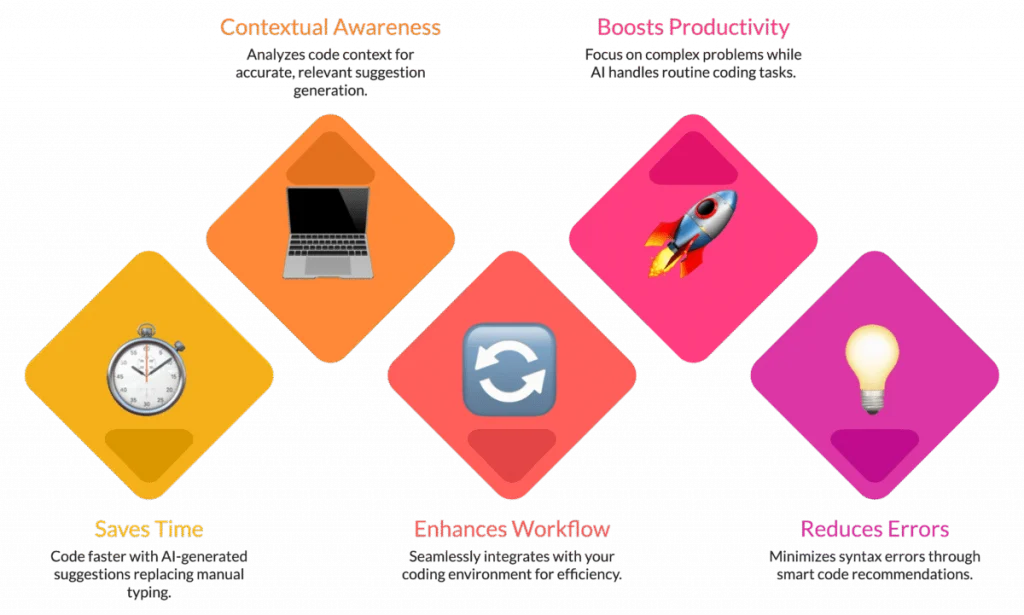
Source: https://bizcoder.com/
#5 Even the smartest generative Artificial Intelligence can’t predict when a notification will annoy a user or when a development workflow will frustrate part of your audience. That insight comes from human experience and empathy. Now know how it works.
AI in SaaS Development: How it Works Across Different Business Models
Now, let’s explore how these benefits apply to specific SaaS AI models and what makes each model unique:
1. B2B SaaS (Business-to-Business)
B2B products are built for businesses and usually involve complex workflows, multiple integrations, and strict compliance standards.
Examples include HR management platforms such as leave management software, accounting software, and payment processing systems. Building these from scratch can be challenging, especially for beginners, but AI code suggestions can help in several key ways:
Reusable Code Snippets
AI can generate standard modules such as user authentication, payment gateways, invoice generation, or data validation routines. These snippets are reusable across different projects, which saves time and reduces repetitive coding.
For beginners, copying and modifying AI-generated fixing code provides an excellent learning opportunity, allowing them to understand how standard components work in real-world applications.
Compliance Assistance
B2B software often handles sensitive business or customer data, which means regulatory compliance is critical. AI can suggest coding patterns that align with GDPR, HIPAA, or PCI-DSS standards, helping reduce the risk of unintentional violations.
While AI isn’t a replacement for legal advice, developers focus on best practices, secure data handling, and privacy-conscious design patterns.
Workflow Automation
Many B2B products involve multi-step workflows such as approvals, reporting, notifications, or employee onboarding. AI can scaffold these processes quickly by generating code templates for automated sequences, triggers, or notifications.
Developers can then customize these workflows to match specific business rules, saving significant time compared to building everything manually.
Beginner Tip: Start small. Ask AI to generate individual modules first, test them in isolation to ensure they work correctly, and then integrate them into larger workflows. This approach minimizes errors, makes debugging easier, and provides a structured path to gradually assemble complex B2B applications.
2. B2C SaaS (Business-to-Consumer)
B2C products are designed for individual consumers rather than businesses. Examples include shopping apps, streaming platforms, fitness trackers, and mobile banking apps.
Success in B2C SaaS often depends on creating highly personalized experiences, seamless interactions, and rapid updates that keep users engaged. AI code suggestions can support this development in several ways:
Recommendation Engines
AI can generate code for features that suggest content, products, or services tailored to each user’s preferences. For beginners, examining these AI-generated algorithms provides a hands-on way to learn how personalization works, from tracking behavior to ranking recommendations.
Developers can then tweak these accurate coding suggestions to better fit the product’s goals or specific user segments.
Automated Support
Customer support is critical in B2C SaaS. AI can generate code for chatbots or AI receptionists that handle common customer queries instantly.
Beginners don’t need to hard-code every interaction; instead, they can focus on improving responses, integrating FAQ logic, or adding context-specific assistance. This speeds up deployment while maintaining a user-friendly experience.
Adaptive UI/UX
AI can propose workflows that adjust the interface based on user behavior, such as changing dashboard layouts, customizing notifications, or highlighting frequently used features. This helps beginners see practical examples of dynamic user interfaces and learn how to create applications that adapt to different usage patterns.
Beginner Tip: Start by using AI to prototype personalization features quickly. Test them with real users, collect feedback, and refine the AI-generated code to improve engagement and usability. This iterative approach ensures that AI accelerates development without sacrificing quality or relevance.
3. B2B2C / Hybrid SaaS
Hybrid or B2B2C platforms serve both businesses and their end customers. Examples include e-commerce marketplaces, booking platforms, or SaaS solutions that cater to both vendors and consumers.
These products require flexible architecture, multi-layered features, and the ability to address different user needs simultaneously. AI can help streamline development in several ways:
Modular Code Generation
AI can produce reusable code modules that serve both business users and end consumers. For instance, a single module for payment processing can be adapted for vendors and shoppers alike, reducing redundancy and saving development time. Beginners can use these modules as learning examples while building more complex hybrid workflows.
Multi-Layer Analytics
Hybrid platforms need dashboards and analytics for multiple perspectives: business performance metrics for vendors and engagement or behavior metrics for consumers. AI can generate initial analytics dashboards quickly, allowing beginners to see how data can be captured, processed, and visualized across layers.
Workflow Automation
AI can scaffold workflows such as notifications, approval processes, and user journeys for different types of users at the same time. For example, it can generate automated alerts for order confirmations for consumers while notifying vendors about stock updates or shipping requests. This helps beginners understand how to manage parallel workflows for multiple user types.
Beginner Tip: Treat AI as scaffolding. It can build the base quickly, but you still need to carefully arrange, connect, and refine the pieces to ensure that business and consumer workflows function seamlessly together. Testing each layer independently before integrating them is key to building a robust hybrid platform.
4. Specialized Domains
AI in coding isn’t just about writing lines of code; it’s about understanding context. With modern AI coding agents integrated into the code editor from Microsoft (Visual Studio Code) and powered by collaboration between GitHub and Google Cloud, developers can now move from generic development to domain-specific innovation.
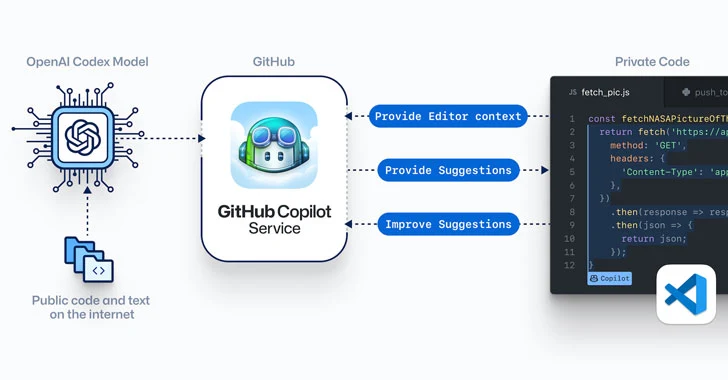
Source: https://thehackernews.com
These tools connect directly to GitHub repositories, streamline pull requests, and deliver intelligent recommendations that feel like having a smart co-pilot for your project. Here’s how AI transforms coding across industries:
Healthcare: AI can suggest secure ways to handle patient data, build telemedicine workflows, and ensure compliance with HIPAA regulations.
Finance: Fraud detection algorithms, automated reporting, and predictive analytics can be scaffolded quickly.
Logistics & Supply Chain: AI speeds up coding for inventory tracking, predictive routing, and process optimization.
Education: Adaptive learning modules, automated grading, and performance tracking can be implemented with AI-generated templates.
Beginner tip: Start with smaller, non-critical modules to experiment with AI in specialized domains, and gradually scale to complex workflows. How AI SaaS development employ this treasure?
How AI Drives SaaS Success for Small and Large Companies
AI is transforming the way SaaS companies operate—but not every company uses it the same way. A 2025 survey shows that smaller SaaS companies, with an ARR under $3M, lean heavily on AI to speed up development and automate repetitive tasks.
For these lean teams, AI in saas development acts like a turbo boost, helping them bring products to market faster without stretching resources.
Larger SaaS companies, with an ARR above $20M, take a different approach. They combine Generative AI with human expertise, balancing automation with careful oversight to maintain quality, security, and make strategic decisions that steer their product roadmap.
The scale of AI’s impact is staggering. By 2025, AI in SaaS is expected to reach $338 billion, and 55% of organizations plan to use AI for threat detection.
Machine Learning (ML): Learns patterns in data or code fragments to suggest improvements, automate routine processes, and accelerate development.
Natural Language Processing (NLP): Converts plain-language instructions into AI-powered code, tests, or documentation, saving time and reducing errors.
Predictive Analytics: Forecasts potential issues such as bugs, customer churn, or operational risks so teams can take proactive measures.
Automation: Handles repetitive coding tasks, monitors systems in real time, and applies fixes instantly, freeing teams to focus on big-picture goals.
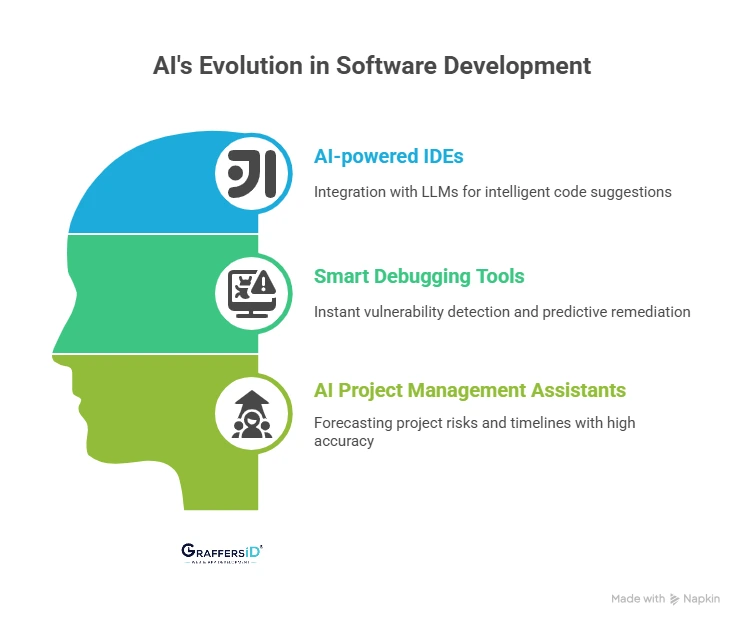
Source: https://graffersid.com/
Whether small or large, SaaS companies that adopt AI code suggestions and technologies gain a clear competitive edge.
- Qodo Merge: Automates code merging and integration, reducing manual errors and improving version control.
- Qodo Gen: Generates clean, ready-to-use code blocks for rapid feature development and consistent programming style.
- DeepCode AI: Uses AI-driven code analysis to detect bugs, security issues, and optimization opportunities early in development.
These tools simplify development, enhance code quality, and speed up delivery, helping teams build and scale full-stack apps efficiently. As a result, businesses experience faster, smarter, and safer growth. Want to know the popular real-world case?
How Paytm Uses AI-Assisted Coding to Power its SaaS Platform
Paytm, one of India’s top payment and financial platforms, handles millions of consumers and thousands of businesses, and behind the scenes, AI-assisted coding is powering its SaaS platform like a silent superhero.
Take code powered by AI payment routing, for example. Payment failures caused by server issues, gateway downtime, or network congestion can frustrate merchants and customers alike.
But with AI, developers can implement an AI Router that predicts the most reliable payment gateway using historical transaction data, ensuring smoother payments and higher success rates almost effortlessly.
Code created by ai doesn’t stop there. It supercharges feature development and integration, generating tests and ready-to-use code snippets for wallet top-ups, instant refunds, and loyalty programs, while also flagging potential conflicts or bugs before they ever reach production.
When it comes to real-time analytics, generated code by ai helps developers quickly build dashboards and reporting modules that track payments, spot anomalies, and summarize key business insights, making data-driven decisions faster and easier.
On the security front, AI-assisted coding powers predictive fraud detection algorithms that automatically flag suspicious activity, helping Paytm stay compliant while reducing coding errors.
And for scalability, AI suggests optimized database queries, caching strategies, and resource management techniques, keeping the platform fast, stable, and reliable even during peak traffic.
For developers, especially beginners, Paytm’s example shows how AI-assisted coding can accelerate development, reduce mistakes, handle complex workflows, and scale platforms seamlessly.
Essentially, it allows teams to focus on innovation and smarter solutions, while AI takes care of the repetitive, complex, and time-consuming coding work behind the scenes.
Before vs After AI-Assisted Coding in SaaS Development
| Aspect | Before AI-Assisted Coding | After AI-Assisted Coding |
| Development Speed | Weeks to implement routine features; manual testing slowed progress | Routine features built in hours or days; AI-written code and prototyping, getting your MVP ready faster |
| Error Rate | Frequent bugs, logic conflicts, and integration issues | AI flags common errors early; your team can focus on high-value features without constant firefighting |
| Feature Complexity | Unique features took a long time to implement; integration risk was high | Developers guided by AI can efficiently build advanced workflows, personalized modules, and recommendation engines |
| Scalability | Scaling required careful manual planning; risk of downtime under heavy load | AI suggests optimized architecture and database strategies; scaling becomes smoother, reliable, and less stressful |
| Innovation | Time spent on repetitive coding questions limited creative problem-solving | Developers can focus on UX, unique features, and strategic innovation while AI handles routine work |
| Analytics & Insights | Dashboards and reporting took significant time to build | AI quickly generates dashboards, real-time analytics, and predictive insights for faster decision-making |
| Security & Compliance | Manual coding left gaps; compliance required extra effort | AI supports secure coding patterns, fraud detection algorithms, and regulatory guidance, reducing risk |
| Cost Efficiency | High developer hours, even for simple features | AI reduces repetitive work, lowering development costs while increasing output and speed to market |
AI-assisted coding standards don’t replace developers; they amplify their coding efficiency, reduce time-to-market, lower costs, and let your team focus on the features that truly differentiate your product.
Why AI + Developers are the Right Combo, Not Just DIY
AI can create features in minutes, but users behave in unexpected ways. Developers step in to adjust workflows, tweak features, and let the product grow organically. For example, AI might build a recommendation engine that recommends every product equally, but developers notice users prefer certain categories and adjust the algorithm for relevance.
#1 Ethical Guardrails
AI might unintentionally introduce bias or privacy risks. Developers are the product’s moral compass. For example, AI suggested personalized promotions based on user activity, but developers ensured it didn’t expose sensitive data or reinforce biased patterns, so users trust the product.
#2 Feature Intelligence
Features rarely exist in isolation. Developers connect AI-generated modules across dashboards, notifications, and integrations. For example, AI might generate a notification system that floods users with alerts; individual developers refine it so notifications tie in with the activity feed and analytics dashboards.
#3 Proactive Problem Solving
AI can flag anomalies, but can’t prioritize potential issues for business impact. Developers analyze these flags, prevent cascading errors, and focus on what matters most. A predictive bug alert from AI might indicate multiple minor issues; developers triage and fix the ones that affect core workflows first.
#4 Development Contextual Creativity
AI handles daily coding brilliantly but can’t craft intuitive UX flows, clever features, or the little touches users love.
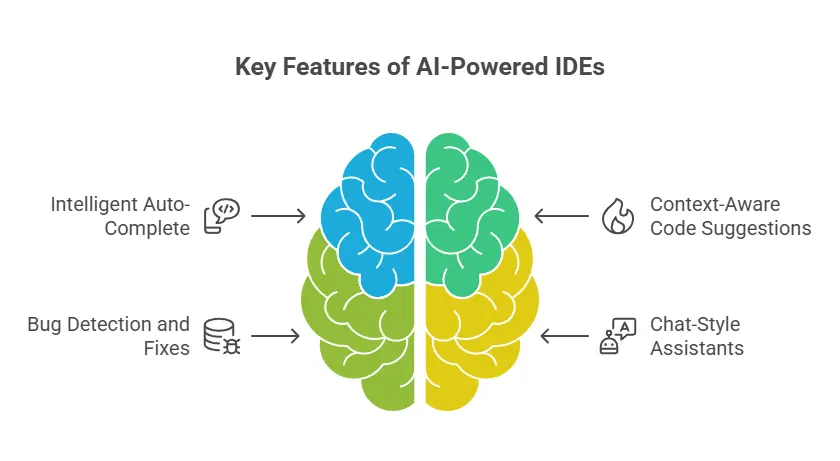
Developers might take AI-generated layouts and apply relevant suggestions, applicable code, and consistent programming style with proper code formatting conventions, or use no code development tools to adjust button placement or color schemes, ensuring the interface feels natural, polished, and engaging.
Source: https://www.geeksforgeeks.org/
#5 Scalable Knowledge Capture
Developers document assumptions, decisions, and AI outputs, so a living knowledge base is created. For example, every tweak to AI-generated analytics dashboards is logged with reasoning so the product can evolve without losing insights from early AI experiments.
#6 Human-AI Synergy for Innovation
When AI’s speed and scale meet human intelligence, creativity, and judgment, the product becomes fast, adaptive, and user-focused. Together AI generates ideas at scale, and developers turn them into coherent, polished, and truly valuable SaaS products.
Why Partnering with Appkodes Makes Sense
Choosing the right development partner isn’t just a business decision—it’s the foundation of every successful SaaS product.
When your vision includes powerful AI collaboration tools and custom features designed to stand out, you need more than just a developer. You need a partner who understands how to blend innovation with scalability.
That’s where Appkodes comes in. As a leading startup mobile app development company, we build flexible, intelligent, and future-ready platforms that evolve with your business. From on-premise deployment to full-scale SaaS solutions, we adapt to your goals and give you total control over how your software grows.
Our platforms integrate effortlessly with existing workflows, so your teams can keep working without missing a beat. Every feature we design fits perfectly into the bigger picture—creating smooth, unified platform experiences that make technology feel natural, not complicated.
Behind every product are skilled developers experienced in complex software development and scalable SaaS architectures. We craft tailored solutions that align with unique business needs, ensuring each product is secure, stable, and built for long-term growth.
Our expertise supports AI-assisted development, making it easier to combine automation with human oversight. This becomes especially valuable in no-code MVP development, where teams need to test ideas quickly without deep engineering effort.
By offering ai code suggestions, providing code recommendations, and suggesting code improvements through advanced AI-driven development tools, Appkodes minimizes risks and streamlines the entire development process for faster, smoother project delivery.

Arun Andiselvam
Founder of AppKodes. As a serial entrepreneur, I have successfully established five brands over the past 12 years. After creating a successful rank tracker for SEO agencies, I am currently dedicated to developing the world's first SEO Project Management software.