How to Build a Mobile-First MVP Using FlutterFlow & BuildFire
Have you ever seen someone launch a sleek mobile app in just a few weeks no tech team, no coding, and wondered how they pull that off? And the question remained: How did they pull that off?
The reality is that building apps today is no longer a prerogative of a developer. This is because of no-code tools like FlutterFlow and BuildFire. Even a first-time founder with zero technical background can turn an idea into a working mobile app in less time, within a budget, and without writing a single line of code.
FlutterFlow is like the Canva of app development, it lets you design fully custom apps with drag-and-drop precision and connect them to Firebase for logins, data, and more.
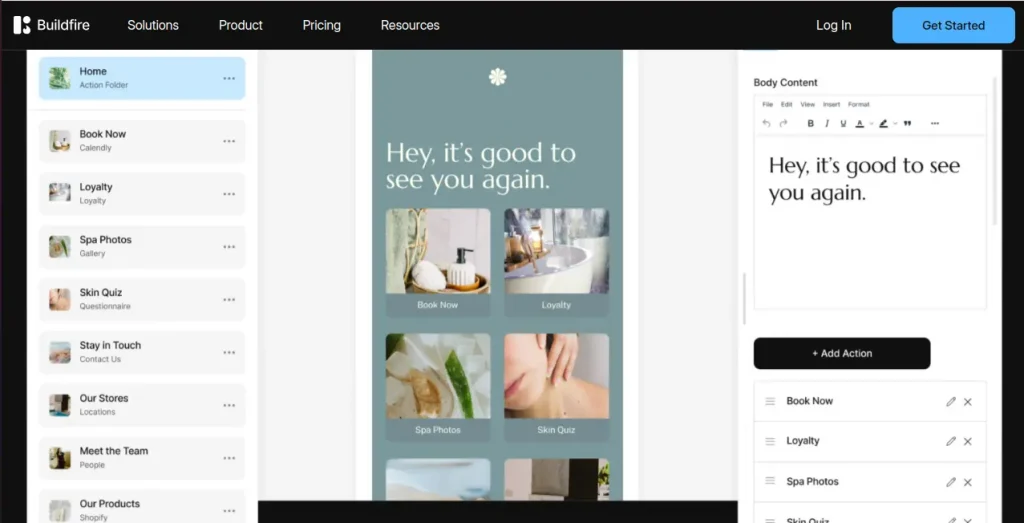
Meanwhile, BuildFire is the ultimate fast-launch platform, offering pre-built templates, ready-to-use BuildFire CMS and plugins, and one-click publishing to iOS, Android, and even as a Progressive Web App.
- Just recently, FlutterFlow announced its global developer conference after surpassing 2.3 million users.
- BuildFire rolled out a game-changing 3.0 update with a new image editor, plugin duplication, and modern design tools.
These are your tools for launching smarter, testing faster, and saving lakhs in development costs. I’ll break down exactly what you need to know before choosing one and how to validate and build a mobile-first MVP using Flutterflow and Buildfire. Ready to find out which platform, from frontend frameworks to backend tools like the MariaDB client, fits your app idea best? Let’s dive in.
FlutterFlow vs BuildFire: What You Need to Know Before Building
For the past few months, I’ve invested time in researching two incredible no-code tools. It can serve different purposes for various types of creators and be beneficial for their needs. Whether you’re a new founder or operating a scaling business knowing when to use these tools can save you from frustration.
Build Custom, Scalable Apps with FlutterFlow
For teams and designers who require complete authority over app customization, FlutterFlow no-code builder is a robust option. Using Google’s Flutter framework, it extends beyond most no-code solutions to provide a scalable and future-proof development experience.
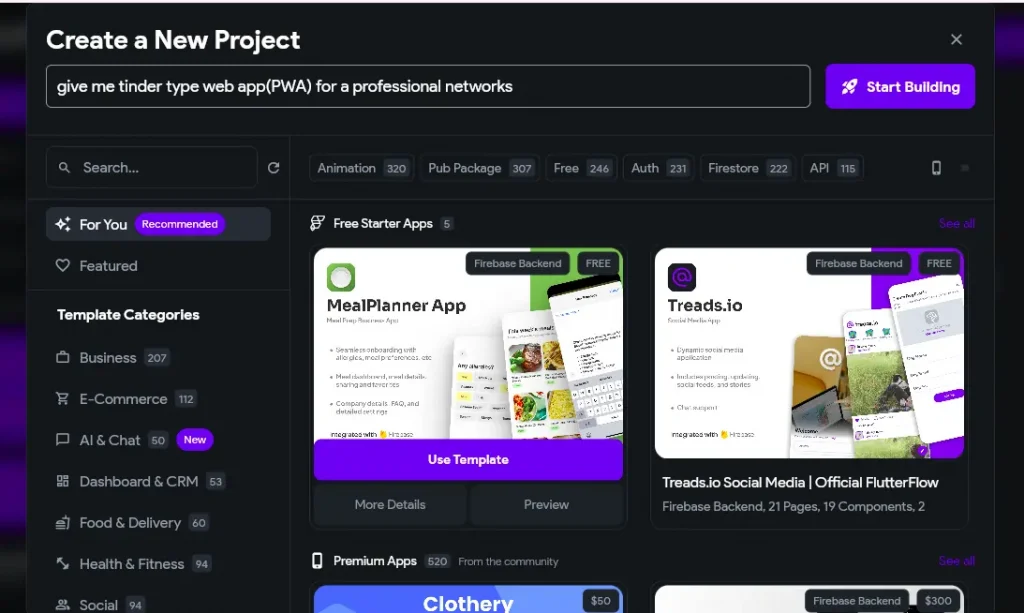
The easy-to-use drag-and-drop editor enables users to create screens graphically without writing code, while the Flutter architecture provides long-term flexibility and performance. FlutterFlow integrates seamlessly with Firebase, and users can easily set up user authentication, real-time databases, and cloud storage.
One of its greatest strengths is the capability to export neat, production-quality Flutter code at any moment, providing complete control for future development or effortless handoff to developers.
Launch Fast with AI and Pre-Built Modules Using BuildFire
BuildFire is a fast app builder without coding, best for rapid app development and ease of use. With just a few guided questions, it instantly generates your app’s foundation, making it the go-to launchpad for non-tech founders, creators, and small teams who want to move fast.
Users may further enhance their app from meetings, video chats, and calendar glues by dragging and dropping modules-a process requiring no designing knowledge.
The platform’s rich plugin marketplace lets you plug in powerful capabilities instantly, and its seamless auto-deployment system gets your app published on both iOS and Android with just a few clicks. But how to do it? Keep reading.
Mobile-First MVP Development Process Using FlutterFlow & BuildFire
If you have a cross-platform MVP app idea but don’t know how to code, you’re not alone and you’re not stuck either. AI app creation tools like FlutterFlow and BuildFire make it possible for anyone to turn a concept into a mobile MVP design, test it with real users, and go through MVP iteration and validation without hiring a full development team.
To build a mobile-first MVP, define your core features, design your interface visually, and connect it to a backend like Firebase (FlutterFlow) or use the built-in CMS (BuildFire). Here’s how.
Step 1: Define the Core of Your MVP
Before even laying hands on any tools, get straight in your head what your MVP (Minimum Viable Product App) should do. What is the issue your app addresses, and what are the bare minimum features needed to demonstrate that? Think about your MVP development plan first. Also, know BuildFire and FlutterFlow pros and cons.
Let’s take an example of developing a personal coaching app. Do you require a chat, payment gateway, and AI-driven insights on day one? Most likely not. You may require just a login screen, a list of available coaches, and a booking feature for sessions. Everything else can wait until you test your idea among early adopters.
Begin small. Concentrate on the most important version of your MVP software development, whether using FlutterFlow or BuildFire.
Step 2: Set Up a Mobile-First MVP FlutterFlow Project
So, how to build an MVP using FlutterFlow or BuildFire? Once your MVP scope is defined, go to FlutterFlow.io or BuildFire.com and sign up. This is where your app comes to life. You can start from scratch or use a template with pre-designed screens like login, home, and profile.
Inside FlutterFlow MVP development, you’ll find a drag-and-drop interface where you can build visually with no coding required. The experience feels intuitive, like creating slides in PowerPoint or editing a website.
Also, in BuildFire, the setup is even faster. It generates a working app structure from your answers during onboarding. You can drag and drop modules into your app, like forms, bookings, or content pages, all with zero code.
Step 3: Design the Interface with Ease
You don’t have to design to make a gorgeous mobile app builder for startups. FlutterFlow lets you graft any widgets through the drag-and-drop methods, such as buttons, text fields, and images, into the app. You can customize all visual aspects in the side panel: colors, fonts, spacing, and so forth, and have the app look stylish in just minutes.
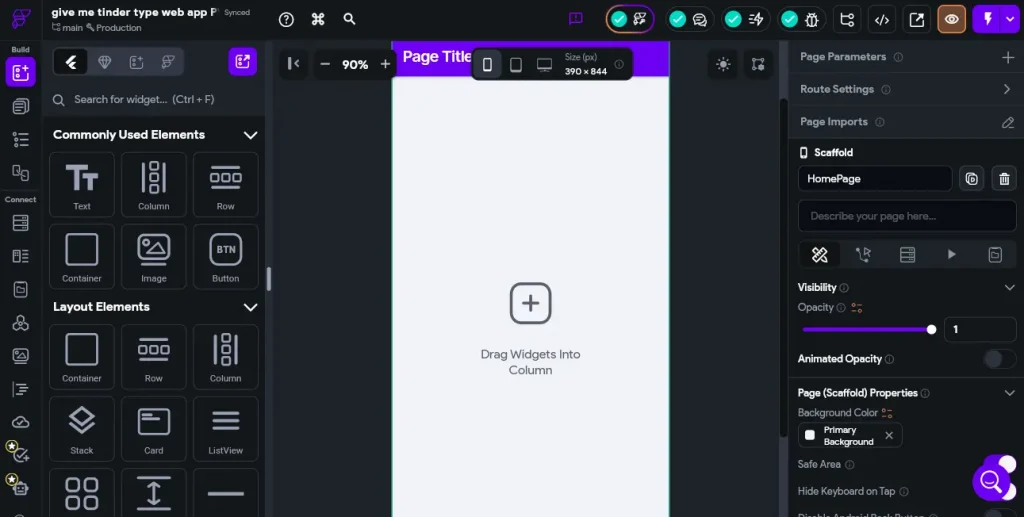
Or If you have Figma designs, you can import them; if not, start with the built-in widgets and tweak as you go.
In BuildFire, you choose from customizable templates and edit the interface using visual tools. Want to add a “Book a Coach” section or a “Contact Form”? Just add that plugin and adjust the layout visually. It’s just as easy and fast, especially for non-designers.
Keep the layout simple and clean. Never confuse your users. Clean and ample layouts look more professional and are streamlined to use.
Step 4: Connect Firebase or Supabase Backend for MVP
With the interface all set, your app requires a backend to support actual functionality such as user data saving or login management. FlutterFlow works perfectly with Firebase, Google’s backend-as-a-service.
Supabase vs Firebase which is best? In a couple of steps, you can implement authentication for user signup and login, Firestore for structured data storage, and cloud storage for items such as uploaded images by the user.
FlutterFlow offers an in-built Firebase setup tutorial that guides you on how to connect your application to Firebase in a secure manner.
If you’re more familiar with traditional databases, Supabase is a good alternative. It offers similar functionality but uses SQL under the hood.
In BuildFire, there’s no external backend setup needed. It comes with a built-in CMS and plugin-powered functionality. You can handle user authentication, store content, collect form responses, and even schedule events using its pre-made tools all through the admin dashboard.
Whether it’s Firebase for developers or BuildFire’s backend for speed, both paths let you build a working MVP in days, not months.
Step 5: Add App Logic and User Flow
This is where your MVP comes alive with interactions and logic.
In FlutterFlow, you can use its action builder to define what happens when a user clicks a button, submits a form, or switches screens. You can even add conditions, page transitions, and data updates all using visual logic blocks without code.
In BuildFire, plugins handle most of the logic. For example, the calendar module allows session booking, the form module captures user input, and push notifications can be configured easily. The logic is set via plugin settings, not by coding.
So whether you’re choosing detailed workflows in FlutterFlow or using plug-and-play functionality in BuildFire, both give you control over how your app behaves.
Step 6: Preview and Test Everything
After the development phase of your app, before the early-stage product launch, you will now proceed to test it. FlutterFlow allows you to have a live preview in a browser or on a mobile device via the companion app. Go through each screen, complete every form, and verify each correct insertion of data into the database.
In BuildFire, you can see live previews as you edit. There’s even a test app for real-time testing on your device. Invite friends to test the MVP flow and give feedback, especially about confusing buttons or steps you may not have noticed.
Don’t just test it yourself. Give a couple of trusted friends a preview link for them to try out and report back. They might notice confusing buttons or steps that you may have missed. Getting an early MVP feedback loop saves you from talking about features no one wants.
Before launching, preview and test your app thoroughly.
Step 7: Deploy
After your MVP testing and feedback, it’s a glorious moment for you when it is ready to go. You can export Flutter code from FlutterFlow if you need more customization, or combine it with BuildFire to enhance both iOS and Android deployment and advanced features.
However, if time is of the essence, you can recreate your MVP using BuildFire, which lets you basically send the app out to the masses without even touching a line of code or certificates.
If you want to actually get the app in the hands of early users as fast as possible while still working on a more scalable version in FlutterFlow in the background, it’s a great option. Also it is essential to know they come with some challenges.
What to Watch Out for When Using FlutterFlow & BuildFire for MVPs?
#1 No-code platforms such as FlutterFlow and BuildFire look plug-and-play initially, but creating actual apps means working with app logic, data movement, and backend integrations. Configuring workflows or handling Firestore collections tends to take a level of technical nuance beyond anticipated.
#2 Integrating Firebase or Supabase is more than dropping in a login component. Handling authentication, permissions, and real-time data tends to involve manual configuration and careful tuning, particularly for non-technical founders.
#3 While having the freedom to build visually is wonderful, some advanced features might not be possible without actually coding. Some platforms also don’t allow code export, questioning long-term flexibility as well as actual ownership of the product.
#4 Selecting platforms such as FlutterFlow that support full Flutter code export provides better control of your app’s future. It provides the ability to hand off simply to developers or convert to more advanced custom solutions when necessary.
#5 Platforms such as BuildFire AI app builder provide pre-built templates and feature modules that can accelerate development, particularly in the initial stages, where getting a testable version out quickly is most important to gather feedback.
#6 To hire a part-time developer who is knowledgeable in no-code and in actual development will make a huge impact. They will be able to troubleshoot complex problems, add missing features, and keep the app architecture scalable. But do you know how users use these tools? Read on.
How Founders Use these Tools?
Instead of just listing features, let’s walk through three real-life startup scenarios. Each company took a different approach: one chose FlutterFlow, one chose BuildFire, and one used both strategically. What they learned might just help you decide your next step.
#1 The Scalable Fintech Startup
This fintech startup had a clear vision from day one: they were building a loan management app that would need dashboards, user-specific workflows, and future API integrations. Rather than hire a full dev team upfront, they turned to FlutterFlow.
Using its visual editor, they designed their app with pixel-level control, integrated Firebase for secure authentication and real-time database needs, and exported clean Flutter code when they were ready to expand.
- Full control over app UI and logic
- Build MVP app with Firebase backend in days
- Saved $10k+ in early development costs
- The app was developer-ready within weeks
They needed a flexible, scalable foundation that could grow into a full product. FlutterFlow gave them that without forcing them to sacrifice customization or code control.
#2 The Solo Wellness Entrepreneur
A solo fitness coach wanted to launch a branded wellness app fast. She didn’t have a technical background and didn’t want to spend months or thousands figuring it out. Her goal was simple: get into the App Store, reach users, and test engagement.
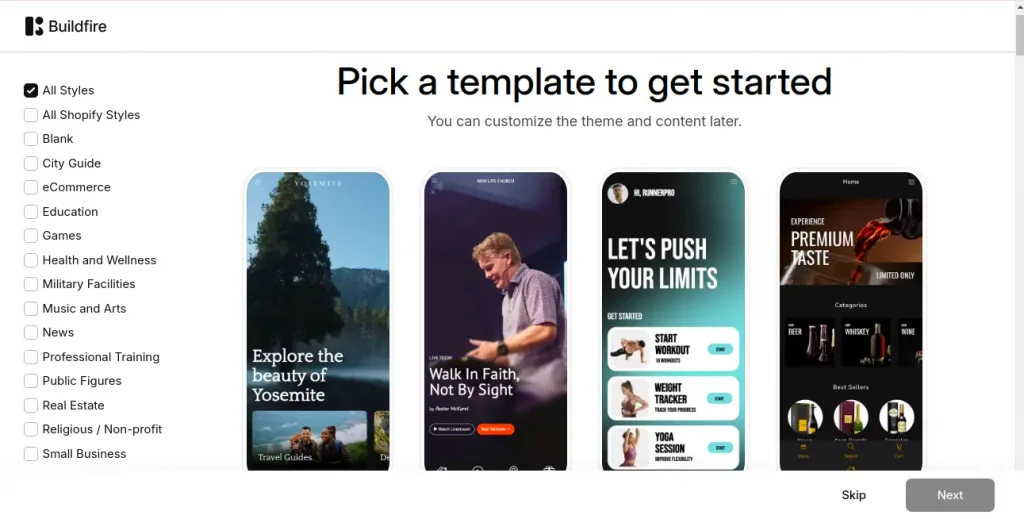
She chose BuildFire, answered a few questions, and used a drag-and-drop app builder to create a fully functional workout app with video content, booking options, and push notifications. In under 10 days, her app was live.
- Published to App Store in a week
- No dev or design team required
- Over 100 downloads in the first month
- Direct feedback helped shape her next steps
BuildFire vs other AI builders, which works best? She needed speed and simplicity, not a full custom build. BuildFire let her launch quickly and validate her concept with real users.
#3 The Smart Hybrid Startup
This Gen Z-focused mental wellness startup took a two-phase approach. In the first phase, they launched a basic community app using BuildFire to test their concept. With built-in modules like chat and video content, they gathered early feedback quickly without overinvesting in development.
Once they had real user data and a better product roadmap, they rebuilt the app by adding custom features, gamification, and FlutterFlow Firebase integration. The transition from prototype to scalable backend for MVP was smooth because they knew exactly what to build and what users wanted.
- MVP validation in <2 weeks using BuildFire
- Scalable rebuild in FlutterFlow with clean code
- Increased retention after user-driven improvements
- Raised pre-seed funding based on working MVP
They used the best platform to build their MVP. BuildFire to validate and FlutterFlow to scale the best of both worlds.
When it comes to FlutterFlow vs BuildFire, the right tool depends on where you are in your journey. Are you trying to prove your idea? Or are you ready to build something scalable?
The smartest founders today aren’t choosing just one; they’re using each tool when it makes sense. Validate first. Then scale with confidence.
The Future of MVP Development: No-Code + AI
For years, launching a tech product meant hiring developers, writing thousands of lines of code, and spending months or more just to test an idea. But now, thanks to the rise of no-code platforms like FlutterFlow and BuildFire combined with the power of AI, that entire model is being rewritten.
1. No-Code MVP Tools are Becoming Production-Ready
No-code platforms like FlutterFlow have come a long way; they’re no longer just for mockups or demos. Powerful features like Firebase integration with FlutterFlow, built-in animations, state management, and the ability to export real Flutter code, these tools now support fully functional, production-ready apps.
Platforms like BuildFire make it even easier for solo founders and business owners to publish to iOS and Android without any backend setup, something that was previously locked behind dev teams and app store know-how.
In the future, we’ll see more no-code tools offering:
- Real-time app scalability tools (e.g., serverless backend support)
- Built-in performance optimization
- Drag-and-drop access to features like AI chatbots, analytics, and third-party APIs
This means your mobile-first MVP can grow without hitting tech walls and without needing to rebuild from scratch.
2. AI will Co-Build Your Product
We’re stepping into a new era, where AI isn’t just assisting, it’s co-building with you. The way founders build apps is rapidly changing. Instead of manually designing every screen or logic flow, AI is stepping in to handle the heavy lifting.
Already, platforms are experimenting with AI MVP development:
- AI-generated app structures (BuildFire does this today)
- Auto-suggested workflows or logic flows based on user goals
- Code generation from text prompts (FlutterFlow is testing LLM integrations)
- AI QA and bug detection for smoother testing
- Personalized onboarding inside no-code tools, guided by AI copilots
Soon, founders will be able to say, “Build me a marketplace app with messaging and payment integration,” and the tool will scaffold 80% of the app’s logic, backend, and UI automatically.
This shifts the founder’s role from “technical decision-maker” to vision shaper and tester. You’ll spend more time refining the user journey and less time getting blocked on how to implement it.
3. MVPs will be Faster, Smarter, and More Data-Driven
In the near future, no-code vs low-code MVP development, when compared, will look more like this:
- Idea validation in 48 hours, not months
- Continuous A/B testing baked into no-code tools
- Real-time user feedback dashboards are auto-connected to product iterations
- In-app AI surveys and analytics help you iterate without writing a single script
Founders will launch, learn, and pivot in weeks, not quarters.
4. Hybrid No-Code/Low-Code Teams will be the Norm
Most startups won’t be either “fully dev” or “fully no-code,” they’ll be hybrid.
A product manager or non-tech founder may own the BuildFire or FlutterFlow prototype, while a part-time dev helps handle integrations or optimize exported code. This blend makes teams leaner, faster, and more affordable and is perfect for the MVP stage.
Expect to see:
- No-code builders as a core hiring role
- Low-code integrations for edge cases or custom needs
- Developer focus shifts from building UI to enhancing and scaling existing no-code prototypes
5. Democratization = More Innovation, Everywhere
The biggest future win? Access.
Because no-code and AI reduce the cost, time, and skill needed to build, more diverse founders from different geographies, industries, and backgrounds will enter the product-building world.
Innovation won’t just come from Silicon Valley anymore; it’ll come from small towns, emerging markets, local businesses, creators, solopreneurs, and underfunded niches. This means more:
- Localized MVPs for niche problems
- Cultural innovation with tech tools
- User-first products are built by the people who understand the users best
Ready for the Next Step?
If you’ve launched your mobile-first MVP or are just starting to explore your app idea, you don’t have to figure it all out alone. That’s where we can help you.
Appkodes, a startup app development company with years of experience helping startups, entrepreneurs, and small businesses turn ideas into real-world apps. From early planning to full launch, we’ve worked with clients across industries, including dating, rental, e-commerce, and healthcare, to make apps that don’t just look good but actually work for users.
We understand how overwhelming the journey can feel. Even if you’re not from a tech background. Our team is here to simplify that process. Whether you’re just validating your concept, need help improving your app prototype, or want to launch an early version of app in the market, we work alongside you, not above you.
At Appkodes, we focus on understanding your business goals, offering ready-made apps and flexible solutions to save you time, also providing ongoing support to you long after launch with updates and guidance, making lean startup MVP feel simple and transparent.
No jargon. No pressure. Just a trusted team that helps you move from idea to impact at your pace.
Frequently Asked Questions
1. Is FlutterFlow good for MVPs?
Yes, you can create an MVP with FlutterFlow, especially if your mobile-first MVP requires custom UI and backend logic, or if scaling is part of the plan. FlutterFlow is basically a drag-and-drop platform from which you can export code in Flutter for advanced customization. Hence, this is an ideal platform for turning MVPs into production-ready apps.
2. Can I develop and deploy without coding?
Absolutely! FlutterFlow and BuildFire made an app-building system that requires zero coding. Once you are done building in BuildFire, you can deploy it in app stores with just a click. FlutterFlow, however, requires a little setup for deployment, but it gives you more control career-wise.
3. What is better than FlutterFlow?
That depends on what one is looking for. BuildFire puts the emphasis on faster deployment. If total freedom of design is what you are after, plus Flutter code export, there is virtually no other no-code platform better than FlutterFlow. For advanced web apps, you can also check tools like Bubble.
4. What backend works with FlutterFlow?
FlutterFlow integrates natively with Firebase authentication, Firestore, and cloud storage. You can also use Supabase or APIs to link external databases and services for added flexibility.
5. Is BuildFire scalable?
BuildFire is scalable for both simple and utility-based apps, particularly for small businesses or internal tools. However, for deeply customized, logic-heavy, or performance-critical apps, you’ll eventually want to transition to a more flexible platform like FlutterFlow or traditional development.

Arun Andiselvam
Founder of AppKodes. As a serial entrepreneur, I have successfully established five brands over the past 12 years. After creating a successful rank tracker for SEO agencies, I am currently dedicated to developing the world's first SEO Project Management software.