How to Write Good Prompts That Help You Get Better Responses
Did you know that generative AI adoption has skyrocketed faster than almost any consumer technology in the last decade?
A 2025 study from the Federal Reserve Bank of St. Louis shows usage among U.S. adults jumping from 44.6% in 2024 to 54.6% in 2025, a surge that rivals the breakout moment of smartphones.
At the same time, the PwC 2025 Global Workforce Survey reveals that daily AI users enjoy 92% higher productivity, stronger job security, and faster salary growth compared to those who use it only occasionally.
Yet here’s the twist no one talks about.
Imagine millions of people gaining access to an intelligent assistant capable of brainstorming, analyzing, creating, and predicting, yet most never tap into even a fraction of its potential.
Not because the AI is limited, but because users don’t know how to speak its language. It’s like having a world-class chef in your kitchen and handing them a recipe titled “Just make something.”
This is where the overlooked skill of how to write good prompts becomes the real game-changer.
In this guide, we’ll uncover why prompt quality determines whether AI gives you brilliance or nonsense and walk you through simple, practical ways to write good prompts that turn AI into a sharper, more strategic partner for your work.
In the world of AI, a prompt is essentially the question, instruction, or context you give to an AI model to get a meaningful response. Think of it as a conversation starter; what you ask determines what you get.
For us, understanding how to craft prompts can unlock new ways to innovate, strategize, and solve problems even without a technical background.
How LLMs Interpret Prompts
Think of a Large Language Model (LLM) like GPT as a smart collaborator. When you give it a prompt, it analyzes your instructions, context, and intent before crafting a response. Here’s a way to visualize it step by step:
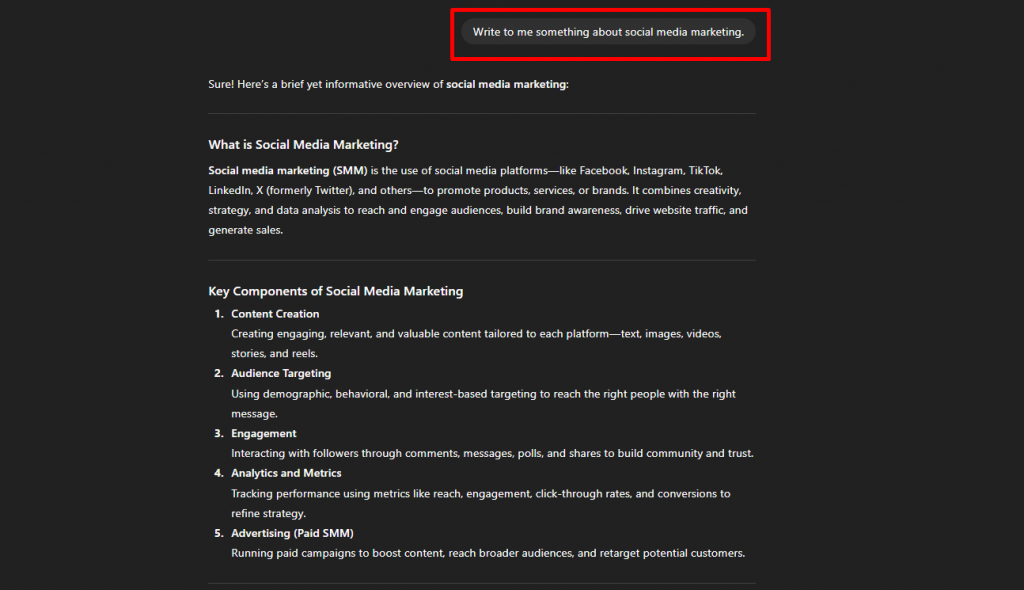
Step 1: Vague Prompt → Generic Output
- Prompt: “Write a social media post.”
- What happens: The AI might create a post that is very generic, without any particular theme, tone, or audience in mind. It works, but it’s not tailored.
Step 2: Clear Prompt → Focused Output
- Prompt: “Write a LinkedIn post introducing our new project management tool, highlighting 3 key features for remote teams.”
- What happens: The AI now understands the platform (LinkedIn), the purpose (introducing a product), and the content focus (3 features), giving you a post you can actually use.
Step 3: Contextual Prompt → Tailored Output
- Prompt: “Based on this customer feedback [insert text], write a Facebook post thanking users for their reviews and encouraging others to try our service.”
- What happens: The AI uses the context (real customer feedback) to craft a post that feels authentic and relatable.
Step 4: Fine-Tuned Prompt → Perfectly Aligned Output
- Prompt: “Write a friendly, 150-word Facebook post celebrating our 5-year anniversary, include a customer testimonial from [insert text], and add a call-to-action to visit our website.”
- What happens: The AI delivers a complete, ready-to-post message that hits the tone, length, and purpose perfectly.
Types of Prompts
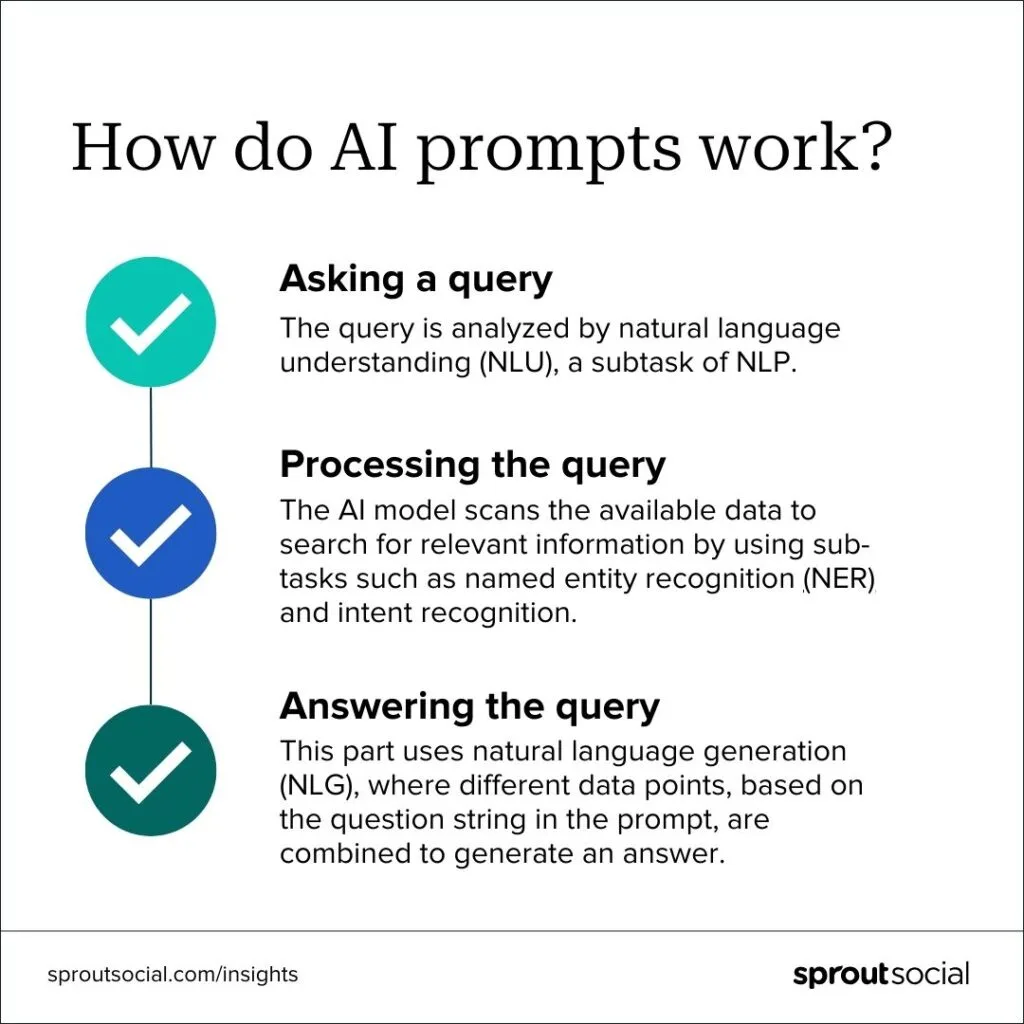
Not all prompts are created equal, and knowing the differences can make a huge difference in the kind of results you get from generative Artificial Intelligence tools. For anyone learning how to write good prompts, the key is recognizing that types directly shape the AI’s responses.
Source: https://sproutsocial.com/
1. Instructional prompts are the simplest and most direct. They tell the AI exactly what you want it to do.
For example, you might ask, “Generate a list of 10 marketing ideas for a small coffee shop.” These prompts work best when your goal is clear and specific, giving the AI a straight path to follow.
Other examples:
- “Write 5 catchy email subject lines for a new fitness app targeting beginners.”
- “Create a 7-day content calendar template for an e-commerce brand.”
2. Conversational prompts take a more interactive approach. They let you engage with AI as if you were speaking to a mentor, consultant, or colleague.
You could ask, “Act as a business advisor and suggest ways to improve customer retention.” This style is particularly useful when you’re looking for advice, brainstorming ideas, or exploring multiple perspectives.
Other examples:
- “You are a marketing consultant. How can a local café increase foot traffic without paid ads?”
- “Pretend you are a first-time user of a language learning app. What features would improve your experience?”
3. Structured prompts provide a framework or format for the AI’s response.
For instance, “Create a comparison table of three project management tools, including pricing, features, and ease of use.” By giving the AI a structure, you can ensure the output is organized and easy to use, which is especially helpful for reports, analyses, or presentations.
Other examples:
- “List 5 blog post ideas for a health website. Include topic, target audience, keyword, and estimated reading time.”
- “Generate a checklist of essential features for a mobile food delivery app: User App, Admin Dashboard, Payment System.”
4. Contextual prompts give the AI background information to generate responses tailored to a specific scenario.
An example would be, “Using this product description, write an email that would appeal to potential investors.” By providing additional context, you guide the AI to produce responses that are not only accurate but also relevant to your specific needs.
Other examples:
- “We sell eco-friendly yoga mats. Write a social media post targeting beginners who care about sustainability.”
- “Based on this sales data for October [insert data], summarize the key trends and insights for the management team.”
Principles of Writing Effective Prompts
How to write good prompts? Writing prompts for AI is a skill, and like any skill, it improves with practice. Some simple principles can make a big difference in the quality of the results you get.
#1 Be Specific
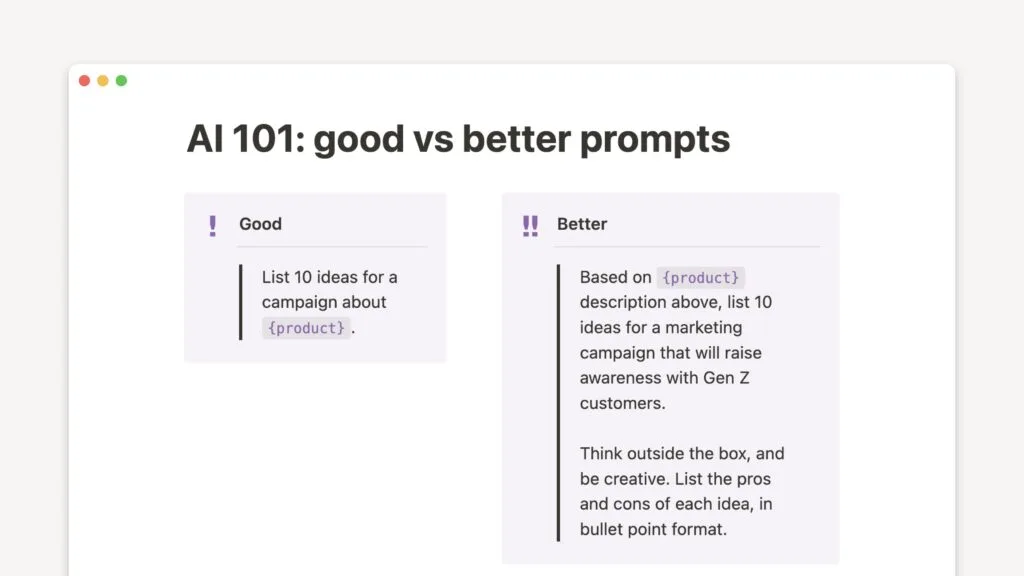
Precise instructions lead to precise results. Instead of saying, “Give me marketing ideas,” try, “List 10 social media marketing ideas for a small bakery targeting local customers.” Clearly defining goals and constraints helps the AI focus on what matters most.
#2 Provide Context
Background information guides the AI to produce relevant and actionable responses. For example, specifying that an email is aimed at investors rather than customers changes the tone, content, and approach entirely.
#3 Use Structure
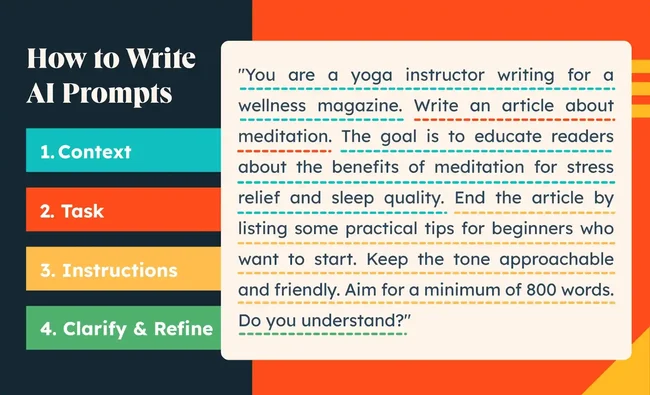
Structured prompts help the AI produce organized outputs. You can use bullet points, templates, or delimiters (like “”” or < >) to indicate sections, boundaries, or instructions clearly. Structured prompts are particularly useful when you want lists, comparisons, or multi-part outputs that are easy to read and act upon.
Source: https://blog.hubspot.com/
#4 Define the Output Format
Explicitly stating the output format ensures the AI’s response is ready to use. Whether it’s JSON for a web application, a table for analysis, a bulleted summary for reports, or UI copy for a website, defining the format saves you from having to rework the AI’s output later.
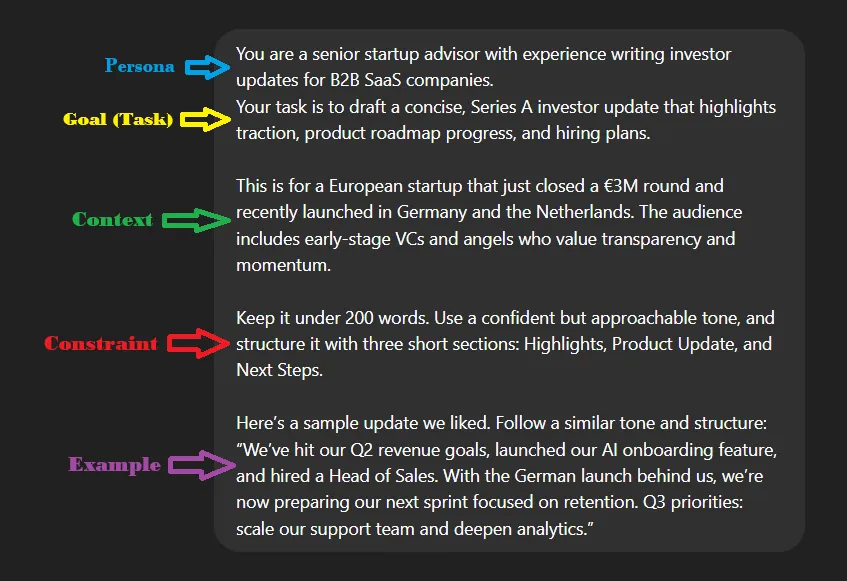
#5 Give Examples
Sometimes, the best way to guide AI is to show it what you mean. Few-shot prompting, providing one or more examples of the desired output, helps the model understand your expectations. You can include before-and-after examples, sample data, or previous outputs to illustrate exactly what you want.
Prompting Techniques for Entrepreneurs
Once you understand the basics of prompting, the next step is learning how to use specific techniques to get the most out of AI. Different techniques can help entrepreneurs generate better content, make smarter decisions, and even simulate real-world interactions.
1. Role-Based Prompting
One of the simplest yet most powerful techniques is asking the AI to take on a specific role.
For example, you might prompt, “You are a UX writer. Suggest a copy for a mobile app onboarding screen that is clear and engaging.”
By framing the AI as an expert in a particular role, you get responses that are more focused, relevant, and aligned with professional standards.
2. Chain-of-Thought / Step-by-Step Prompting
Sometimes, a complex task needs careful reasoning. Step-by-step or chain-of-thought prompting encourages the AI to work through problems sequentially.
For instance, instead of asking for a final business strategy, you can prompt it to “List the key steps to increase subscription retention, considering marketing, product features, and customer support.” This technique often results in more thorough and actionable outputs.
3. Persona-Driven Prompts
For entrepreneurs designing products or services, simulating user perspectives is invaluable. Persona-driven prompts let the AI take on the characteristics of a target user, helping you anticipate needs, objections, or preferences.
For example: “You are a first-time online shopper concerned about security. How would you react to this checkout process?”
Practical Prompting in Real Business Scenarios
Entrepreneurs often discover that AI becomes far more useful when prompts feel like real business briefs rather than vague instructions. And this is exactly where understanding how to write good prompts starts to create a measurable difference in the quality of outcomes.
A few extra details your audience, message, tone, or desired outcome, can shift the output from generic to genuinely usable. Across industries, this small shift makes an outsized difference in the quality of content, insights, and communication you get back.
In e-commerce, for instance, prompts work best when they reflect how shoppers actually make decisions. Instead of a broad “write a product description,” the AI responds far better when you describe:
- who the product is for,
- what benefits matter most to them,
- the tone your brand uses, and
- the ideal length of the description.
- With these details, the output starts feeling like copy that belongs on a real product page, not something generic.
Example prompt:
“Write a 120-word product description for a cotton summer dress designed for working women aged 25–35. Highlight breathability, all-day comfort, and premium stitching. Tone: modern, minimal, and clean.”
Source: https://hatchworks.com/
The same level of intention helps in real estate, where buyers care about lifestyle as much as the property itself. When your prompt includes:
- the property type and location,
- the target buyer, and
- the key amenities or selling points,
- the AI can frame the property in a way that appeals directly to the right audience.
Example prompt:
“Create a listing description for a 2BHK apartment in Indiranagar, Bangalore. Target young professionals. Emphasize coworking facilities, metro connectivity, nearby cafés, and the property’s pet-friendly environment. Keep it concise and sales-ready.”
In healthcare and wellness, context is essential for producing content that is safe, accurate, and relatable. Clarifying:
- the purpose of the content (newsletter, blog, social post),
- the audience (employees, patients, general readers), and
- the boundaries (no medical claims),
- helps the AI generate material that is both responsible and engaging.
Example prompt:
“Write a 400-word article on stress management for a corporate wellness newsletter. Avoid medical claims. Provide simple techniques employees can try during a busy workday, such as breathing exercises, desk stretches, and micro-breaks.”
For EdTech, specificity makes explanations more effective. Guiding the AI with:
- the learner’s grade level,
- the level of complexity required, and
- the preferred format (analogy, summary, steps),
- transforms the output into something students can actually understand and remember.
Example prompt:
“Explain photosynthesis for 8th-grade students using simple language. Include one easy analogy and add a 3-step revision summary they can quickly review before exams.”
In SaaS and B2B, precision becomes even more important because audiences are niche and expectations are higher. A strong prompt often includes:
- who you are communicating with,
- what your product solves,
- what metric proves the value, and
- the tone you want (short, professional, value-first).
- This helps the AI produce communication that feels targeted and intended outcome-driven.
Example prompt:
“Write a 90-word cold email to CTOs of mid-sized retail companies. Present our inventory optimization SaaS as a way to reduce stockouts by 15%. Maintain a professional, concise, value-first tone.”
Even experience-driven industries like hospitality and travel benefit significantly from detailed prompts. Sharing details like:
- the type of property,
- the type of traveler you want to attract, and
- the experience highlights you want to emphasize,
- allows the AI to craft copy that evokes the right mood and encourages bookings.
Example prompt:
“Create a 150-word landing page introduction for a luxury resort in South Goa. Target couples seeking privacy. Highlight ocean views, private plunge pools, bespoke dining, and curated romantic experiences.”
Across all these scenarios, the pattern holds: the more your prompt resembles a real creative or marketing brief, the more the AI behaves like a real creative or marketing partner. Practical prompting isn’t about being technical; it’s about being intentional.
Common Prompting Mistakes and How to Avoid Them
Even experienced entrepreneurs often run into familiar challenges when working with AI. Understanding these mistakes and knowing how to prevent them helps teams create clearer, faster, and more reliable outputs without unnecessary details and trial and error.
1. Overly Long Prompts
While context is important, extremely long prompts can overwhelm the model and blur the core objective. The best results usually come from breaking complex tasks into smaller, well-defined instructions.
In practical workflows, this is something teams naturally help with, because different members often refine, reword, and structure inputs so the AI processes them more effectively.
Treat the prompt like a brief: focused, organized, and easy for both humans and AI to follow.
2. No Output Constraints
AI tends to generate broad, free-form answers if it isn’t given clear boundaries. Without specifying format, tone, or length, the output may feel scattered or hard to use in a real product or campaign.
Many teams avoid this by agreeing internally on standard formats, whether it’s bullet points, tables, scripts, or JSON, so the AI returns information that fits directly into existing workflows.
Simply deciding “what the output should look like” improves consistency across everything you generate.
3. Ambiguous Instructions
Vague prompts often lead to vague responses. Asking something like “improve this content” doesn’t give the AI direction on what improvement means: Is it readability? SEO? Tone? Structure?
When multiple people collaborate on content or product tasks, they naturally clarify these requirements, which turns the instruction into something the AI can act on with precision.
Clear intent reduces friction and results in output that aligns with what the business actually needs.
4. Assuming the Model Knows Business-Specific Details
AI doesn’t come with built-in knowledge of your business model, customer type, workflows, or competitive landscape.
Entrepreneurs sometimes skip essential details, expecting the model to fill in the gaps. When teams interact with AI regularly, they tend to document context like personas, product descriptions, and messaging guidelines so the model receives the same baseline information each time.
This avoids generic outputs and ensures the responses reflect the actual business environment.
5. Not Testing Variations
A single prompt rarely produces the ideal result. Iterating with slightly different versions often reveals clearer complex sentence structures, stronger outputs, and better alignment with goals.
In real-world use, teams naturally test variations because each person brings a different framing, which exposes new angles and improves the final prompt.
Source: https://www.thevccorner.com/
Treat prompting as a small, ongoing experiment where you refine, compare, and adjust until the model consistently produces what you want.
Advanced Prompt Strategies for AI Apps
Once you’ve mastered the basics of prompting, you can explore advanced strategies to make AI even more powerful, especially when building apps or digital products. These techniques help you manage complexity and scale AI outputs for real-world applications.
1. System Prompts vs. User Prompts
In AI applications, prompts can be divided into system-level instructions and user-level requests. System prompts define the AI’s overall behavior, tone, or rules, such as “You are a helpful assistant that always provides concise answers.”
User prompts are the day-to-day inputs from end-users. Separating these ensures consistency and allows AI to behave predictably across multiple interactions.
Examples:
- Customer Support Team: A system prompt may define the AI’s tone as calm, clear, and empathetic, while user prompts come from actual customers seeking troubleshooting help.
- HR Department: A system prompt tells the AI to follow company policies when answering workplace-related queries; user prompts include employee questions about leave, benefits, or processes.
2. Multi-Turn Conversation Design
AI often performs better in conversations when it can maintain context over multiple turns. Designing multi-turn prompts allows the AI to remember previous inputs, track decisions, and build on prior responses. This is essential for apps like chatbots, customer support, or interactive guides where continuity matters.
- Operations: The AI collects details step by step, inventory levels, delivery issues, and supplier constraints before suggesting operational improvements.
- Product Team: The AI runs a structured brainstorming session, asking for goals, constraints, and user personas before generating feature ideas.
3. Retrieval-Augmented Prompting (RAG)
Sometimes, AI needs external information to produce accurate answers. Retrieval-augmented prompting combines AI with a knowledge base or database, allowing it to fetch relevant data before generating responses. Essentially, this technique functions like a specialized AI search engine tailored to your internal data.
For entrepreneurs, this means AI can provide real-time, context-aware answers for users without needing to memorize everything itself.
Examples:
- Legal/Compliance: AI pulls the latest policy documents to answer employee questions without giving outdated or incorrect guidance.
- Finance: AI retrieves real-time pricing sheets, invoices, or budgeting templates before preparing financial summaries.
4. Prompt Chaining for Complex Workflows
Complex tasks often require multiple steps. Prompt chaining connects several prompts in sequence, allowing AI to process tasks step by step.
For example, an AI might first analyze customer feedback, then summarize insights, and finally generate an action plan all through connected prompts. This strategy is powerful for automating multi-step business processes.
- Customer Experience: Step 1: Analyze customer reviews → Step 2: Identify recurring issues → Step 3: Propose improvement actions.
- Recruitment: Step 1: Extract skills from resumes → Step 2: Match skills to job criteria → Step 3: Generate a shortlist summary.
5. Using APIs and Templates for Production Apps
When deploying AI in real-world applications, developers rely on APIs and reusable templates. These tools allow AI outputs to be seamlessly integrated into apps, dashboards, or web platforms.
Templates standardize prompt sentence structures, while APIs enable dynamic input and output handling, making AI both scalable and reliable in production environments.
Examples:
- Support Portals: Templates ensure every answer follows the same troubleshooting format, while APIs fetch ticket details to personalize responses.
- Learning & Development: Templates generate lesson plans, while APIs bring in curriculum data or learner progress.
Tools and Frameworks to Help You Write Better Prompts
Writing effective prompts doesn’t have to be a struggle. With the right tools and the support of a development team, it can become almost effortless.
Prompt Testing Tools
These tools let you experiment with different prompts and instantly compare outputs. Alone, it can feel like trial and error, but with a development team, testing becomes systematic and efficient. Teams can quickly identify what works best and integrate it seamlessly into workflows.
AI Playgrounds
AI playgrounds provide a sandbox to try out prompts in real time. Entrepreneurs can prototype ideas and see immediate results. A development team can take these experiments further, scaling them and preparing prompts for integration into apps or systems without the usual headaches.
Prompt Template Libraries
Prompt template libraries help teams organize reusable, high-performing prompts in one place. They ensure consistency across projects, reduce repetition, and speed up development. With clear documentation and standardized patterns, teams can quickly adapt templates for new use cases without starting from scratch.
Versioning Tools
Keeping track of prompt changes is crucial. Versioning tools let teams save, compare, and roll back prompt iterations. Alone, managing versions can be tedious, but a development team can handle it smoothly, ensuring nothing gets lost and improvements are implemented quickly.
Use Cases: Prompts Entrepreneurs Can Start With
AI prompts aren’t just a technical experiment; they’re tools that can drive real business impact. Here are some practical ways entrepreneurs can start using prompts today:
1. Customer Support AI
AI can handle common customer questions, troubleshoot issues, and provide instant responses. By creating prompts that simulate real customer interactions, entrepreneurs can build AI chatbots that save time and improve customer satisfaction.
2. Product Recommendation Engines
Prompts can power personalized recommendations, helping your business suggest products or services based on user behavior, preferences, or past purchases. Even a simple prompt can help an AI suggest the right upsell or cross-sell opportunities.
3. Content Generation
From social media posts to blog articles, prompts can help generate creative, engaging content quickly. Entrepreneurs can use structured prompts to maintain brand voice and consistency while significantly reducing content production time.
Source: https://ezycourse.com/
4. User Onboarding Assistants
Guiding new users through your app or service can be automated with AI. Prompts can help create step-by-step instructions, tips, and personalized recommendations, making onboarding smoother and more engaging.
5. Internal Process Automation
AI isn’t just for customers; it can help streamline internal operations. Prompts can automate reporting, summarize meeting notes, draft emails, or even generate analytics insights, freeing up your team to focus on higher-value tasks.
How to Test, Evaluate, and Improve Prompts
Writing a prompt is just the beginning. To get the best results, entrepreneurs need a process for testing, evaluating, and refining prompts, and this is where a development team can make the process smooth and efficient.
a. A/B Testing Prompt Variations
Trying different versions of the same prompt helps identify which one produces the most accurate or useful response. Alone, this can be time-consuming, but a team can systematically design and test multiple variations, compare outputs, and quickly determine the best approach.
b. Evaluating Output Accuracy
Not all AI outputs are perfect on the first try. Teams can set benchmarks for quality, relevance, and clarity, ensuring that each prompt consistently delivers valuable results. This step is critical for business use cases like customer support, product recommendations, or content generation.
c. Prompt Performance Tracking Inside Apps
For AI embedded in apps, tracking how prompts perform in real-world interactions is key. Teams can monitor user engagement, success rates, or errors, using this data to continuously optimize prompts. This makes AI more reliable and aligned with business goals.
d. Continuous Refinement Loop
Prompt improvement is ongoing. With a collaborative approach, teams can refine instructions, adding more context, adjust output formats, and iterate quickly. This continuous loop ensures that AI not only meets current needs but also evolves alongside the business.
Why Appkodes?
Partnering with Appkodes, a leading startup mobile app development company, gives entrepreneurs a practical way to turn ideas into polished digital experiences without getting buried in technical complexity.
Instead of spending months trying to perfect prompts or fine-tune workflows alone, businesses can rely on Appkodes’ mix of AI development services and no-code MVP development to accelerate execution.
This collaboration makes it easier to shape artificial intelligence generated content into usable, high-quality outputs that support real business goals. With a structured approach, teams can focus on creativity and strategy while Appkodes handles the technical foundation.
More importantly, the partnership creates a cycle of continuous iteration, where every new insight, test, or user interaction helps refine the system and generate better outcomes. Whether you’re improving a recommendation engine, polishing onboarding flows, or optimizing customer interactions,
Appkodes ensures each version gets smarter and more aligned with your desired outcomes. Instead of static solutions, you get an adaptable AI-powered product that evolves with your users, delivering value that compounds over time.

Arun Andiselvam
Founder of AppKodes. As a serial entrepreneur, I have successfully established five brands over the past 12 years. After creating a successful rank tracker for SEO agencies, I am currently dedicated to developing the world's first SEO Project Management software.