9 Prompts to Write Code, Test, & Fix It – You Don’t Have To
Remember when writing code meant staring at a blank editor for hours, debugging through endless error logs, and googling for the “right” Stack Overflow answer? That cycle is what most founders, developers, and even CTOs still wrestle with today. But here’s the thing: you don’t have to anymore.
AI is quietly but rapidly rewriting how software gets built. According to GitHub’s 2024 Developer Productivity Report, over 92% of developers already use AI coding assistants in some form. And McKinsey’s recent study found that AI-driven code generation can accelerate development timelines by 30–50%, while also cutting testing time in half. That’s not a small gain, it’s a complete paradigm shift.
As a founder who’s lived through late-night coding marathons just to fix a stubborn bug before a product demo, I can tell you this: the game has changed. You no longer have to write every function by hand, test every edge case yourself, or spend hours debugging cryptic error logs. With the right AI prompts, you can now,
Write code in any framework or language with near-production quality.
Generate and run tests that simulate real-world conditions automatically.
Fix errors and optimize code with explanations included; no need to hunt through forums.
The best part? You don’t have to be a “10x engineer” to do this. Whether you’re a startup founder racing to validate an MVP, a freelancer juggling multiple clients, or a product team shipping features weekly, these AI prompts level the playing field.
In this post, I’ll share 9 proven prompts that can help manage your coding, testing, and debugging workload. Think of them as your new AI-powered co-developer, one that never sleeps, doesn’t complain, and keeps your productivity sharp.
By the end of this, you’ll know 9 powerful AI prompts to write code, test, and fix code effortlessly. And, also when and why to use them. So you can make smarter decisions about integrating AI into your development workflow.
Why Prompts Matter in Coding Today?
In software development, time is money. Every extra week spent writing boilerplate code, manually testing, or chasing bugs is a week of lost market opportunity. And in today’s super competitive world, speed-to-market is the make-or-break of a product.
This is where prompts come in.
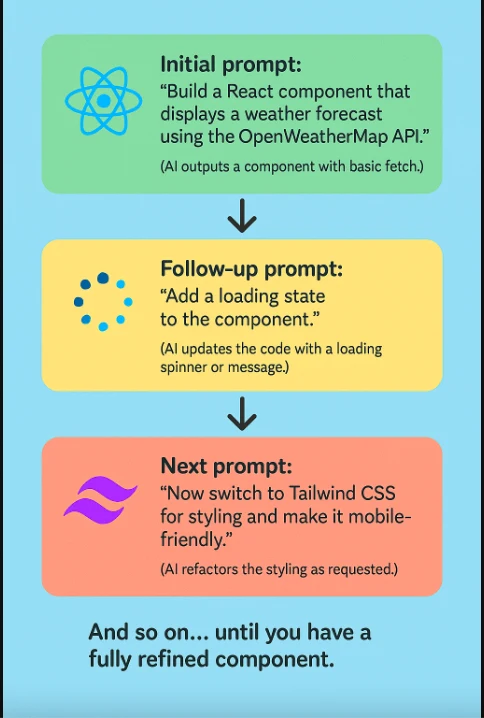
Prompts aren’t just casual inputs to ChatGPT or GitHub Copilot, but are becoming the new syntax of modern coding. With a well-crafted prompt, you can spin up a full-stack app skeleton, generate tests, or fix broken functions in seconds. What used to take days of effort can now be condensed into a few lines of natural language. And this is happening right now.
- 73% of developers say AI tools make them faster, with 87% reporting higher productivity, according to GitHub’s 2023 State of Developer Survey.
- Stack Overflow’s 2024 Trends Report shows that 44% of professional developers already use AI assistants for debugging and testing.
- Gartner predicts that by 2026, 80% of software engineering teams will use AI-powered coding tools as part of their workflow.
As a founder, I see this shift as more than just technical convenience; it’s strategic leverage. When I was building my first MVP years ago, I lost weeks writing database schemas and fixing repetitive authentication bugs.
Today, with the right prompts, that same work can be automated in an afternoon. That’s not just a productivity boost, it’s a competitive advantage.
The Business Angle
For startups and product teams, the question isn’t “Can AI write code?” anymore; it’s “What happens if we don’t use AI to write code?”
Because while your team is grinding through manual testing, your competitor may already be shipping updates powered by AI-assisted workflows. Prompts matter because they,
- Reduce development bottlenecks → Faster sprints, fewer delays.
- Lower error rates → More reliable code, fewer post-release crashes.
- Free up human creativity → Developers focus on product vision, not repetitive syntax.
In other words, prompts are no longer just productivity hacks. They’re quickly becoming the decision point between teams that ship fast and teams that fall behind.
Source: https://medium.com/
9 Prompts to Transform How You Code
There are new ways of thinking with AI-powered coding prompts designed to improve speed, accuracy, and creativity. These prompts help developers overcome roadblocks, explore alternatives, and write cleaner, more efficient code.
3 Prompts for Writing Code
Generate entire functions or modules in seconds by giving the AI clear, task-specific instructions. Well-crafted prompts reduce trial and error, letting you focus on problem-solving instead of boilerplate.
Prompt 1: Generate a CRUD API in [language/framework] with error handling
Example Prompt
Write a RESTful CRUD API in Node.js with Express, including JWT authentication and proper error handling.
What AI Delivers?
- Full set of Create, Read, Update, and Delete endpoints.
- Authentication middleware using JWT tokens.
- Standardized error-handling logic to avoid unhandled crashes.
Why This Matters?
Every app, from to-do lists to enterprise platforms, needs CRUD operations. Normally, this takes hours to code from scratch. With this prompt, you get a production-ready backend skeleton in seconds that your team can immediately extend.
Decision Tip-> If you’re validating an MVP, this prompt alone can shave 2–3 days off your timeline.
Prompt 2: Build a Responsive Login + Signup Page with Password Reset Flow
Example Prompt
Create a responsive login and signup page using React and TailwindCSS, with client-side validation and a password reset feature.
What AI Delivers?
- A ready-to-use login UI with form validation.
- Signup flow integrated with backend API calls.
- Forgot Password / Reset Password workflow.
Why This Matters?
Authentication is one of the most repetitive and error-prone parts of app building. With a single prompt, you get a working frontend + backend integration flow that you can plug into your project.
Decision Tip-> Instead of spending a sprint on authentication, use AI to generate it quickly and keep your dev team focused on core business features.
Prompt 3: Design a Database Schema for any business app and generate migration scripts
Example Prompt
Design a normalized PostgreSQL schema for a food delivery app, including tables for users, restaurants, menus, orders, and payments. Generate SQL migration scripts.
What AI Delivers?
- A normalized database schema (avoiding redundancy).
- Entity relationships (Users ↔ Orders ↔ Payments).
- SQL migration scripts you can run directly.
Why This Matters?
Database design errors cause long-term scaling problems. AI can suggest optimized schemas instantly and even prepare migration scripts, saving you both time and costly redesigns later.
Decision Tip-> Use AI for first-draft database structures and let your senior devs refine the logic. This balances speed with reliability.
3 Prompts for Testing Code
Testing ensures your code doesn’t just “work” but actually works reliably at scale. Yet many developers skip it because writing test cases feels repetitive and time-consuming. AI changes the game here, turning natural language prompts into ready-to-run unit tests, integration tests, and edge-case scenarios in seconds.
Prompt 4: Write Unit Tests in [Jest/Pytest/Other] for This Code Snippet
Example Prompt
Write Jest unit tests for this Express.js CRUD API code. Cover success, failure, and authentication cases.
What AI Delivers?
- Unit test cases with describe and it blocks.
- Mocked database calls and API responses.
- Edge case handling (invalid input, missing auth token).
Why This Matters?
Unit testing is often skipped in early MVP builds because it’s time-consuming. With AI, you can generate ready-to-run test files instantly, ensuring your app doesn’t break as it scales.
Decision Tip-> If you’re a founder on a budget, AI-generated unit tests are a cost-effective alternative to hiring a dedicated QA engineer in the early stages.
Prompt 5: Simulate 10 Edge Cases for This Function and Generate Test Cases
Example Prompt
List 10 edge cases for this payment processing function in Python and generate Pytest cases for each.
What AI Delivers?
- A list of potential failure points (e.g., expired card, duplicate payment, network timeout).
- Automated test cases simulating these edge scenarios.
Why This Matters?
Most bugs in production come not from the “happy path,” but from edge cases nobody thought about. AI doesn’t forget them. It ensures resilience where manual testing often fails.
Decision Tip-> This is crucial if your product handles transactions, healthcare data, or anything mission-critical. It reduces costly post-launch errors.
Prompt 6: Create an Automated Test Coverage Report and Suggest Missing Cases
Example Prompt
Analyze this Java codebase and generate a test coverage report. Identify untested functions and suggest additional test cases.
What AI Delivers?
- A breakdown of which functions/methods are covered.
- Highlighted gaps in test coverage.
- Suggested new test cases to improve coverage.
Why This Matters?
Manual test coverage analysis requires specialized tools and QA teams. AI can now provide this instantly, ensuring your codebase meets industry-quality benchmarks.
Decision Tip-> Use this prompt before investor demos or client presentations—it shows your product isn’t just functional, it’s reliable.
3 Prompts for Debugging & Fixing Code
Debugging is every developer’s least favorite chore—yet it eats up more than 50% of development time according to multiple studies. AI can cut that down dramatically. With the right prompts, you can spot errors, get explanations in plain English, and even auto-generate fixes without scrolling through endless Stack Overflow threads.
Prompt 7: Debug This Error Log and Suggest the Exact Fix With Code Replacement
Example Prompt
Debug this Python error log from Django: TypeError: ‘NoneType’ object is not iterable. Suggest the fix and provide corrected code.
What AI Delivers?
- A step-by-step breakdown of what the error means.
- Pinpointed root cause (e.g., missing query result).
- Corrected code snippet ready to paste.
Why This Matters?
Instead of wasting hours trawling through Stack Overflow, AI gives you explanations + fixes in one shot. This shortens debugging cycles from hours to minutes.
Decision Tip-> Use this for urgent bug fixes (like before a client demo). It’s fast, but always cross-check the fix before pushing to production.
Prompt 8: Refactor This Code for Scalability and Performance Optimization
Example Prompt
Refactor this JavaScript code to improve performance and scalability. Use best practices for async handling and reduce memory usage.
What AI Delivers?
- Cleaner, modularized functions.
- Optimized loops, async calls, and queries.
- Suggestions for caching, batching, or lazy loading.
Why This Matters?
Badly written MVP code often works fine with 100 users but crashes at 10,000. AI helps identify bottlenecks early and offers fixes that scale.
Decision Tip-> Run this prompt when preparing for growth or investor scale-up presentations. It makes your product future-ready.
Prompt 9: Find Security Vulnerabilities in This Code and Recommend Fixes
Example Prompt
Scan this PHP login function for security vulnerabilities like SQL injection or XSS. Suggest safer alternatives and provide corrected code.
What AI Delivers?
- A list of potential vulnerabilities (e.g., unsanitized inputs, hardcoded secrets).
- Refactored secure code samples (parameterized queries, hashed passwords, CSRF protection).
- Best-practice security recommendations.
Why This Matters?
Security is often overlooked in fast-paced builds. One small oversight could cost millions in a breach. AI gives startups a safety net without hiring a full security team.
Decision Tip-> Make this a standard step before deployment. It builds trust with clients, investors, and users.
Mini Case Study: From Prompt to Production in 1 working day
Goal-> Ship a secure, tested To-Do web app with login, CRUD, and basic analytics.
Stack-> Node.js + Express, PostgreSQL, React + Tailwind, Jest (backend), React Testing Library (frontend).
Hosting-> Render/Railway (API + DB) and Vercel/Netlify (frontend).
Success Criteria-> Users can sign up, log in, create/edit/delete tasks, filter by tag/deadline; app passes tests; basic security checks clear.
Scope & repo scaffolding (20–30 min)
Decision checkpoint
MVP scope = “auth + tasks + tags + due dates”. No push notifications, no recurring tasks (later).
Prompt (context priming used for all later prompts)
“You are a senior full-stack engineer building a To-Do web app for production. Priorities: correctness, security, testability, DX. Stack: Node.js + Express API, PostgreSQL via Prisma, React + Tailwind UI, JWT auth. Produce code that compiles and runs.”
- Create mono-repo (e.g., apps/api, apps/web), add .editorconfig, Prettier, ESLint.
- Initialize GitHub + CI (GitHub Actions) to run tests on PR.
Phase 1: Backend foundation (Prompts 1, 3)
CRUD API + Auth
Prompt 1
Write a RESTful CRUD API in Node.js with Express for tasks (title, notes, dueDate, tags[], status). Add users, JWT auth (signup/login), auth middleware, and centralized error handling. Include pagination & input validation with Zod.
Outcome
- Routes: /auth/signup, /auth/login, /tasks (GET/POST), /tasks/:id (GET/PATCH/DELETE).
- Middleware: requireAuth, errorHandler.
- Validation: strong payload checks; consistent error responses.
Database schema + migrations
Prompt 3
Design a normalized PostgreSQL schema (users, tasks, task_tags, tags). Generate Prisma schema and migration commands. Enforce foreign keys, indexes (userId, dueDate), and cascading deletes for user cleanup.
Outcome
- Prisma schema.prisma with User, Task, Tag, TaskTag.
- Migrations ready to run: npx prisma migrate dev.
Decision tip-> Add indexes for userId + dueDate now (cheap) → avoids later performance pain.
Phase 2: Testing baseline (Prompts 4, 5, 6)
Unit tests for auth & tasks
Prompt 4
Write Jest unit tests for auth and task controllers using supertest. Cover success, auth failures, invalid payloads, and pagination.
Outcome
- __tests__/auth.spec.ts, __tests__/tasks.spec.ts.
- Mocks for DB where appropriate; supertest for API contract.
2B) Edge cases
Prompt 5
List 10 edge cases for tasks API (e.g., invalid JWT, malformed tags, dueDate in past, injection attempts, huge payloads, rate limiting). Generate Jest tests for each.
Outcome
- Concrete edge tests; catches nasty cases early (e.g., 413 responses, 422 validation).
2C) Coverage & gaps
Prompt 6
Analyze the codebase structure and propose a Jest coverage configuration. Identify untested branches/functions and generate missing tests to reach ~80%.
Outcome
- Coverage report: extra tests added for error branches and tag linking.
Decision checkpoint-> Halt feature work until green CI + ≥80% coverage. This discipline saves rework.
Phase 3: Frontend UX (Prompt 2 + light tests)
Auth screens + task views
Prompt 2
Create responsive React + Tailwind pages: Login, Signup, Dashboard (task list, filters by tag/status/due), Task Editor modal. Integrate with the API, handle JWT in Authorization header, and show toast errors.
Outcome
- Clean, mobile-first UI; form validation; optimistic updates for task edits.
- Basic state management (TanStack Query or Context).
Frontend tests
Companion prompt
Write React Testing Library tests for Login, Signup, and TaskList components (happy path, error states, loading). Mock API calls.
Outcome
- Confidence in UX flows; catches regression in forms quickly.
Phase 4: Debug, Refactor, Secure (Prompts 7, 8, 9)
Debugging logs
Prompt 7
Given this error log [paste log] from the tasks PATCH endpoint, explain the root cause and provide corrected code.
Outcome
- Pinpointed bug (e.g., missing await, null tag array).
- Ready-to-paste fix + brief explanation (helps code review).
Refactor for scale
Prompt 8
Refactor the tasks controller for performance. Reduce N+1 queries, batch tag upserts, ensure idempotent updates, and add caching hints. Provide before/after snippets and benchmarks.
Outcome
- Cleaner services layer; fewer queries; better separation of concerns.
Security pass
Prompt 9
Scan auth and tasks code for OWASP Top 10 risks (injection, broken auth, sensitive data exposure, CSRF). Replace unsafe code (e.g., string SQL) with parameterized queries; add rate limiting and helmet config.
Outcome
- Hardening: strict CORS, HTTP headers via helmet, rate limiter, secure password hashing, JWT expiry/rotation guidance.
Decision checkpoint-> Only proceed to deploy if the security checklist passes (see below).
Phase 5: Deploy, observe, and iterate (60–90 min)
- Infra: Provision Postgres (Railway/Render), set env vars, run migrations.
- API deploy: Render/ Railway; Frontend deploy: Vercel/ Netlify.
- Observability: Hook up logging (Pino), monitoring (Better Stack/Logtail), and uptime (UptimeRobot).
- DX: Pre-commit hooks (lint + test), required CI checks on main.
Security & Quality Checklist (go/no-go)
- All auth flows validated (signup, login, token refresh/expiry).
- Input validated with Zod/DTOs on every endpoint.
- Passwords hashed (bcrypt/argon2), JWT secrets rotated, envs not committed.
- Rate limiter + helmet + strict CORS.
Unit + component tests ≥ 80% coverage; red routes (auth, payments in
- future) ≥ 90%.
- No direct string interpolation in DB calls; only parameterized queries/ORM.
- Error messages don’t leak internals; standardized API errors.
- Basic accessibility checks on forms (labels, focus states, ARIA).
Timelines & ROI (what a founder cares about)
| Stage | Traditional | With Prompts | Savings |
| API + Auth + Errors | 1–2 days | 1–2 hours | 70–80% |
| DB Schema + Migrations | 0.5–1 day | 30–45 min | 50–70% |
| Tests (unit + edge) | 1–2 days | 2–3 hours | 70–80% |
| Frontend Auth + CRUD UI | 1–2 days | 3–4 hours | 60–70% |
| Refactor + Security pass | 1 day | 2–3 hours | 60–70% |
| Total | 5–8 days | ~1 workday | ~70–80% |
Speed is only useful if you preserve quality. The prompts above front-load tests + security so you’re not borrowing time from the future.
“Paste-and-go” prompt pack you can reuse
- API + Auth
Write an Express CRUD API for tasks with JWT auth, Zod validation, pagination, and centralized error handling. Include folder structure and example routes. - DB Schema
Design Prisma schema for users, tasks, tags (M2M via TaskTag). Generate migrations, add indexes (userId, dueDate), and sample seed script. - Unit Tests
Write Jest + supertest specs for auth and tasks endpoints. Cover success, validation errors, missing/invalid JWT, pagination. - Edge Tests
List 10 edge cases for the tasks API and generate Jest tests for each. Include payload size, invalid tags, past due dates, and unauthorized modifications. - Coverage
Suggest a Jest config to produce coverage reports, identify untested branches, and generate additional tests to hit 80%+. - Frontend UI
Create React + Tailwind pages for Login, Signup, Dashboard with filters and a Task Editor modal. Integrate with API, handle JWT, and show toast errors. - Debug
Explain and fix this error log from the PATCH /tasks endpoint. Provide corrected code and a 2-line rationale. - Refactor
Refactor the tasks service for scalability: remove N+1 queries, batch tag upserts, ensure idempotency, and show before/after diffs. - Security
Audit the auth + tasks code against OWASP Top 10. Replace insecure code with safe patterns, add rate limiting, Helmet, and strict CORS.
What to ship in v1?
- Auth + CRUD + filters
- Tests + coverage
- Hardening + basic monitoring
- Clean DX (CI, lint, format)
- Push notifications, recurring tasks, calendar sync (park for v1.1)
Benefits & Limitations of Using AI Prompts for Coding
- Speed & Efficiency
According to GitHub’s research, developers using AI coding assistants complete tasks 55% faster than those coding solo. What might take hours in manual trial-and-error can now be reduced to minutes with the right prompt. - Cost Savings
For startups and small teams, every hour of engineering time matters. By letting AI handle boilerplate code, debugging, and testing, companies save on hiring overhead and accelerate time-to-market without burning through capital. - Faster MVP Validation
The startup journey is about validating ideas quickly. With AI prompts, you can build a functional MVP in weeks instead of months. This means real users can test your product early, and you can pivot before sinking resources into features nobody wants.
Source: https://www.c-sharpcorner.com/
Limitations
- Human Review is Essential
AI can write flawless syntax, but it cannot fully understand compliance laws, security protocols, or nuanced business logic. A fintech app, for example, cannot risk relying solely on AI for PCI compliance or fraud detection rules. - Context Gaps
AI generates based on probabilities, not intuition. If your prompt lacks detail, you’ll get generic results — which can lead to subtle bugs or unscalable architecture. - Ethical & Security Risks
Blindly copying AI-generated code may introduce vulnerabilities or violate licensing. Without human oversight, you risk long-term technical debt.
As a founder, I see AI not as a replacement but as a co-pilot. It’s like having a highly productive junior engineer who never sleeps, but still needs senior-level supervision. If we treat AI as a partner in speed, not a substitute for judgment, we get the best of both worlds: agility and reliability.
The hype is real: over 92% of developers are already experimenting with AI tools like GitHub Copilot and ChatGPT for coding assistance (Stack Overflow 2024 Survey). But the big question remains: Should you integrate prompt-based coding into your workflow, or not. Here’s a simple founder’s lens to help you decide.
Best Fit Scenarios for AI-Prompt Coding
- Startups & MVPs
When speed is everything, AI can help you validate an idea in weeks instead of months. As a founder, I’ve seen MVPs that would normally take 12–16 weeks shrink down to 4–6 weeks with AI-assisted coding. That’s not just saving money—it’s grabbing market opportunity faster. - Lean Development Teams
If your team is small and juggling multiple priorities, AI becomes your “extra developer.” It can handle boilerplate code, unit testing, and bug fixes while your core team focuses on critical features. - Experimentation & Prototyping
AI is brilliant for quick “what if” explorations. Instead of burning weeks on feasibility studies, you can prompt AI to spin up working prototypes, helping you decide what’s worth building out.
Where to Be Cautious?
High-Regulation Industries (Healthcare, Finance, GovTech)
Compliance, audits, and accountability can’t be compromised. Even if AI generates correct code, you need strict validation and explainability something today’s AI isn’t fully reliable for. Here, human oversight is non-negotiable.
Life-Critical Systems
Think medical devices, aviation, and autonomous driving. In these environments, one buggy AI-suggested function could cost lives. AI can assist in drafting, but it should never replace rigorous engineering practices.
The Decision Matrix
| Scenario | Adopt AI? | Why |
| Prototyping an MVP | Yes | Speed > Perfection. AI accelerates time-to-market. |
| Small startup team | Yes | Cuts dev load; boosts productivity. |
| Enterprise SaaS app | Partial | Use AI for testing & code cleanup, but keep humans on core logic. |
| Banking/Healthcare system | No | Regulatory + risk exposure too high. |
| Safety-critical software | No | Error margin = unacceptable. |
AI-prompt coding isn’t about replacing developers, it’s about knowing where it creates leverage without adding risk. If you’re running lean and chasing time-sensitive opportunities, it’s a game-changer. If you’re in high-regulation or life-critical spaces, it’s best left as a sidekick, not the driver.
The Future: Prompt Engineering as a Core Developer Skill
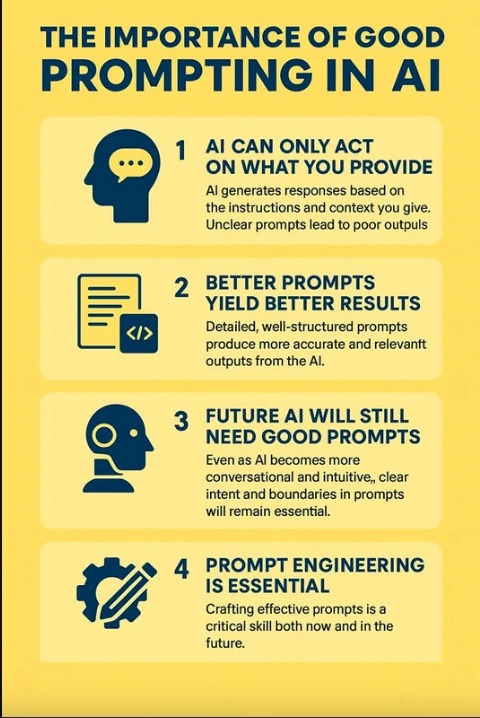
We’re changing the way we write code. For decades, we’ve focused on mastering syntax, learning the right semicolons, brackets, and structures to make machines understand us. But today that’s changing. We’re entering an era where the new language of code is the prompt.
Instead of typing out 200 lines of boilerplate, developers are describing the intended outcome and letting AI handle the scaffolding. This doesn’t mean programmers are becoming obsolete. Quite the opposite. It means their role is evolving into something even more strategic: prompt engineers.
Why does this matter?
- By 2030, analysts predict that up to 45% of code will be generated by AI (Gartner).
- Companies that adopt prompt engineering now will have a 3–5x productivity advantage compared to traditional dev teams.
- Just as cloud computing became non-negotiable, AI-prompt fluency will soon be a baseline developer skill.
In my company, we now train developers to think in prompts first, code second. A developer who knows how to structure a precise AI prompt can build in hours what used to take days. That shift is not optional, it’s the future of software development.
In short: the developers of tomorrow won’t just ask, “How do I write this function?” They’ll ask, “How do I craft the right prompt to get AI to write this function for me?” And those who master this skill will lead the next wave of innovation.
Closing Note
AI prompts are no longer just a productivity hack; they’re changing how startups and enterprises build software. From faster development and smarter testing to quicker bug fixes, the trend is clear: businesses that adopt AI will outpace those that don’t.
As a founder, here’s the bottom line.
If speed, cost-efficiency, and innovation matter to your business, you can’t ignore AI prompts.
But here’s the good news! You don’t have to figure it all out alone.
We’ve taken this AI-driven approach and combined it with No-Code MVP Development. That means,
You get the speed of AI to validate your idea.
You get the simplicity of no-code tools to launch faster.
And you keep the flexibility to scale once your MVP gains traction.
Think of it as having an AI co-pilot plus a no-code toolkit—together they help you go from idea → MVP → market fit in record time. So, my call to you as a fellow builder is,
Try AI prompts.
Use no-code for your MVP.
Keep humans in the loop.
That’s the formula to build smart, lean, and future-proof.
Frequently Asked Questions
Can AI write production-ready code?
Yes, but it needs human review for logic, compliance, and security. AI can speed up delivery, but final accountability still lies with developers
What prompts are best for debugging code?
Structured prompts like the following help AI pinpoint issues and suggest fixes faster.
Debug this error log and explain the fix
Will AI replace developers?
No. AI handles repetitive coding tasks, while developers are essential for strategy, system design, and innovation.
Is AI-generated code safe for startups?
Yes, when combined with security audits, peer reviews, and compliance checks. Many startups are shipping faster with this hybrid model.
How does AI improve testing?
AI can generate unit tests, edge cases, and coverage reports instantly, reducing manual testing time and increasing release confidence.

Arun Andiselvam
Founder of AppKodes. As a serial entrepreneur, I have successfully established five brands over the past 12 years. After creating a successful rank tracker for SEO agencies, I am currently dedicated to developing the world's first SEO Project Management software.