Top Features to Look for in a Construction Management System Open Source Tool (Lessons from Procore, Buildertrend & CMiC)
Most construction firms don’t fail because they chose the wrong software; they fail because they didn’t know what to look for before choosing. Here’s a different way to look at it. If you strip these platforms back to their early days, each one was built by someone who was simply tired of a specific problem repeating on every project.
Procore came from the frustration of teams constantly asking, “Which is the latest drawing?” Work would stop, calls would be made, and sometimes the wrong version would still get used. Over time, that single problem shaped a system where updates are instant and shared across everyone, turning daily confusion into something almost invisible.
CMiC grew out of a different question: “Are we actually making money on this project?” For many firms, the answer only came after the project ended. Costs were scattered, reports were delayed, and decisions were reactive. By bringing financials and projects together, that uncertainty shifted into ongoing visibility.
With Buildertrend, the pain was more human: “Why is everything a follow-up?” Builders were constantly chasing clients, subcontractors, and updates. Small delays added up not because work was hard, but because coordination was messy. Simplifying communication and tracking turned that constant chasing into a more structured flow.
What’s interesting is that none of these started as “feature-rich platforms.” They started as answers to very specific, very real frustrations. And over time, those answers became features. Now we’re in a different situation.
A construction management system open source can give you all these features upfront. But when everything is available, the real challenge isn’t access; it’s understanding which of these problems you actually have. That’s what makes the difference.
This article doesn’t just list features. It traces them back to the real problems they were meant to solve, using lessons from Procore, Buildertrend, and CMiC, so you can choose a system based on what will actually change how your projects run.
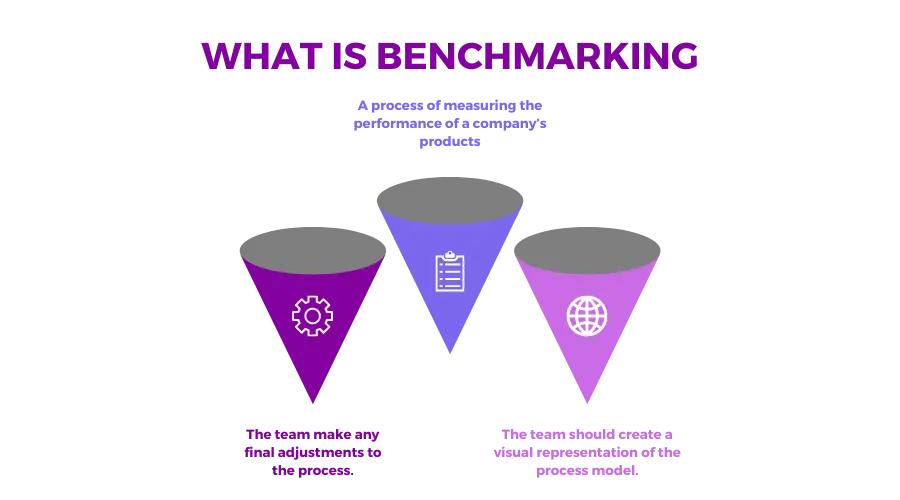
How We Benchmarked These Open-Source Construction Software Features
Before getting into the feature list, here’s how we approached this, because in a construction management system, more features don’t always mean more value.
We looked closely at the full feature sets of Procore, Buildertrend, and CMiC, breaking them down across 13 core functional areas. This included everything from preconstruction and project management to financials, field operations, and reporting.
Each platform has its own strengths.
- Procore is especially strong when it comes to managing the entire project lifecycle. It does a great job of keeping teams aligned, with solid document control and growing use of AI tools to support field teams.
- BuilderTrend focuses more on ease of use. It’s known for its client-facing features and built-in CRM, making it a popular choice for residential builders who want simple, clear workflows.
- CMiC is built for larger, more complex operations. It goes deeper into financials, HR, and reporting, offering an ERP-level system for companies that need that level of control.
When you put all three together, you’re looking at more than 200 open source construction software features across different parts of the construction process. But you need to be aware that not all of these features matter equally.
Around 82% of construction companies in India reported at least one underperforming project in the last financial year, compared to over 50% globally.
This highlights a broader industry challenge, where project execution gaps, coordination issues, and inconsistent use of management systems continue to impact outcomes.
Source: https://chisellabs.com/
1. Project Scheduling & Gantt Chart Management
If there’s one feature that really decides whether a project stays on track or slowly falls apart, it’s scheduling. On-site delays happen frequently, not because people are not working, but because there’s no clear understanding of what’s next.
A proper scheduling system can make a real difference by giving teams a clear view of the full timeline, helping them understand how tasks connect, and making it easier to see what will be impacted if something slips. So, many major platforms actually handle this smartly. Here are some real-world examples,
Procore is built for more structured, complex projects.
It gives you Gantt charts to map everything visually and supports the critical path method, so you can clearly see which tasks actually control your project timeline. It also connects with tools like Primavera P6 and Microsoft Project, which many larger teams already rely on.
Buildertrend takes a more practical, day-to-day approach.
Schedules update in real time, and subcontractors get notified when something changes. The look-ahead view is especially useful; it helps teams focus on what’s coming next instead of reacting too late.
If you’re evaluating an open source tool, the goal isn’t just to check if “scheduling” exists; it’s to see if it actually works the way real projects do. At a minimum, you should expect:
- A drag-and-drop Gantt chart so you can adjust timelines easily
- Task dependencies, so one delay doesn’t go unnoticed
- A way to compare planned vs actual progress
- Visibility into the critical path
- Mobile access, because field teams need this just as much as office teams
If a tool treats a simple task list as “scheduling,” that’s your first warning sign. Task lists don’t show impact, expose dependencies, or help you handle delays.
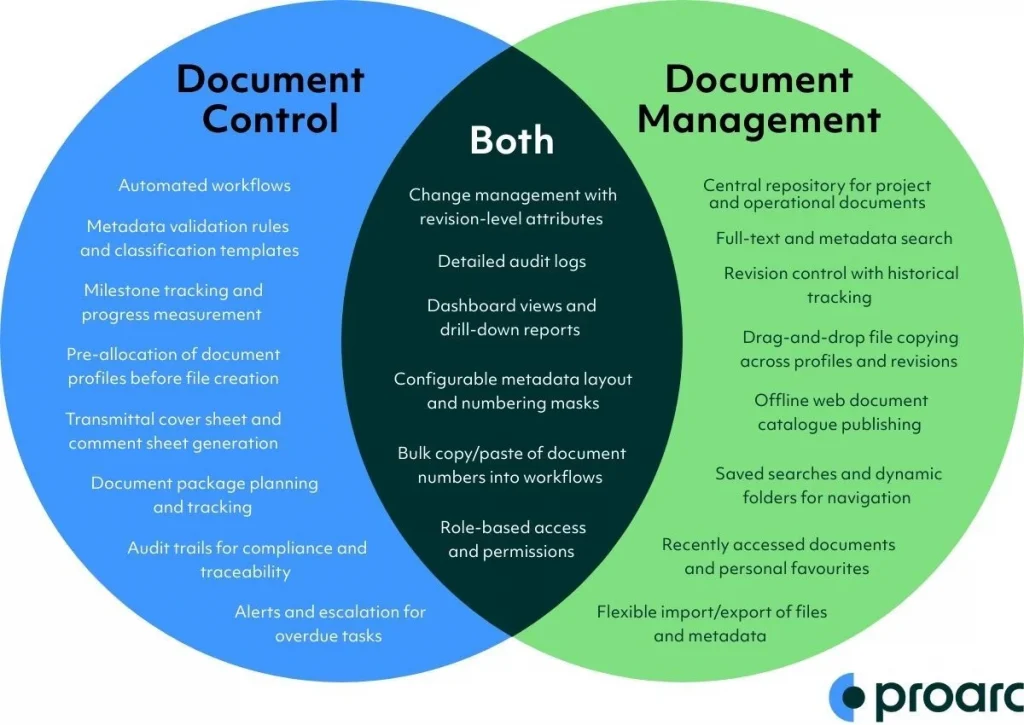
2. Document Management & Version Control
On a real job site, issues usually show up only when someone is working from an older drawing without realizing it. The work gets done, then someone notices the mistake, and suddenly you’re dealing with rework, delays, and awkward conversations about who had the latest version.
The goal is, apart from storing more files, to make sure there’s no confusion about which file is the right one. With document management, it is possible.
Procore handles this in a very practical way for field teams. When a new drawing is uploaded, it automatically updates the version, so the latest one is always what people see first. If something changes, teams can quickly compare the old and new versions side by side and spot what’s different instead of guessing.
Markups help teams communicate directly on the drawing, and distribution logs make it clear who has received the update, so there’s less room for miscommunication.
CMiC takes a stricter approach, which works well for larger teams. Every action on a document is tracked, so you can see who uploaded it, who viewed it, and what changed. Access can also be controlled based on roles, which helps avoid situations where the wrong people edit or share critical documents.
If you’re looking at an open source tool, think about how this would actually work on-site.
Can your team quickly find the latest drawing without asking around?
Can you check who viewed or downloaded a file?
Can you upload the full set of drawings at once instead of one by one?
And if the internet drops, can the site team still access what they need on mobile?
There are also a few related workflows that matter in day-to-day use. RFIs should be tied directly to drawings so questions don’t get lost. Submittals should be tracked so approvals are clear. Specs should be linked so teams don’t have to dig through folders to find context.
“If a system just lets you upload files into folders without tracking versions, it’s not really document management. It’s just storage. And in practice, that’s how teams end up working from the wrong information without even realizing it.”
Source: https://www.ascertra.com/
3. Budget Tracking & Real-Time Job Costing
Budget control in construction only works when every department stays connected. It begins in preconstruction with estimates, flows into procurement through contracts and purchase orders, evolves daily on-site, and ultimately reflects in accounting.
When this chain breaks, costs don’t immediately appear wrong; they surface too late to fix. That delay is a major reason nearly 63% of projects experience cost overruns. A strong system brings this entire lifecycle into one continuous, connected view.
From a project and site perspective, companies like Procore focus on real-time visibility. As work progresses, budgets are continuously compared against actual costs, allowing project managers to understand their position without waiting for reports.
Committed costs, such as subcontractor agreements and purchase orders, are tracked early, giving visibility into future spending. Cost-to-complete forecasting adds another layer, helping teams anticipate where the project is heading if current trends continue. This enables decisions while there’s still time to adjust.
From a finance and operations standpoint, CMiC connects deeper financial structures. It integrates with the general ledger, supports work-in-progress reporting, and manages multi-company, multi-currency environments. This is critical for organizations handling multiple projects where financial alignment must happen without manual reconciliation.
For smaller teams, Buildertrend simplifies the process. It enables quick budget setup, tracks expenses as work progresses, and syncs with accounting tools so financial data stays updated in the background.
If you’re evaluating an open-source solution, the key is connectivity. Estimates should convert into structured budgets, procurement should reflect committed costs, site activity should update actuals in real time, and finance should receive accurate data without duplication.
A clear red flag is when a system only tracks invoices. That means finance is working in isolation, while project and site teams have no real visibility into costs. At that point, it’s not job costing, it’s just recording expenses after the fact, when there’s very little left to control.
4. Change Order Management
On a construction site, a change doesn’t just affect managers but also every single worker involved in that task. When a change isn’t clearly communicated, the mason continues with the old drawing, the supervisor gives mixed instructions, and the subcontractor team works based on what they last heard.
By the time the update reaches everyone, part of the work is already done the wrong way. That’s where rework, delays, and frustration actually begin. So, change order management is more than just an approval process; it is making sure that when something changes, everyone on site is aligned at the same time.
Procore handles this by structuring changes step by step from Potential Change Order to Change Request to Owner Change Order. Once a change is approved, it reflects across the system, including drawings, schedules, and budgets. For workers, this means they’re less likely to act on outdated information, because updates are pushed through in a structured way rather than passed around informally.
With Buildertrend, the focus is on quick communication. Changes can be raised directly from the field and approved through client portals with e-signatures. This reduces the delay between identifying a change and getting clarity, which helps workers avoid idle time or guesswork.
CMiC adds another layer of control by maintaining a full record of every change. While this is more finance- and contract-focused, it ensures that what workers execute on-site is always backed by an approved scope and properly tracked changes, reducing the risk of unpaid or disputed work.
If you’re evaluating an open source tool, the key question is simple: when a change happens, does it actually reach the people doing the work?
The system should support structured approvals, digital sign-offs, and automatic updates to schedules and budgets. It should also maintain a clear log so teams can track what’s approved, pending, or rejected.
A clear red flag is when change orders are managed outside the system. If updates are shared through calls, emails, or spreadsheets, they won’t reach everyone consistently. And when even one worker misses that update, the impact shows up immediately, on the ground, in the form of rework, confusion, and lost time.
5. Field Operations: Daily Logs, Photos & Inspections
Unlike the others, construction work moves fast and in many directions at once.
Structural work, MEP installations, finishing material movement, and inspections. If these aren’t recorded as they happen, the picture of progress looks messy. By the weekend, teams are left trying to piece together from memory what is not completed, what is pending, and what actually went wrong. That gap is exactly why real-time field tracking matters.
A good system captures site activity as it happens, not after. Procore is designed around this real-time visibility. Teams can maintain daily logs that include crew counts, weather conditions, and work completed, along with geotagged photos that show exactly where progress is happening.
Inspection checklists ensure each stage of work is verified properly, and its Safety Hub brings safety observations into the same flow, so nothing is missed or tracked separately.
Buildertrend makes it easier to document and communicate progress, especially for client-facing projects. It combines daily logs with material delivery tracking and uses AI to generate photo summaries, giving a clear, simplified view of what’s been completed without needing detailed manual updates.
CMiC focuses more on operational depth. It tracks field time against specific tasks, logs equipment usage for different types of work, and maintains compliance documentation, ensuring that critical activities are properly recorded and aligned with reporting requirements.
If you’re evaluating a construction management system open source, the key is how easily it supports real-time updates across different types of work. Teams should be able to fill daily logs directly from mobile, upload photos and videos with proper project tagging, and use customisable inspection forms for different trades.
Punch list management is also important, so issues identified on-site are tracked and resolved systematically. And one thing that often gets overlooked, but matters the most in practice: if the system doesn’t work offline on mobile, it won’t work on-site.
Connectivity isn’t always reliable, and if teams can’t capture updates in the moment, they end up relying on memory later, which is exactly what this feature is meant to avoid.

Source: https://elevateconstructionist.com/
6. RFI & Submittal Management
On a construction project, not everything is clear from the drawings. Questions come up when dimensions don’t match, specifications are unclear, or site conditions differ from what was planned.
That’s where RFIs come in. Similarly, submittals ensure that what’s being installed, materials, equipment, and finishes, actually match the design intent. When these two processes aren’t managed properly, the impact shows up quickly: wrong installations, repeated clarifications, delays, and, in some cases, liability issues.
What makes this critical is not the number of RFIs or submittals, but how well they are tracked, reviewed, and closed.
Procore structures RFIs in a way that keeps them moving. Each RFI is routed to the right person with clear deadlines, so questions don’t sit unanswered. It also allows teams to capture potential cost or schedule impact at the time of raising the RFI, which helps project managers understand the bigger picture early.
On the submittal side, it can generate a register directly from specification sections, ensuring nothing is missed during execution.
CMiC takes a more controlled, workflow-driven approach. RFIs and submittals move through defined review stages, with role-based stamps that show who reviewed and approved each step. If something is rejected, resubmittals are tracked with proper version history, so there’s always a clear record of what changed and why.
If you’re evaluating a construction project management tool, the focus should be on visibility and accountability. You should have a clear RFI log with a status dashboard showing what’s open, closed, or overdue.
Deadlines should trigger automatic alerts so nothing gets delayed unnoticed. Submittals should follow a structured routing process with clear Approved or Rejected statuses, and every resubmittal should carry version tracking so changes are easy to follow.
A major red flag is when RFIs are still handled through email threads. That usually means there’s no central tracking, no clear deadlines, and no reliable record of decisions. In practice, that creates risk, not just in terms of delays, but also when questions arise later about what was approved and when.
7. Subcontractor & Vendor Management
The majority of the actual work isn’t done by the main contractor; it’s done by subcontractors and vendors. Whether it’s electrical, plumbing, finishes, or specialised installations, they typically handle 70–80% of the execution. So if subcontractors aren’t managed properly, it doesn’t matter how strong your internal team is; the project will still struggle.
The challenge is in visibility. Who is approved to work? Are their documents valid? What have they committed to? What have they delivered? Without a system, this information gets scattered across emails, calls, and spreadsheets.
Procore approaches this from the start of the subcontractor lifecycle. It includes prequalification, so teams can assess subcontractors before awarding work, along with bid management to streamline the selection process.
Once onboarded, compliance documents like insurance and certifications are tracked, and a dedicated subcontractor portal gives subs a place to access project information and submit what’s required.
Buildertrend focuses more on day-to-day coordination. Subcontractors can log into a portal to check schedules, upload documents, and stay aligned with project updates. Payment tracking is also built in, which helps maintain transparency and reduces back-and-forth when it comes to invoicing and approvals.
CMiC handles this from a procurement and financial control perspective. It includes purchase order matching, subcontract management, and lien waiver tracking, ensuring that what’s ordered, delivered, and paid for is fully aligned.
This becomes especially important in larger projects where multiple vendors and contracts are running simultaneously. If you’re evaluating a construction management system open source, the key is to see how much control and independence it gives you over subcontractor workflows.
You should have a central directory with details like insurance and compliance tracking, a subcontractor portal where they can access schedules and upload documents themselves, and proper PO and payment workflows to manage commitments and cash flow.
A clear red flag is when there’s no subcontractor portal. That usually means all communication goes back to email, documents are shared manually, updates get missed, and tracking becomes inconsistent. At that point, the system isn’t really managing subcontractors; it’s just sitting alongside the same old process.
8. Client Portal & Communication Tools
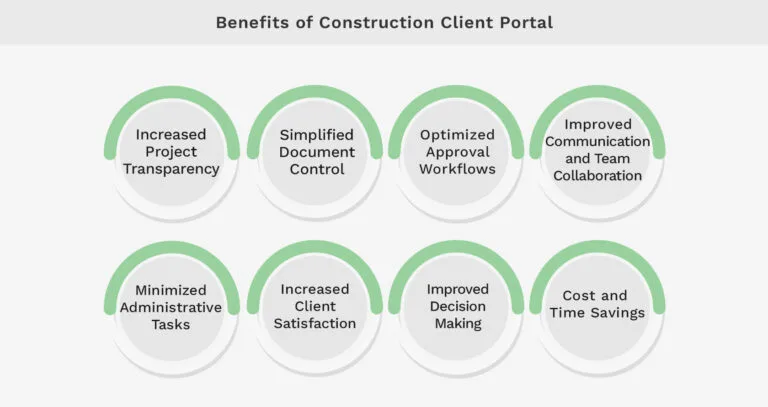
In most construction projects, issues with clients don’t start because something went wrong—they start because the client doesn’t have a clear view of what’s going on. When updates are inconsistent or scattered across calls and emails, it creates uncertainty.
Over time, that lack of visibility turns into questions, delays in approvals, and eventually disputes. This is why client communication needs to be structured, not informal.
What works better in practice is giving clients a single place where they can see progress, review updates, and take action when needed.
Buildertrend does this particularly well by making the client part of the workflow. Its branded client portal provides real-time project updates, a photo gallery to track progress visually, and built-in selection approvals so clients can review and confirm choices without back-and-forth. This reduces delays and keeps decisions properly documented.
Procore approaches it with more controlled visibility. Through its owner access module, clients can view project dashboards, track overall progress, and access shared documents. This works well for projects where transparency is important, but information still needs to be managed carefully.
If you’re evaluating an open source construction management system, the focus should be on how easily clients can stay informed without depending on your team. A client-facing portal should offer clear progress visibility, access to photos, the ability to review and approve change orders, and a central place to download important documents.
One feature worth paying attention to is selection management. Allowing clients to choose finishes or materials directly within the system keeps everything recorded in one place and avoids confusion later, something Buildertrend handles particularly well and is worth replicating.
A clear red flag is when there’s no client-facing layer at all. That usually means communication is happening in separate tools like email or messaging apps, which doubles admin work and increases the risk of miscommunication since clients are never looking at the same source of truth as the project team.
9. Reporting, Analytics & Dashboard Visibility
In construction, problems rarely come from a lack of data; they come from not being able to see what that data is actually telling you. Costs, schedules, safety, and quality are all moving at the same time, and if you can’t view them together, decisions end up being reactive instead of planned.
That’s why reporting isn’t just about exporting numbers; it’s about having clear visibility into project health at any given moment.
Procore focuses on making this visibility immediate and accessible. It offers pre-built project dashboards that show key metrics without needing manual setup, along with portfolio-level financial reporting for teams managing multiple projects.
Its AI-powered Copilot also allows users to ask questions in plain language and get insights without digging through reports.
CMiC goes deeper into business intelligence. With tools like NEXUS AI, it supports cross-project benchmarking and advanced analytics, helping teams compare performance across projects. Custom KPI dashboards allow organizations to track exactly what matters to them, especially in complex, multi-project environments.
BuilderTrend keeps reporting more straightforward and practical. It covers financial reporting, job profitability, and client-facing progress summaries, giving both internal teams and clients a clear understanding of how the project is performing.
If you’re evaluating an open source construction management system, the key is whether it helps you see what’s happening, not just store data. You should have ready-to-use dashboards for cost and schedule health, the ability to export reports in formats like PDF or Excel, and visibility across multiple projects if you’re managing more than one.
A custom report builder is also important, so you can track metrics specific to your workflow.
A clear red flag is when a system only lets you export raw data into Excel. That means all the analysis still depends on manual work. At that point, it’s not really helping you manage the project; it’s just acting as a database.
10. Mobile App with Offline Access
On a construction project, the system only works if the people on-site actually use it. And in reality, most of that interaction happens through a phone, not a desktop. If logging updates, checking drawings, or approving something takes too long or doesn’t work without internet, teams simply stop using the system.
That’s why mobile usability isn’t a “nice to have”; it directly decides whether your CMS gets adopted or ignored.
All three platforms, Procore, Buildertrend, and CMiC, recognise this and offer native iOS and Android apps built specifically for field workflows, not just scaled-down desktop versions.
Where Procore stands out is in how it handles real site conditions. Its offline mode allows teams to continue working without connectivity, with data syncing automatically once they’re back online.
It also supports voice-to-text notes, which makes quick updates easier on-site, and allows drawing markups directly from mobile, so changes and clarifications don’t get delayed.
Buildertrend focuses on practical, everyday use. Features like a mobile time clock with geofencing help track attendance accurately, while change orders can be created and approved directly from the phone. Daily logs can also be completed on-site, reducing the need to revisit updates later.
If you’re evaluating an open source construction management system, the key is to think about how it performs in the field, not just in demos.
A proper solution should have native apps for both iOS and Android, support offline usage with automatic syncing, and include essential features like drawing access, daily logs, photo capture, and push notifications for approvals or updates.
One clear red flag is relying on a web app that “works on mobile browsers.” In practice, that’s not the same as a purpose-built mobile app. It tends to be slower, less reliable, and harder to use on-site, exactly the kind of friction that leads to low adoption.
Bonus Feature: AI & Automation Capabilities
AI is quickly shifting from a “nice-to-have” to a baseline expectation. 63% of construction firms are adopting AI to improve their sustainability efforts. Also, 27% of architecture, engineering, and construction professionals currently use AI in their operations.
Platforms like Procore are already moving in this direction with AI copilots that handle data queries, automate RFIs and submittals, and even predict schedule risks.
CMiC is advancing with NEXUS AI, offering features like conversational “Ask AI,” sentiment analysis across project communications, and anomaly detection. Meanwhile, Buildertrend focuses on practical use cases such as AI-generated photo summaries for client updates.
For open source or customizable tools, full-scale AI may not always be available yet, but even basic automation can deliver strong value. Features like overdue alerts, automatic task routing, and scheduled reporting can significantly reduce manual follow-ups and improve consistency across projects.
The opportunity: There’s a clear gap in the market for an open, flexible construction project management tool that combines core project workflows with built-in AI and automation. For firms evaluating tools today, this is not just a bonus feature; it’s a forward-looking advantage that will shape how efficiently teams operate in the coming years.
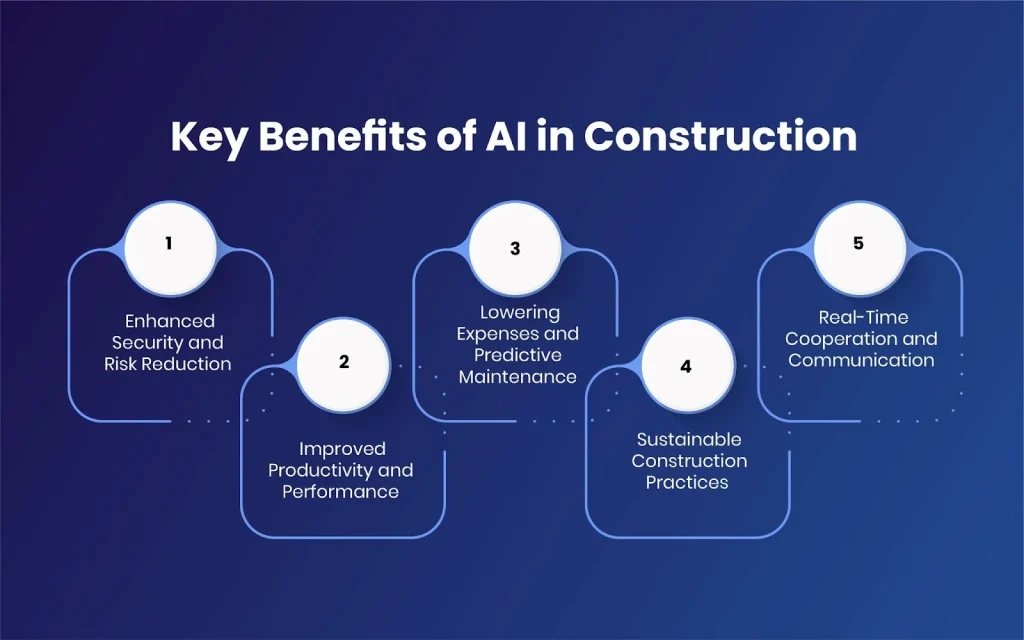
Source: https://www.toobler.com/
How to Evaluate These Features Before You Buy
Firms are switching to a construction management system, the real question is what features actually work in practice. From budgeting to field coordination and document control, evaluating performance in real project scenarios helps you pick a system that truly fits your workflow.
#1 Build a Feature Scorecard
Start by identifying the core features that directly impact project success, such as budgeting accuracy, scheduling reliability, document control, field coordination, and reporting. Assign each feature a weight based on its importance to your workflow. Then score how well each feature performs in real project conditions. This ensures evaluation is based on outcomes, not marketing claims.
#2 Test Features in Real Project Conditions
Don’t rely on demos or sandbox environments. Evaluate features in an active project setup for at least 30 days. This reveals how the system handles real challenges like delays, change orders, communication gaps, and on-site constraints reveal how the system handles actual site conditions, delays, or team workflows.
#3 Validate with Field-Level Users
Features only matter if they work for the people using them daily. Involve site engineers, supervisors, and project managers early in the evaluation. Their feedback on speed, usability, and practicality is critical to understanding whether a feature truly works in the field.
#4 Evaluate Reliability, Support, and Ecosystem
A feature is only as strong as the system supporting it. Check update frequency, customer support responsiveness, documentation quality, and community activity. Strong ecosystem support ensures features remain usable and improved over time.
#5 Assess Real-World Value, Not Just Cost
Instead of focusing only on pricing, evaluate how each feature reduces delays, improves coordination, or prevents cost overruns. Consider total operational impact, training effort, integration needs, and long-term scalability.
Final Take
The features that matter in a construction management system open source tool are not opinions; they’re outcomes of years of trial, error, and real project failures.
Platforms like Procore, Buildertrend, and CMiC didn’t arrive at their current state by adding features randomly. They were shaped by what projects demanded: tighter schedules, clearer documents, stronger cost control, smoother field operations, and better communication.
And that order matters.
Because when these five areas are strong, projects stay predictable. When they’re weak, no amount of extra features can fix the gaps.
That’s the real takeaway.
Today, with a construction management system open source approach, the advantage is no longer access; it’s clarity. The teams that win are not the ones using the most tools, but the ones choosing the right capabilities from the start.
At Appkodes, this understanding shaped the platform itself, built by closely studying how systems like Procore, Buildertrend, and CMiC solve real problems, and bringing those proven capabilities together into one practical solution.
Not as a list of features, but as the best CMS for contractors that reflects how construction actually runs.
Where to Go from Here
If you’re evaluating options for your Procore alternative open source, don’t just compare tools, compare how they handle the fundamentals:
- How clearly do they manage schedules?
- How reliably do they control documents?
- How early do they show cost impact?
- How well do they support field teams?
- How smoothly do they handle communication?
Go through these one by one, and you’ll notice the best choice becomes hard to miss.

Arun Andiselvam
Founder of AppKodes. As a serial entrepreneur, I have successfully established five brands over the past 12 years. After creating a successful rank tracker for SEO agencies, I am currently dedicated to developing the world's first SEO Project Management software.