How to Build an App Like TikTok in 45 Days Using Ready-to-Integrate Components
What if you could launch your TikTok-like app without rebuilding every feature from scratch?
If you’ve explored short video app development before, you’ve probably heard the same answer from most software vendors: “It usually takes anywhere from 6 to 18 months.”
At first, that sounds reasonable. After all, a TikTok-like app includes video streaming, user profiles, chat, notifications, live streaming, wallets, moderation tools, and much more.
But here’s the question most founders never stop to ask. “Do all of these features really need to be built from scratch?” That’s where the biggest misconception begins.
Many founders assume that choosing custom development means recreating every single capability from the ground up. Because of that, they often end up choosing a clone script just to launch faster, even if it means compromising on flexibility and long-term product vision.
App development has evolved beyond the traditional choice of either launching a simple clone or spending months building everything from scratch. There’s now a middle ground that combines the strengths of both approaches.
The opportunity is growing rapidly. The global short video platform market is estimated to reach USD 2.5 billion in 2026, making speed-to-market more important than ever.
That’s where component-based development comes in. Instead of choosing between speed and flexibility, it helps founders achieve both.
In this guide, you’ll discover how to build an app like TikTok in just 45 days using ready-to-integrate components, what can be reused, where custom development still matters, and how experienced teams balance speed with flexibility.
What is Component-Based App Development?
In a component-based app development approach, instead of a pre-built app, you only take the modules you need. Then developers assemble the components that you selected into your own application. It starts with independent and reusable modules.
It doesn’t need to start from scratch, either, not like adapting a ready-made script.
For example, imagine you’re building a house; you buy doors, windows, and bathroom fittings, then build your own house using those ready-made parts. This s component based development
You can choose an authentication component, live streaming component, wallet component, and then you can customize these features for creating your own TikTok alternative or short video app.
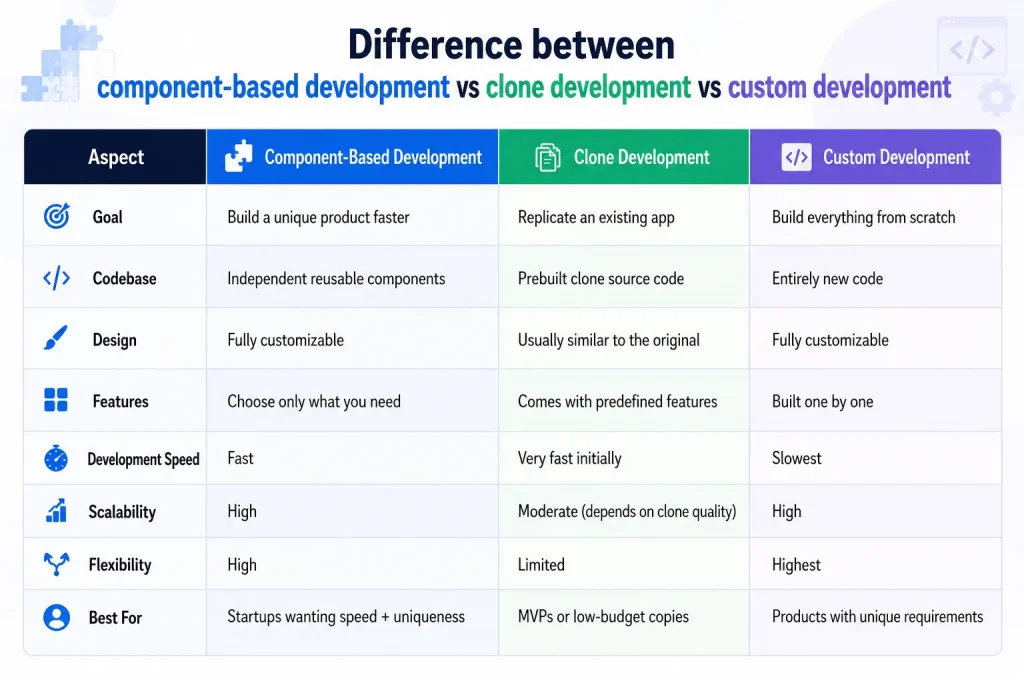
Here you can understand how component-based app development differs from custom development and clone development
Which Features Can You Build Faster with Ready-to-Integrate Components?
One of the biggest advantages of component-based development is that you don’t have to engineer every capability from scratch. When you want to build an app like TikTok, production-ready components allow you to accelerate development while keeping the product fully customizable.
Here are some of the core components that can significantly reduce development time when building a TikTok-like app
Components | What it Enables |
| Short Video Component | Supports video upload, playback, engagement actions, content feed, and creator profiles to deliver the core short video experience. |
| Single Host Live Component | Allows individual creators to host live streams with audience interaction and real-time engagement. |
| Multi-Guest Live Component | Enables multiple hosts or guests to join the same live session, making collaborative streaming possible. |
| PK Rewards Component | Supports live PK battles, virtual gifting, reward distribution, and interactive creator competitions. |
| Ranking Component | Displays creator, user, or event leaderboards based on points, gifts, engagement, or custom ranking metrics. |
| Levels Component | Introduces user and creator level progression, badges, achievements, and loyalty-based engagement systems. |
| Wallet Component | Manages virtual coins, in-app purchases, creator earnings, withdrawals, and transaction history. |
| MP4 Virtual Gifts Component | Enables animated MP4 gifts that users can purchase and send during live streams to increase engagement and monetization. |
These components provide production-ready functionality, not a finished application. They can be integrated, customized, and combined based on your business model, allowing you to build a unique short video platform instead of simply replicating an existing app.
Founder’s Decision: Build from Scratch or Use Ready-to-Integrate Components?
Many founders assume that every feature needs custom development simply because they’re building a new product. But that’s actually one of the biggest mistakes they make. Some features genuinely need to be built completely from scratch, while others can simply be reused with a few customizations. And that’s exactly where component-based development becomes the best option.
The real objective isn’t simply to ship features faster. It’s to build an app like TikTok that reflects your own business vision without wasting engineering effort on features that already have proven implementations.
Now, let’s look at which features should be built from scratch and which ones can be implemented using reusable components.
Ready-to-Integrate Features
Instead of measuring how long it will take to build, ask if the feature can be reused or integrated. So the real contrast is the question: “Does building this feature from scratch actually create a competitive advantage?”
For capabilities like live streaming, chat, wallets, virtual gifts, rankings, levels, and notifications, the answer is usually no. These are established platform capabilities with well-defined user expectations. Rebuilding them from the ground up rarely changes how users perceive your product, but it can significantly increase development time, testing effort, and maintenance costs.
When proven components already exist, integrating and customizing them is often the more practical choice. It allows the team to deliver reliable functionality without spending months recreating features that users already understand.
What Should Be Built from Scratch?
The features that deserve custom engineering are the ones that define how users experience your platform. Ask yourself:
- Does this feature make my product noticeably different from competitors?
- Will users remember my platform because of this experience?
- Does it directly support my long-term business strategy?
If the answer is yes, it’s worth building from scratch.
Your recommendation feed, creator discovery logic, user onboarding journey, content moderation workflows, monetization strategy, and overall brand experience are examples of areas where custom development creates lasting value. These decisions shape how users interact with your platform and are much harder for competitors to replicate than standard platform features.
The goal isn’t to build everything yourself. It’s to invest your engineering effort where it creates the greatest impact.
What Should You Build First When Developing a TikTok-Like App?
As a founder, you may think, “Let’s build live streaming first,” because you’re looking at it purely from a business perspective. Naturally, you prioritize the features with the highest demand.
But how does a developer look at the same request? When they hear, “Build live streaming,” they immediately think about everything it depends on—authentication, user profiles, backend services, storage, permissions, and notifications.
If these aren’t completed first, starting live streaming development becomes difficult because of all these dependencies. Eventually, the entire development process gets delayed, and nothing reaches completion smoothly.
Whether you’re planning to build an app like TikTok for a startup, creator platform, or niche community, following the right implementation sequence helps reduce delays and keeps the project on schedule.
So, let’s discuss the order you should follow when building an app.
Layer 1 – Foundation: This layer supports every other feature in the application, making it the first priority.
- Authentication
- User management
- Backend architecture
- Database
- Cloud storage
Without this foundation, development becomes much more difficult halfway through the project.
Layer 2 – Core Product Experience: With the infrastructure ready, the team can focus on the experience users expect from a short video platform.
This includes video upload, video playback, personalized feeds, search, and user profiles. At this stage, the application becomes a functional product rather than just a technical framework.
Layer 3 – Engagement: Once users can consume content, the next objective is to keep them active on the platform. Features such as likes, comments, follows, sharing, chat, and notifications encourage interaction and improve user retention.
These work like accessories that enhance the core product experience.
Layer 4 – Advanced Features: Only after the core experience is stable do teams introduce advanced functionality.
This includes live streaming, digital wallets, AI-powered recommendations, analytics, virtual gifts, monetization, and other business-specific features that differentiate the platform in the market.
Once the implementation strategy is clear, the project moves into execution. Instead of wondering what to build next, every phase has a clear objective, measurable deliverables, and a defined timeline. But the real question is: How do all these pieces come together in just 45 days?
How to Build an App Like TikTok in 45 Days: A Proven Timeline
Here’s what a structured 45-day app development roadmap typically looks like when using ready-to-integrate components.
Day 1-5: Product Discovery & Planning
The project begins with requirement workshops, feature prioritization, architecture planning, UI/UX discussions, and component selection. By the end of this phase, the development roadmap, milestones, and implementation plan are finalized.
Days 6–12: Foundation Setup
Developers configure the development environment, cloud infrastructure, repositories, databases, backend services, authentication, and continuous deployment pipelines. This phase establishes the technical ecosystem required for the rest of the project.
Days 13–20: Building the Core Experience
Ready-to-integrate components are connected with backend services while the user interface is customized to match your branding and business requirements. Internal reviews help validate the overall user experience before moving forward.
Days 21–28: User Engagement Features
The team focuses on connecting different user journeys into a seamless experience. Notifications, chat, engagement workflows, and platform interactions are validated to ensure everything works together smoothly.
Days 29–35: Advanced Features & Business Logic
Business-specific workflows are implemented alongside advanced integrations such as payments, analytics, AI capabilities, live streaming, virtual gifts, or other custom requirements that differentiate the platform.
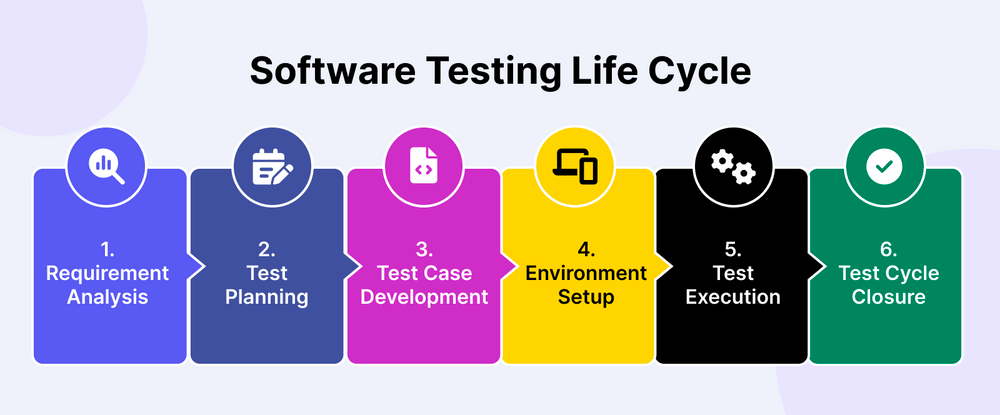
Days 36–42: Testing & Optimization
The complete application undergoes functional testing, performance optimization, bug fixing, security validation, and compatibility testing across multiple devices and network conditions.
Days 43–45: Launch Preparation
The final days are dedicated to preparing the application for release. After completing the last quality checks, the app is deployed to the production environment, submitted to the app stores, and made ready for a successful launch.
Even if development is progressing well, what are the hidden bottlenecks that can delay your app launch?
What Dependencies Can Delay Your Short Video App Launch?
Building an app isn’t just about completing features one by one. Every stage depends on something else being ready. When one dependency slips, the timeline usually shifts with it. Here are the most common ones.
Third-Party Service Dependencies
Features like payments, live streaming, push notifications, and cloud storage rely on external services. If approvals, account setup, or integrations take longer than expected, developers often have to pause related work until everything is ready.
Feature Dependencies
Some features simply can’t exist on their own.
For example, a short video feed needs user accounts, backend APIs, and video processing before users can actually watch content. Engagement features like likes, comments, shares, and personalized recommendations come only after the feed is working properly. Because of this, delaying one core module can affect several others.
Design & Approval Delays
Changing designs after development has started is one of the easiest ways to extend a project timeline. A small UI update can require developers to rewrite screens, QA teams to test them again, and designers to revise supporting flows. What looks like a minor change often creates work across multiple teams.
Integration & Compatibility Issues
Whether you’re building custom features or using ready-made components, everything has to work together without conflicts. Most integration issues appear only after different modules are connected, which is why this phase usually takes longer than teams expect.
QA & Performance Bottlenecks
A feature isn’t considered complete just because it works. Video playback, streaming quality, notifications, payments, and performance all need to be tested under real usage conditions. Fixing issues at this stage is normal, but it can still push the launch date.
Store Release & Compliance
Development isn’t the final step. The app still has to pass App Store and Play Store reviews, along with privacy, permission, and compliance checks. These approvals can add a few extra days before users can actually download the app.
However, these dependency-related challenges are significantly reduced with a well-planned component integration approach because you’re working with proven, production-ready modules and predefined implementation sequences.
How AI Speeds Up Component-Based App Development
AI is no longer just an experimental tool. According to a 2026 industry report, around 90% of developers now use AI assistance for their software development, making it a practical way to speed up coding, debugging, testing, and component integration.
Actually, you’ve probably heard people say many times before that “AI helps write code.” But AI’s role is not as simple as that. In reality, its contribution goes far beyond just writing code.
It doesn’t just generate code. It also speeds up component integration. Developers don’t have to spend a lot of time understanding APIs because AI helps explain documentation, generate integration snippets, suggest SDK configurations, and identify missing dependencies.
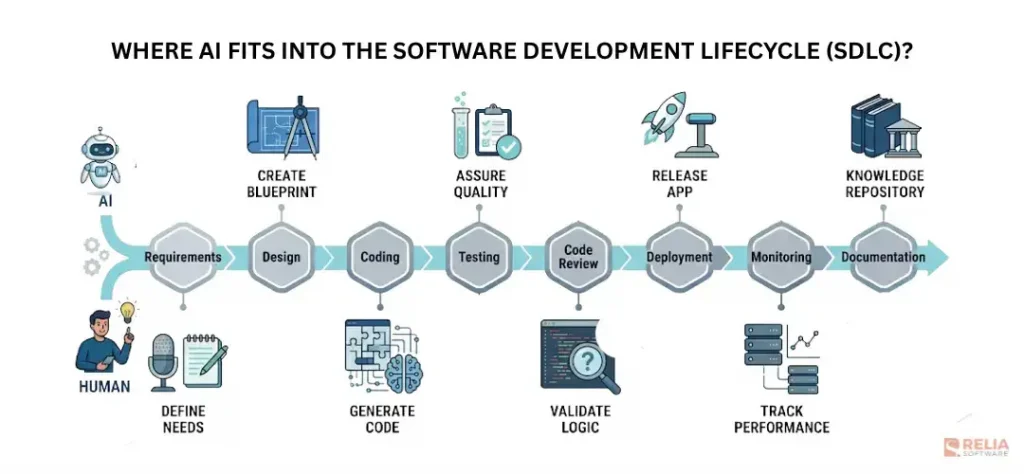
Rewriting the entire codebase to match custom requirements takes time. But here, AI helps developers modify existing components instead of rebuilding everything from scratch.
If you think AI’s role ends with development and design, that’s not the case. It also helps identify bugs much faster. During integration, issues like API mismatches, authentication failures, version conflicts, and serialization problems are common. AI helps detect and fix these issues in real time.
As we already know, software testing is an iterative process. Every small issue can extend the testing and quality assurance cycle. Here, AI helps generate test cases, identify edge cases, and automate regression testing tasks.
Ultimately, AI removes repetitive engineering tasks.
Production-ready components reduce the amount of software that needs to be built. AI reduces the effort required to integrate, customize, and validate those components. Together, they enable development teams to deliver scalable mobile applications in significantly less time without compromising quality.
Component-Based vs Clone vs Custom Development: Cost Comparison
Actually, all three development approaches depend on individual business needs and preferences. One of the most important factors in choosing between them is the budget.
If your primary goal is to build an app like TikTok, understanding how each development approach affects both budget and delivery time makes it much easier to choose the right strategy.
So, in this section, let’s understand why the cost varies across these three development methods and what makes one approach more expensive than another.
Clone Development
Clone development is suitable when the goal is to launch something very similar to an existing platform as quickly as possible with minimal changes.
It usually comes with default built-in features such as backend development, authentication and user management, video upload and posting, direct messaging, chat, and an admin dashboard.
Features like live streaming and wallets are typically offered as add-ons. Apart from the base clone cost, vendors also charge extra for modifications such as branding, UI customization, testing, and deployment. The table below shows the estimated total development cost after including these additional charges.
Category | Estimated Cost |
UI/UX | $500–$2,000 |
Mobile App Development (iOS & Android) | $1,500–$5,000 |
QA & Testing | $500–$2,000 |
Deployment & DevOps | $500–$1,500 |
Estimated Total | $5,000–$20,000 |
Custom Development
Custom development makes sense when your product requires highly specialized functionality or architecture that cannot reasonably be built using existing components.
Unlike clone development, there are no pre-built features. Since everything is developed from scratch, it is more expensive than other development methods because every stage of development adds to the overall cost.
Category | Estimated Cost |
UI/UX | $8,000–$20,000 |
Mobile App Development (iOS & Android) | $25,000–$70,000 |
Backend Development | $15,000–$50,000 |
Authentication & User Management | $2,000–$8,000 |
Video Upload & Processing | $8,000–$25,000 |
Live Streaming | $10,000–$35,000 |
Chat & Messaging | $5,000–$15,000 |
Wallet / Payments | $6,000–$20,000 |
Admin Dashboard | $8,000–$20,000 |
QA & Testing | $8,000–$20,000 |
Deployment & DevOps | $5,000–$15,000 |
Estimated Total | $100,000–$300,000+ |
Component-based Development
Component-based development is a good fit when you want a custom product without reinventing common features.
Here, the cost includes not only the base implementation but also the customized development required to match your specific product requirements.
Category | Estimated Cost |
UI/UX | $2,000–$6,000 |
Mobile App Development (iOS & Android) | $8,000–$20,000 |
Backend Development | $4,000–$12,000 |
Authentication & User Management | $500–$2,000 |
Video Upload & Processing | $2,000–$6,000 |
Live Streaming | $2,000–$8,000 |
Chat & Messaging | $1,000–$4,000 |
Wallet / Payments | $1,500–$5,000 |
Admin Dashboard | $2,000–$6,000 |
QA & Testing | $2,000–$6,000 |
Deployment & DevOps | $1,500–$4,000 |
Estimated Total | $20,000–$60,000 |
(Note: These costs discussed in this section are estimated industry costs. Actual costs depend on your app’s scope, features, infrastructure, and development team)
Final Notes
When founders first think about building an app like TikTok, the conversation usually starts with one question: “How long will it take?” But after reading this guide, you’ve probably realized that the better question is “What actually needs to be built from scratch?”
Because not every feature deserves months of engineering effort.
Users don’t choose your platform because you wrote your own wallet module or rebuilt live streaming from the ground up. They stay because of your content experience, your creator ecosystem, your community, and the unique value your product delivers. That’s where your development time should go.
Everything else? If a reliable, production-ready component already exists, there’s no reason to reinvent it.
That’s exactly why Appkodes, a software development company, built ready-to- integrate components. Instead of spending months recreating standard platform features, you can simply plug in proven modules like short videos, live streaming, wallets, rankings, levels, PK rewards, and MP4 virtual gifts, then focus your team’s energy on building the experiences that truly differentiate your platform.
Your competitors won’t win because they write more code. They’ll win because they reach the market sooner with the right product. So, ready to turn your idea into a market-ready short video platform?
If you’re ready to build an app like TikTok using proven, production-ready components, Appkodes is here to help. Let’s discuss your product vision, identify the components you can accelerate, and create a development roadmap that gets your platform to market faster—with complete freedom to make it your own.
Frequently Asked Questions
1. Is it possible to build a TikTok-like app in 45 days?
Yes, it is possible to build an app like TikTok in around 45 days when you use production-ready components for features such as authentication, video streaming, chat, and payments. The timeline depends on project scope, required customizations, and the complexity of your short video app development.
2. Can I customize a TikTok-like app built with production-ready components?
Absolutely. Production-ready components provide the foundation, while your app’s interface, branding, user experience, business logic, and unique features can be fully customized. This approach helps build an app like TikTok without being restricted to a standard clone application.
3. Is component-based development suitable for scalable startup products?
Yes. Component-based development is a practical choice for startups that want to build an app like TikTok with faster time-to-market while maintaining scalability. Reliable components can support growing user bases, and custom features can be added as the product evolves.
4. Can I add features after launching the first version of my short video app?
Yes. Many startups launch an MVP first and introduce additional features based on user feedback. A component-based architecture makes it easier to expand your short video app development project with capabilities like live streaming, wallets, AI features, or creator monetization over time.
5. What infrastructure is required to support a TikTok-like app?
To build an app like TikTok, you’ll typically need cloud hosting, scalable databases, video storage, content delivery networks (CDNs), authentication services, and monitoring tools. The exact infrastructure depends on your expected traffic, video processing requirements, and long-term scalability goals.

Arun Andiselvam
Founder of AppKodes. As a serial entrepreneur, I have successfully established five brands over the past 12 years. After creating a successful rank tracker for SEO agencies, I am currently dedicated to developing the world's first SEO Project Management software.